1
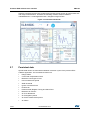
Premium EVK software user interface
UM1764
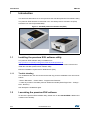
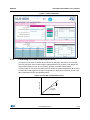
The cross-talk compensation factor (x-talk) is calibrated with the premium EVK using a
target of approximately 3% (black) reflectance, at least 60 x 60 mm square, placed 100 mm
above the sensor.
To activate automatic x-talk calibration, click on the pink Cal x-talk button, follow the onscreen instructions then click Apply. Once calibrated the button will turn green.
To manually set the x-talk, enter the x-talk value in the cross-talk compensation factor
field and click on Apply as shown in Figure 4.
2.2
Measuring the range
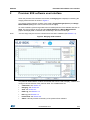
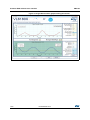
When the premium EVK software is in ranging mode, it measures absolute range from the
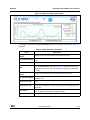
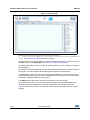
sensor to a target. This is shown in graphical form in the Ranging tab, see Figure 2.
The Ranging tab displays two graphs:
•
Signal Strength (Power), see Section 2.2.1
•
Range Measurement (ToF), see Section 2.2.2
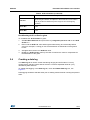
The buttons listed in Table 1 are available at the bottom of the tab.
Table 1. Buttons in the Ranging tab
Button
2.2.1
Description
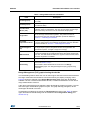
Start (Pause/Resume)
Click on Start to begin ranging. The Start button changes to
Pause/Resume while the device is ranging.
Stop
Click on Stop to stop ranging.
Reset
The Reset button resets the I2C communications interface between the
application and the VL6180X.
HW Reset
The HW Reset button resets the VL6180X hardware.
Reset Stats
The Reset Stats button clears the measurement statistics Max, Min, Mean
and Std Dev values.
Configure
The Configure button displays the Configuration dialog which allows the
user to configure key parameters and initialization settings (see
Section 2.2.3).
Signal Strength (Power) graph
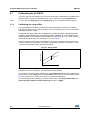
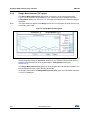
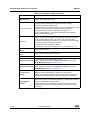
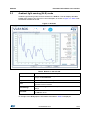
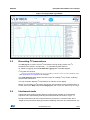
The Signal Strength (Power) graph plots, in real time, the Signal Rate (Mega Counts per
Second) returned from the target, as shown in Figure 6.
The Signal Rate can be viewed as a measure of the reflectance of the target, with high
reflectance targets producing stronger signal rates.
7/23
DocID026336 Rev 4