1
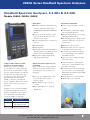
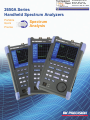
2650A Series Handheld Spectrum Analyzers
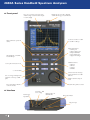
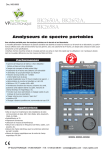
▲ Easy operation
The 2650 series handheld spectrum analyzers
are straightforward to operate and provide many
functions to facilitate quick and easy
measurements:
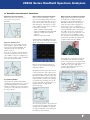
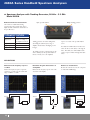
Smart one button “Auto Tune" function which
automatically scans the full frequency range,
detects and centers the maximum signal, and
configures optimum values for RBW, VBW,
sweep time and reference level
Detect the maximum
level within full span.
Input attenuator and internal preamp are set
automatically to optimal values based on the
reference level
Easy configuration of frequency, span, and
amplitude
Marker and peak search functions enabling
rapid measurements
200 setups and reference spectrum
measurements can be stored and recalled from
either internal memory or USB flash drive
Filenames can be customized and include a
date and time stamp.
Large easy-to-read display. The backlight is
adjustable and monochrome mode can be
used for extreme lighting conditions
Long battery life
The 2650A provides a battery operating time of
up to 4 hours (approximatly 3 ½ hours with
back light set to typical settings). Battery
replacement is simple and doesn’t require any
hand tools. To fully charge the lithium-ion
battery takes only approximately 4 hours
(analyzer must be turned off). A two color LED
indicates the charging status “charging”, “charge
completed”, “no battery detected” and “charging
error”.
Center the maximum signal, configure
optimum parameters
▲ Simple and flexible documentation of your measurements
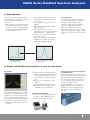
PC software
■ Capture 1001 trace data points (twice the
number of display dots) and store the data in
CSV (comma separated values) format for
detailed analysis (e.g., import into a spread
sheet)
■ Save the screen to a bitmap file or to the
clipboard
■ Control all instrument settings from the PC
■ Download custom antenna gain factor
compensation data to the instrument
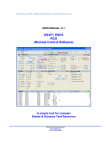
The 2650A series includes easy-to-use software
for documentation and further analysis of your
measurements. Connect the analyzer via USB
cable to your PC, configure the analyzer remotely, then download measurement data and instrument settings for storage and further analysis.
■ Continuously sweep and transfer trace data
to the PC.
Conveniently save measurement data
to USB flash drive
Easily save and recall measurement data and settings in CSV format directly to and from the USB
flash drive. Filenames can be customized and
have a time and date stamp. Users can choose
to store measurement data and setups in separate files or combined in one file.
Using the Copy function, a screen image in
bitmap format (BMP) can be directly stored to
the USB drive. CSV data residing in internal
memory can be stored to the USB drive in a
lump sum.
Hardcopy to USB printer
Generate a hard copy of the display by directly
connecting the optional USB printer model
PT2650A to the 2650A series analyzer.
7