1
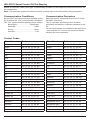
Navigating The On Screen Menu
Pressing the menu key on the remote or rear keypad will cause the On Screen Display (OSD) main
page to be displayed with five menu tabs: Picture, Audio, Time, Setup, Lock and Channel. Use the
cursor keys to move through the various sub menus. Pressing the menu key again will move the
selection back one level. Press exit to quit.
Audio
Picture
Picture Mode Standard
Dynamic
Soft
Personal
Contrast
Brightness
Sound Mode Standard
Music
Movie
Personal
Adjust contrast level
Bass
Adjust brightness level
Treble Adjust treble level
Color Adjust color level
Balance
Tint Adjust tint level
Sharpness
AVC
(Automatic
Volume Control)
Set time interval to turn off
inactive display
Audio Language English
Spanish
French
Time Zone Select time zone
Daylight On/Off
Savings Time
Setup
Menu English
Languages Spanish
French
No options
Lock
Password
Transparency
Set user password to
prevent unauthorized
access to OSD
Choose between Antenna
and Cable
Noise Reduction Off
Weak
Middle
Strong
Auto Scan Searches for available
channels
Favorite
On/Off
Zoom Mode Normal
Wide
Zoom
Cinema
Channel
Air/Cable
On/Off
SPDIF Type PCM
(Digital Audio Raw
Output Format)
Time
Clock
Adjust balance level
Surround On/Off
Adjust sharpness level
Color Mode Normal
Cool
Warm
Sleep Timer
Adjust bass level
Advanced
Shows favorite channels
No Option
Closed Caption On/Off
Show/Hide Enable/Disable unwanted
channels
Basic Selection:
Channel No. No options: Displays list of
channels
Advanced
Selection:
Channel Label Change channel names
DTV Signal Displays channel info and
signal strength
Option:
XVS
Restore Defaults
14
2014-06-13
CC 1-4
Text 1-4
Service 1-6
Select Font Size, Color
and Opacity
On/Off
Restore all options to their
original settings
#:220-9002-5 2015-02-24