1
2400 Series SourceMeter® User’s Manual
Range, Digits, Speed, and Filters
7-3
Auto ranging
NOTE
For the Model 2430, auto ranging cannot be performed while in the Pulse
Mode. Therefore, all the following information on auto ranging is not
applicable to the Model 2430 Pulse Mode.
For the Source V Measure I, Source I Measure V, and Ohms configurations, press
AUTO RANGE to enable auto ranging. The AUTO annunciator turns on when
auto ranging is selected. With auto ranging selected, the instrument automatically
chooses the best range to measure the applied signal. Note that the highest available range is dependent on the corresponding compliance setting.
Auto range considerations
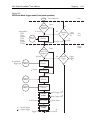
If the SourceMeter has to autorange, the SDM (source-delay-measure) cycle is
repeated to take the measurement on the new range. This means that any programmed source delay will be applied each time the unit has to autorange. For
example, if a 1 second source delay is programmed, the unit could take 2 or more
seconds to complete a reading if it has to change ranges.
The autorange algorithm used in the SourceMeters is as follows: If the reading
reaches 105% of the present range, the unit will go up 3 ranges, or to the highest
range possible if it can't go up 3 ranges. The unit will take another reading, then
decide whether it needs to continue going up in range or pick the right range
based on the reading. If the reading is 10%, 1%, or 0.1% of the present range, it
will go down by 1, 2, or 3 ranges based on the reading.
Auto range change mode
The auto range change mode determines how the instrument performs auto ranging. In the SINGLE mode, the SourceMeter will auto range only after first taking a
reading. In the MULTIPLE mode, the SourceMeter will auto range up on compliance in the Delay phase of the Source-Delay-Measure (SDM) cycle, thereby minimizing the possibility that a SourceMeter will be in compliance in a multipleSourceMeter system. The SourceMeter can downrange only once a reading has
been taken.
NOTE
See Section 6, “Source-delay-measure cycle,” for more SDM information.
With the auto range change mode set to MULTIPLE, you can also program the
soak time, which specifies the amount of time after the first point of a sweep that
the unit will sit in a loop actively auto ranging up and down to allow a multiple
SourceMeter configuration to settle. This process will occur only during the first
SDM cycle after the initial sweep trigger. (See Section 11, “Trigger models.”) This
feature is especially useful for situations with long DUT settling times (such as low
current measurements) when several down-range change cycles from the higher
ranges are required.