1
Cautions
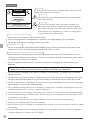
CAUTION
RISK OF ELECTRIC SHOCK
DO NOT OPEN
ATTENTION
RISQUE DE CHOC ELECTRIQUE
NE PAS OUVRIR
PRECAUCION
Warning
To protect the device from fire or electric shock, keep your LCD
display away from rain or moisture.
Caution
To protect your device from electric shock, be sure to plug
into socket securely.
RIESGO DE CHOQUE ELECTRICO
NO ABRIR
DO NOT REMOVE COVER(OR BACK).
NO USER-SERVICEABLE PARTS INSIDE.
REFER SERVICING TO QUALIFIED SERVICE PERSONNEL.
Caution
If you use LCD display with video games, computers, or
any other similar products together, please keep brightness
and contrast at a low level. If an image appears on the screen
with a high level of brightness or contrast, the image might
be kept on the screen permanently.
Tips for cleaning LCD display
1 Please wipe the LCD display with soft or dry cloth.
2 DO NOT use dissolvent or methylbenzene. Otherwise, you might damage your LCD display.
3 Be sure the LCD display is unplugged before you clean it.
Cautions for CATV
Be sure to acquire due authorization from broadcaster/CATV service provider/program owner before
using the TV receiver to watch programs through UHF, VHF, or CATV.
Cautions for installation and use of LCD display
1 Please check the LCD display power specification shown on the serial No./model tag. Be sure to use
the power according to the specification. If you are unsure about the power requirement, please contact
your distributor or local power company.
2 Be sure to plug into socket securely. If you have problems with plugging in, please contact your
distributor.
The plug is designed in such a manner that you can plug into a socket in a certain
direction. If you have problems with plug, please check with your distributor.
1 DO NOT allow overloading in the socket or extension cord. Otherwise, you might receive Electrical
shockor cause fire.
2 DO NOT leave any object pressing or winding on the power cord. Keep your LCD display away from
any place that might cause damage for your LCD display or mislead you to use a wrong Power cord.
3 Be sure to turn off your LCD display if it's not in use. If your LCD display is not in use for a long time,
please unplug it to prevent fire from happening.
4 The ventilation opening behind your LCD display is designed for ventilation and dissipation. Keep the
ventilation opening clear, so as not to obstruct dissipation.
5 DO NOT place your LCD display on the bed, sofa, or carpet, so as not to block the ventilation opening.
6 If you do not have proper ventilation setup, DO NOT keep your LCD display in the closed space, such
as bookshelf or TV cabinet.
7 Keep your LCD display away from high-temperature objects or any heat-generating object.
8 Keep your LCD display away from direct sunshine.
9 DO NOT place your LCD display on an unstable shelf or desk so as to prevent injuries caused by falling
LCD display.
10 DO NOT allow sharp objects to penetrate through your LCD display, so as not to cause any damage to
the high voltage device inside your LCD display.
02