1
█ Catalog █
Safety Notes................................................................................................1
Main Menu Interface......................................................................................3
DVD Operation Instruction ..............................................................................5
Radio Operation Instruction..............................................................................7
USB/SD Operation Instruction ..........................................................................9
IPOD Operation Instruction.............................................................................10
Bluetooth Operation Instruction........................................................................11
EQ Setup Instruction.....................................................................................12
System Setup Menu......................................................................................13
GPS Operation Instruction..............................................................................22
Remote Control Operation Instruction................................................................30
Wiring Diagram..........................................................................................32
The Technical Parameters ..............................................................................34
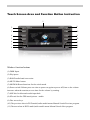
Touch Screen Area and Function Button Instruction
1
2
9
3
10
4
11
5
12
6
7
13
8
14
15
Window function buttons
(1).DISK Input.
(2).Play/pause.
(3).BAND:radio-band conversion.
(4).MUTE:Mute button.
(5).MODE:different functions for the switch mode.
(6).Power switch/Volume:press one time to power on,again to power off,Soon as the volume
increases when the rotation,reverse-time for the volume by rotating.
(7).MIC:this for bluetooth audio input hole.
(8).SD card slot for GPS/music/picture...media.
(9).Disc access keys.
(10).The previous when in DVD model,radio model means Manual Search Previous program.
(11).The next when in DVD model,radio model means Manual Search Next program.
(12).GPS menu.
(13).Bluetooth receive/Manual tuning,When the radio frequency tuning,DVD for fast
forward/slow motion.
(14).IR:Remote window.
(15).USB interface.
Safety Notes
In order to avoid any injury or property damage of the user or other persons, please be sure
read in details and abide the following notice item.
1)
Read the manual
2)
Take good care of the manual for future use .
3)
To comply with all the warning and notice of this manual.
4)
To comply with operating instructions.
5)
Regarding the power supply, please refer what the manual stated.
6)
The installation and wiring distribution of this product needs specialized skills and experience. To ensure safety, commissioned by professional technicians for installation and wiring
7)
There is no any parts attached with the products for user to repair and replace, please ask
the professional technician with qualification of maintenance to repair and replace.
8)
Do not plug any ventilation cooling vents, the local shell holes and other openings are for
ventilation of heat. In order to ensure machine works stable and reliable, long service life,
not to plug the hole cooling ,ventilation environment must be maintained to avoid overheating the machine caused by smoking, fire or other danger.
9)
Heat source should be avoided and products will be not installed on local exposure to direct
sunlight, high temperature areas; to be away form heat sources ,such as heating, heaters,
heat or have other things (including amplifiers)
10)
Should avoid water or moist, do not let this machine being exposed to rain or mo is ture in
the environment (as when rain and car washing) to avoid the internal machinery of the
short circuit caused the fire, electric shock or other danger.
11)
Before cleaning machines have to shut down power, and then wipe panel Do not use volatile chemicals (such as gasoline or thinner) to clean panel.
12)
To prevent foreign matter or liquid into the inside of the machine, do not insert the foreign
body form the cooling hole or other opening into the machine. If you insert foreign bodies
may cause electric shock, machine parts within a short circuit caused the fire, such as the
risk of electric shock.
13)
How to install the machines, do not install the unit to the truck, frame, tripod, bracket or
table without the manufacturer's recommendations, should be installed on the install fittings
which come with machines. When used in the car, pay more attention to firm the installa1
tion of this machine, avoid the machine falling down because of the sudden brake and resulting in personal injury.
14)
Don't operate the machine in the events of rain or lightning for a long time, have to cut off
the machine power.
15)
Appear in the following situations, please turn off the local power supply in time, and contact with professional technician.
a)
When the power cord or plug damaged.
b)
When the machines were splashed with liquid or when the entry of foreign matter;
c)
When the machine has been rained or moisture attack;
d)
When the machine crashed form a height or as a result of abnormal operation or unreasonable damage caused.
16) LCD; do not let the machine decline to avoid LCD screen fragmentation, if so, when the outflow of liquid crystal, do not touch the liquid crystal, so as not to be harmed . Do not heat the liquid crystal display or scratching LCD with sharp objects, touch panel is also susceptible to
scratching LCD with sharp objects, touch panel is also susceptible to scratching. The effective
pixel of LCD screen is more than 99.99 percent, but 0.01 percent of the pixels could not be lighten normally.
17) The Manual of instruction and icons just to explain the functions, there may be a little different with actual operation, the user should follow the actual operation.
§In order to prevent accidents, avoid a possible violation of applicable
law, do not use other function as purposes expect navigation when
driving.
§In some areas, drivers or other people in car, it is illegal to watch the images of the display.
Pre-installation notes
§ products of the manufacturers recommend that you do not install or repair their navigation systems by yourself. Installation and maintenance of the product may cause you in danger of electric
shock or other, for all installation and maintenance operations of this navigation system please
entrusted to the service personnel authorized by manufacturer.
§prohibiting use the following dangerous installing way and location:
1.
When the car in a sudden stop may cause injury on the driver and passengers.
2.
To avoid the possibility that impede the operation of the vehicle drivers.
2
Such as the driver front seat or the floor near the steering wheel. Stick shift.
§ in the dashboard panel or before open the hole from faceplate, make sure that the rear space. Be
careful, not to damage the fuel cable, brake cable, electrical components, power lines or cable
communications.
§ in the use of screws, please ensure that they are not contact with any electrification down-lead.
Vibration may have damaged wire or insulation skin and lead to a short circuit or other damage
to the vehicle.
§ In order to ensure proper installation, use the standard method of installation of the required
components. If you use any non-standard components, this product can be internal damager or
loose components, leading to damage of the product.
§ If the GPS antenna may lead to the winding column or stick shift that would be very dangerous. Please ensure that the installation of the product will not disturb driving.
§ Please ensure that all leading cable will not be caught by the doors or sliding framework in the
seat, so as not to cause a short circuit.
§ after finish the installation of navigation systems, please check vehicles and other equipment is
correct.
§ some government may prohibit or restrict to install or use of the system in the vehicle. Please
comply with all the rules related to the application of laws and regulations. on using, installation
and operation of the navigation system.
§ This product will be installed in the position between the driver's seat and passenger seat in order not avoid any damage on the unit by driver and passenger when the car suddenly brake.
§ Never install this product on the dashboard, door or columniation and girder, and the position
the air bag expanding out and nearby, please refer to your vehicle owner's manual to find out the
area front airbags expanding
§ Do not install this product on the location may prevent the vehicles, including airbags, pillows
and any operating system performance.
§ prevent electromagnetic interference: In order to avoid Electromagnetic interference, please try
to stay away form the following components of this product, cable or other lead.
- FM, AM antenna and its lead.
- GPS antenna and its lead
And you should arrange every leads to stay away form each other, not make it colligation or
crossbanding together. EMI will increase the possibility of showing wrong location.
3
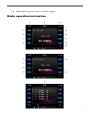
Main Menu
There are 11 function button on the MAIN MENU, you can touch each icon to realize the
operation of relevant functions. In different playback statuses, touch left upper part of the touch
screen to enter the Main Menu
Figure 2
Profile of Main Menu :
4
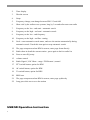
1.
Radio
2.
Disc Play
3.
USB for multimedia
4.
Ipod
5.
SD card for multimedia
6.
System menu setting ( click the key to enter relevant setting of system menu )
7.
TV ( Analog TV ) or DTV ( Digital TV )
8.
GPS Navigation –Wince application software
9.
Bluetooth
10.
AV Input
11.
Rear Camera
Note: If there is no any device connection, icons for DVD, USB, SD,iPod and Camera is
invalid in this case.
DVD Player Operation Instruction
( Please use the standard of legitimate discs, this drive only supports discs 12cm )
5
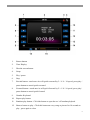
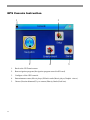
DVD Interface Instruction
1)
The current operation status display
2)
Return to the Main Menu button
3)
EQ setup button
4)
Return Button : press return button or not operate the touchscreen in five seconds, the
operation menu will automatically disappear.
5)
System setting
6)
Play information button
7)
Play / Pause
8)
Stop / eject
9)
Previous
10)
Next
11)
Rewind button : touch once it will quick rearward by 2 / 4 / 8 / 16 speed, press play /
pause button to cancel quick rearward
12)
Forward button : touch once it will quick forward by 2 / 4 / 8 / 16 speed, press play /
pause button to cancel quick forward
13)
Enlarge image : Touch once it will enlarge 1 / 2 / 3 speed
14)
Page button : Click this button adjustable or Menu to return to another page
15)
Repeat Play button : Click on one in every single repeat / Repeat Title / Repeat all /
Repeat the closure of the transfer
16)
Repeat Fragment key player : Click the first choice of strarting point A, click to
choose the end of the second B, the system at this time will be between fragment AB
repeat play, and then turn off this feature at first
17)
Voice conversion button : Click this button in different languages, conversion
between different tracks, such s the CD itself is only one track invalid clicks show
18)
Subtitle conversion keys : Click on this button can convert subtitles in different
languages ( CD – ROM titles such as no more information will be invalid clicks )
19)
CD Single main course : In the broadcast, such as clicking this button will return to
the main menu
20)
6
Title menu button
21)
Multi-angle conversion button ( need disc support )
Radio operation Instruction
7
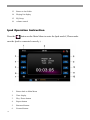
2.
Time display
3.
Dim the screen
4.
Setup
5.
Frequency change, can change between FM1.2.3 and AM
6.
Short visit by the radio access systems, long by 3 seconds after auto-scan radio
7.
Frequency to the low - end semi - automatic search
8.
Frequency to the high - end semi - automatic search
9.
Frequency to the low - end frequency
10.
Frequency to the high - end fine - tuning
11.
Seek—enter automatic search status, and save the station automatically during
automatic search. Touch this icon again to stop automatic search
12.
The page setup menu when RDS is turn on, enter page down directly
13.
Radio show in detail the current station , press again to back to radio list
14.
Press to enter EQ setup
15.
volume control
16.
Radio Signal ( LOC Short – range / DX Remote ) control
17.
PTY switch button, option for RDS
18.
AF switch button, option for RDS
19.
TA switch button, option for RDS
20.
RDS Area
21.
The page setup menu when RDS is turn on, enter page up directly
22.
Long press this area to save the station
USB/SD Operation Instruction
8
1.
Return button
2.
Time Display
3.
Dim the screen button
4.
Setup
5.
Play / pause
6.
Stop
7.
Rewind button : touch once its will quick rearward by 2 / 4 / 8 / 16 speed, press play /
pause button to cancel quick rearward
8.
Forward button : touch once its will quick forward by 2 / 4 / 8 / 16 speed, press play /
pause button to cancel quick forward
9.
Number Keyboard
10.
Repeat play button
11.
Random play button : Click this button to open the on / off random playback
12.
Browse button to play : Click this button on every song or picture for 10 seconds to
play , press again to close
9
13.
Return to last folder
14.
Playing list display
15.
EQ Setup
16.
volume control
Ipod Operation Instruction
Press the
button on the Main Menu to enter the Ipod model ( Please make
sure the Ipod is connected correctly ). .
10
1.
Return back to Main Menu
2.
Time display
3.
Play / Pause button
4.
Repeat button
5.
Rearward button
6.
Forward button
7.
Number keyboard
8.
Random play button
9.
Browse button ( press it to play every song / picture for 10 seconds )
10.
Search to play according to the directory ( you can search different album, different
singer to play )
11.
Ipod Video play button
12.
Chapter / file display button : press it to display the chapter / file from the list
Bluetooth Operation Instruction
( This function should be used only match up one GSM Mobile Phone with bluetooth function )
1.
Bluetooth Interface Instruction ( Press
1)
in the Main Menu access to bluetooth model )
Return to Main Menu button
11
2)
Time display
3)
Dim the screen button
4)
Setup
5)
Call Switch
6)
Deleted number button
7)
Pair button
8)
Phone book management button : display missed number, received number, dialed
number and phone book
9)
2.
Auto answer button
Bluetooth pair communication
Pair
Open the power of the machine, the bluetooth function automatically open, the state display
menu icon is white if there have not cellphone pair with it, the first pair will display SORRY NO
LINK words , get ready one GSM mobile phone with bluetooth function, according to mobile
instruction to operate, find out the bluetooth function enter button, and select bluetooth adapter,
then the pair button on touchscreen of the unit, now bluetooth is starting to pair and search each
one together, there will find the bluetooth of the machine, the name is CAR Kit, choose confirm ,
during the paring and connecting , the Mobile phone will prompt to request a password, you have
to enter “0000” and confirm. The mobile phone will display paring successfully and then change
from white to green, when “ link on ” displayed on the screen, then it can work normally. When
the mobile phone have paired with the machine, it will automatically connect in the next time if
you open the machine.
EQ Setting
Click the icon
in the menu or SEL key in remote controller to enter EQ setting
Note : There's no EQ under Bluetooth state.
12
Settings
Options
User
Specification
Customization by user ( Bass, Middle & Trade
are on under the status )
Classical
Classical
Rock
Rock'n'roll
Jazz
Jazz
Pop
Pop
Loudness
On/Off
Switch for loudness
Bass
-7~7
Bass Setting
Middle
-7~7
Middle Setting
Treble
-7~7
Treble Setting
Fade
-7~7
Balance setting for front & rear sound track
Balance
-7~7
Balance setting for left & right sound track
Sub-woofer
-7~7
Sub-woofer adjustment
EQ
These three settings are
available when “EQ”is
set “user”
Note : Click " + " and " - " in the menu to adjust
System Menu Setting
Click
icon or SETUP key in remote controller to enter System menu setting
interface,including ASP setting, video setting, and general setting. Users can set the modes
according to their own preference
Note : Click the
and
to page up / page down in the system menu
ASP Setting
13
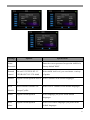
In System menu setting interface, click ASP to enter setting interface shown as Figures.
Settings
Options
Specification
Bass Cent
60Hz / 80Hz /
According to the loudspeakers features and the types of audio
Freq
100Hz / 200Hz and video source, choose the right BASS Cent Freq , so as to
adjust the dynamic range of sound performace.
BASS Q Value 1.0 / 1.25 / 1.5 / After select BASS Cent Freq , by adjusting BASS Q Value
2.0
different sharpness of bass output can be achieved. The
greater Q value is, the more prominent bass is
Bass DC Gain on / off
On / off of BASS DC Gain
MID Cent
500Hz / 1KHz / According to the loudspeakers features and the types of audio
Freq
1.5KHz /
and video source, choose the right MID Cent Freq so as to
2.5KHz
adjust the dynamic range of sound performance
MID Q Valve
0.5 / 0.75 / 1.0 / After select MID Cent Freq, by adjusting the value of the Q
1.25
factor different sharpness of bass output can be achievable.
The greater Q value is , the more prominent MID is.
TREB Cent
10KHz /
According to the loudspeakers features and the types of audio
Freq
12.5KHz /
and video source, choose the right TREB Cent Freq, so as to
15KHz /
adjust the dynamic range of sound performance
14
17.5KHz
LOUD Cent
400Hz /
According to the loudspeakers features and the types of audio
Freq
800Hz /
and video source, choose the right LOUD CENT Freq.
2400Hz
Power on Vol
Fixed / Last
Volume setting after power is on. Choose fixed to open
VOL
setting of Fixed Vol. Last VOL is the volume of previous start
up
Fixed Vol
10 ~ 30
Select certain fixed volume according to your desire.
Video setting
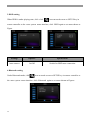
In System menu setting interface,click Video to enter video menu setting,shown as Figures.
Settings
Options
Camera mirror On/Off
Specification
Switch of mirror image display for input image
from rear-view camera
15
General setting
In System menu setting interface,click General to enter general menu setting,shown as Figures.
Settings
Options
System Time 00:00:00
Specification
Operation on the touch screen:Click the cursor box of hours or
minutes,input hours and seconds through the digital
keyboard,or through up and down cursor keys and direct
digital input on remote controller.
Time Format
12 hour/24hour Set the time display system for 12 hours/24 hours
Language
English/Francoi Choose menu language type:English/Francois/Espanola
s/Espanola
Beep
On/Off
Set the operation sound:on/off
No
When start the devise,TFT panel will not memorize the angle.
When shut down the devise,TFT screen slip off in place.
Yes
TFT Auto
When start the devise,TFT panel will memorize the angle.
When shut down the devise,TFT screen slip off in place.
open
Whenever start up and shut down,TFT screen will not
Manual
16
act,manual click OPEN key of the remote controller to slide
up and down.
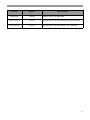
Screen Saver On/Off
Setting screen saver:on/off
Select"NO"to exit the touch screen witness:choose"yes"to
operate touch screen calibration .According to the on-screen
TS
Yes/No
calibrate
instruction,click in the white display box,click tracking in a
row until calibration is successfully achieved,then the system
will automatically switch to sources interface of playing.
Use Default
Yes/No
Settings
Select"NO"to exit the setting and "Yes"to restore factory
defaults.
Setting modes
1.Radio setting
When radio is under playing state, click
icon on touch screen or SETUP key in the
remote controller to enter system menu setting interface.
Click RADIO to set the menu shown as Figure.
17
Settings
Options
Specification
Radio Region USA/Europe/C Choose the radio standard of your country
hina/OIRT
RDS
On/Off
Open or close FM radio reception RDS function
TA Option
Seek/Alarm
Select "Seek",radio will automatically search again after
losing TP information. Select"Alarm",radio will not
automatically search,only with "BEEP BEEP" sound
TA Return
Long/Short
TA Return works only when seek is selected on TA Option
.Select Long enables radio to automatically search again after
losing TP information of 3 minutes, select Short limits time
to 45 seconds.
Clock Tune
On/Off
When select On,the time displays on the machine
synchronizes RDS radio time .Shut down the function by
selecting Off.
TA Volume
0~30
Volume setting of TA
2.DISC/ USB/ SD setting
When DISC/USB/SD/ is under playing state, click
icon on touch screen or SETUP key in
remote controller to the enter system menu interface, click DISE/ USB/SD/ again to set menu
shown as Figure.
18
Settings
Options
Specification
Enter
Enter the correct password to open the child lock,
Password
factory default"8888"
Parental
Kid safe/2.G/3.PG/4.PG-13/
Select child lock level, you can choose a variety
control
5.PG-R/6.R/7.NC-17/8.Adult
of grades
Subtitle
English/French/Spanish/Auto/O Select subtitles in the default languages.
ff
Div-x
Ascll/Unicode/Turkish/Cent
Subtitle
Europe/Cyrillic
Audio
English/French/Spanish
Select DIVX subtitles in the default languages.
Select language you prefer in the default
languages.
DVD
Menu
English/French/Spanish
Select DVD menu languages you prefer in the
default languages.
19
3.IPOD setting
When IPOD is under playing state, click click
icon on touch screen or SETUP key in
remote controller to the enter system menu interface, click IPOD again to set menu shown as
Figure.
Settings
Options
Specification
Auto connect
On/Off
Switch for IPOD auto connection
4.Bluetooth setting
Under Bluetooth mode, click
icon on touch screen or SETUP key in remote controller to
the enter system menu interface, click Bluetooth again to set menu shown as Figures.
20
Settings
Options
Specification
Bluetooth
On/Off
Switch On or Off Bluetooth
Auto Connect
On/Off
Switch On or Off Auto connection for bluetooth
Auto Answer
On/Off
Switch On or Off Auto answer via bluetooth
21
GPS Console Instruction
1
3
2
22
4
5
1.
Back to the DVD main menu.
2.
Run navigation program.(Navigation program stored in SD card)
3.
Configure of the GPS console.
4.
Entertainment center.(Movie player,E-Book reader,Music player,Graphic viewer)
5.
Games.(Russian diamond,Try to connect,Edacity Snake,Push box)
Setup Menu Instruction
1
2
3
5
6
7
4
8
Cancel the changes and go back to main menu.
Save the changes and go back to previous menu.
1.
Configure the path of the navigation program.
(1) Touch the Navigation Setup button.
23
(2) Touch the
24
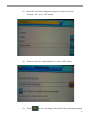
(3) Insert SD card of the navigation program. Touch to select the
“Storage card ” press “OK” button
(4) Touch to select the “dynavinshell.exe”, press “OK” button.
(5) Touch
to save the change of the path of the navigation program.
25
2.
GPS Monitor.
(1)
Touch GPS Monitor
(2)
Columns that not empty means satellites signal received. The
higher the stick, the better the signal is. When GPS get the exact
position, the color of the sticks will change from gray to blue. It
means your navigation program can get the correct position of
where you are.
(3)
26
If the columns always empty for 1-2 minutes. Touch
(4) Touch
to reset GPS receiver.
Usual Setup Instruction
1.
Touch the usual setup button
27
2.
Change the options. Touch
cancel the changes and go back to main
menu.
Touch
save the changes and go back to previous menu.
Touch Screen Setup Instruction
1.
Touch the touch screen button
2.
Touch
,cursor will move to top-left ,touch
bottom-left, touch
again ,than cursor move to bottom-right, touch again ,
than cursor move to the top-right,touch
again, cursor will disappear and an
“OK” words will appear in the middle of the screen.
28
again ,than cursor move to
3.Touch “OK” to complete touch screen setup.
29
XIV.Romote Control Instruction
Note:Please take off the battery plate before using the remote control.
1.Remote Control Buttons
2.Function Instruction
Power on/off: press once to turn on/off.
MUTE buttons: Mute function.
MODE switch button: press once to switch to Radio/DVD/AUX/TV/GPS.
Eject button.
30
DVD button: press this button direct to enter DVD mode.
STOP button.
VOL+/VOL- button.
Play/pause button.
GPS Navigation button.
In the radio to the low/high-frequency semi-automatic search radio stations,in the player
when the song/next song(chapter).
OK
confirm button.
TV
button.
BAND
radio button.
AUDIO switch button ,on TV mode to switch audio,on DVD to switch left/right sound
0.1.2....10+ select the current band (Chapters) Preset radio stations,enter the number button.
GOTO search type player.
RPT
Repeat button.
TITLE
reading DVD disc menu for the title,VCD disc for the PBC to open and close.
ZOOM
image to enlarge.
A-B
player set to repeat fragment.
SETUP
system settings menu.
ANGLE
angle(disc support needed).
ROOT
single main course.
RDM
shuffle.
INFO
player information button.
31
PIC
image brightness settings button,it can adjust as ◄ ►
.
SUB-T language switch(need the disk support).
MENU
EXIT
when in DTV it means system setup in ,DVD mean current players and the main menu.
exit DVB-T setup .
▲►▼◄ ENT up/down/lift/right select or enter menu.
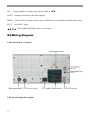
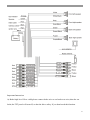
XV.Wiring Diagram
1.The information of tail jack.
2.Wiring of loudspeaker outputs.
32
Important Instruction:
A).Brake high level. Have valid,please connect brake wire to car brake test wire,when the car
brake,the TFT panel will turn off, so that the drive safety. If you don't need this function.
33
First:connect the brake wire together with the black GND wire,then the until can work normally.
Second,in the main system setting access language and then press the brake button setting to
cancel the brake wire function,then the in it can word normally.
B).Back car high level vaid, the TFT panel will display back video sight when backing the
car,please connect reverse wire from to the back car test wire,so that the driver can see the
obstruction.
3.Audio according to the users habit
All the audio and video output wires please refer to the sticker on them for connection.
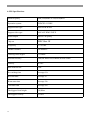
XVI.Technical Parameters
1.DVD Technical Parameters
Laser wave length
DVD 650nm;CD 780nm
Pick up
HITACHI 1200W
Compatible disc
MPEG-4(DIVX),DVD,DVD+R,DVDR,VCD,CD,CDR,CDRW,MP3,JPEG,WMA
Anti-shockproof
DVD 3 seconds;VCD/CD 10 seconds;MP3 90 seconds
Audio output level
Audio:1.2V±0.2
Frequency response
20Hz-20KHz
Audio signal-Noise ratio(S/N)
≥80dB
34
Dynamic scope
≥80dB
Video output level
1.0±0.2Vp-p
Brightness signal-noise Ratio(S/N)
≥56dB
Color signal-noise Ratio(S/N)
≥60dB
Display system
AUTO/NTS/PAL
Menu language
Chinese/English/Spanish/French/German/Italian
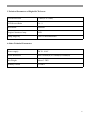
2.TV Technical Parameters
Frequency Range
48.25MHz~847.25MHz
TV display system
PAL/NTSC/SECAM/SECAM_L
Audio system
DK/I/BG
3.Radio Technical Parameters
FM frequency range
87.5~108.0MHz
AM frequency range
522~1620KHz
FM sensitivity
≤25dB
AM sensitivity
≤45dB
Signal-noise(S/N)
≥50dB
Distortion
≤0.3%
35
4.GPS Specifications
Main frequency
400(2440)MHz or 500(2450)MHz
Operation system
WINCE5.0 CORE
Support audio type
MP3/PCM/WMA
Support video type
ASF/AVI/WMV/DIVX
Audio output
Stereo CD quality
Chip set
SIRF Star III
Frequency
1.575GHZ
Channel number
20 channels
Tracking sense degree
-159dBm
Position accuracy
10m,2D RMS 5m,2D RMS,WAAS enable
Velocity
0.1m/s
Data renewal rate
1HZ
Re-catching time
Average 0.1s
Hot start time
Average 1s
Warm start time
Average 38s
Cold start time
Average 42s
The biggest fixed height
18,000m
The biggest velocity
515m/s
36
5.Technical Parameters of Digital-LCD Screen
LCD Screen Size
7 inch (or 6.2 inch)
LCD Screen Ratio
16 : 9
Resolution
800x480
Original luminous lamp
LED
Lamp longevity
Over 10 thousand hours
6.Other Technical Parameters
Power supply
DC12~14.4V
Outer dimension
Max:189mm(W)x132mm(H)x180mm(D)
Net Weight
About 3.5KG
Standby current
<10MA
37