1
4. Phone calls
4.3 Connecting to the phone
4.4Making a call
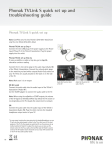
Wear your hearing aids and ComPilot II correctly and
switch them on (see chapter 3.4).
Enter the phone number using the phone
keypad and press the dialing button.
After your phone has been paired to ComPilot II, they
will automatically connect to each other. If they do
not connect automatically, go to your phone’s Bluetooth
menu and select ComPilot II from the list.
You will hear the dialing tone through
your hearing aid.
If you are required to connect manually, please refer to
your phone’s user guide.
Confirmation of successful connection is indicated on
ComPilot II by the audio indicator blinking blue.
The connection will be maintained as long as the
devices remain on and within range.
ComPilot II can connect to two phones at the
same time but only one call at a time is possible.
Call
Speak into ComPilot II – not
into the phone – when the
call is in progress.
4.5 Accepting a call
When a call is received on your cell phone:
JComPilot II audio indicator will show a solid blue
light.
J It will take about 2 seconds before you hear the
ringtone through your hearing aids.
J Press the main button once you hear the ringtone
through your hearing aids.
When pairing to a phone we recommend to disable
the phone key tones and SMS alerts.
16
17