1
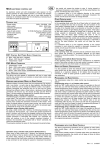
MC9 electronic control unit
GB
An electronic control unit for the automation of 4 motors for
rolling window shutters and/or sun blinds, with optional connection of Wind, Sun and Rain Sensors and use with pushbutton control panel and radio control for individual and centralised control.
TECHNICAL SPECIFICATIONS
Operation with Local Control or Zone Keys:
Connection to the U1-U2-U3-U4-UZ and D1-D2-D3-D4-DZ low
voltage inputs of the local control keys (normally open) for
running the shutter will ensure the following operation:
U1-U2-U3-U4-UZ control raising for the configured motor time,
D1-D2-D3-D4-DZ control lowering of the shutter; sending a
command for the same direction before the motor stops running, the control unit stops the shutter; sending a command
for the opposite direction before the motor stops running, the
control unit reverses the movement.
CONNECTION OF CN1 TERMINAL BOARD
1: ~230V line input (Phase).
2: ~230V line input (Neutral).
3: Motor 1 Upward movement output.
4: Motor 1 Shared output.
5: Motor 1 Downward movement output.
6: Motor 2 Upward movement output.
7: Motor 2 Shared output.
8: Motor 2 Downward movement output
9: Motor 3 Upward movement output.
10: Motor 3 Shared output.
11: Motor 3 Downward movement output
12: Motor 4 Up output.
13: Motor 4 Shared output.
14: Motor 4 Downward movement output.
Operation with General Keys:
The following type of operation is obtained by connecting the
general command buttons (normally open) for movement activation to the low voltage inputs UG – DG:
UG controls upward movement until the motor running time
has elapsed and DG controls downward movement. If a command is sent in the same direction before the motor running
time has elapsed, the control unit will ignore the command; if
a command is sent in the opposite direction before the motor
running time has elapsed, the control unit will invert the direction of the motor.
OPERATION WITH DIFFERENT RADIO CONTROLS
It is possible to program different models of radio control: storing a code (1 key) obtains Step by step cyclical operation (Up
– Stop – Down), storing two different codes (2 keys) obtains
different commands – the first for Raising and the second for
Lowering; storing a BeFree radio control (3 keys) obtains
separate commands – the first key for Raising, the second for
Stopping and the third for Lowering.
CONNECTION OF CN2 TERMINAL BOARD
U1 Upward movement Local Input (NO).
GND shared Signal Input
D1 Downward movement Local Input (NO).
U2 Upward movement Local Input (NO).
GND shared Signal Input
D2 Downward movement Local Input (NO).
U3 Upward movement Local Input (NO).
GND shared Signal Input
D3 Downward movement Local Input (NO).
U4 Upward movement Local Input (NO).
GND shared Signal Input
D4 Downward movement Local Input (NO).
Operation using a 1-key radio control:
Using the radio control with single key ensures the following
operation: the first press controls the upward movement for
the configured motor time. The second press controls downward movement of the shutter; if the key is pressed before the
motor stops running, the control unit stops the shutter, another
press of the key reactivates the motor in the opposite direction.
CN3 TERMINAL BLOCK CONNECTIONS
1:
2:
3:
4:
5:
6:
7:
8:
9:
10:
11:
12:
13:
14:
The control unit allows you to control the 4 motors independently using the Local U1-2-3-4 (Up) or D1-2-3-4 (Down) controls, and the UZ (Up zone), DZ (Down zone) and general UG
(Up) and DG (Down) simultaneous control keys. It is also possible to control the 4 motors together or independently using
one or more radio controls. In the default configuration the
control unit has no radio control stored on its memory.
FUNCTIONAL PROPERTIES:
- Power supply:
230V~ 50/60Hz 1700W max.
- Motor output:
230V~ 400W Max.
- Working temperature:
-10 to 55°C
- Radio receiver:
433.92 MHz
- Compatible radio controls:
12-18 Bit - Rolling Code
- Nr possible radio controls:
60 Max.
- Nr possible wireless sensors:
3 Max.
- Packaging dimensions:
190x140x70 mm.
- Container:
ABS UL94V-0 ( IP65 )
1:
2:
3:
4:
5:
6:
7:
8:
9:
10:
11:
12:
INITIAL OPERATING CONDITION
Operation using a 2-key radio control:
Using the radio control with 2 keys ensures the following operation: the first key (“Up” for raising) controls upward movement of the shutter for the configured motor time and the second key (“Down” for lowering) controls downward movement
of the shutter. If another Up command is sent while the shutter
is being raised, the control unit continues to raise it; whereas if
a Down command is sent, the control unit stops the motor.
The procedure is the same for the Down movement phase.
24 Vac Sun Sensor Power Output
“S” Sun Sensor Input (NO).
GND shared Input / 0 Vac Output
“R” Rain Sensor Input (NO).
GND shared Input
“W” Wind Sensor Input.
UZ Upward movement Zone Input (NO).
GND shared Input
DZ Downward movement Zone Input (NO).
UG Upward movement General Input (NO).
GND shared Input
DG Downward movement General Input (NO).
Antenna Input.
Antenna hot pole Input.
Operation using a 3-key radio control (BeFree x1):
Using the BeFree x1 radio control ensures the following operation: the (Up) key controls upward movement of the shutter for
the configured motor time, the (Stop) key stops operation and
the (Down) key controls downward movement of the shutter. If
a (Stop) command is sent while the shutter is being raised or
lowered, the control unit stops the motor. If a command is sent
that is in the opposite direction, the control unit causes the
shutter to change direction.
1
Rev. 1.3
03/12/10
Operation using a 3-key radio control (MX83-86):
Using the MX83-86 radio control ensures the same operation
as for the MX81 version. The radio control’s two side keys, (-)
and (+), also allow you to select commands (Up – Stop –
Down) for 3 different utilities (MX83) or 6 different utilities
(MX86). Pressing and holding the two side keys (-) and (+) for
a few seconds also enables and disables operation of the sun
sensor (the selection is confirmed by a quick Up/Down movement of the motor).
ZONE AND GENERAL CENTRALIZATION
Centralization with cable and keys
The centralization of two or more control units via wire enables
simultaneous raising or lowering of the connected shutters. To
do this you need to connect the control units with a bus of
three wires in parallel to the inputs of the General UG (Up) and
DG (Down) commands and the “GND Signal” common reference.
This allows you to control the 4 motors independently or simultaneously with the UZ (Up) and DZ (Down) zone commands and centralize other control units with the UG (Up) and
DG (Down) general commands.
ANEMOMETER OPERATION
The electronic control unit raises the sun shade whenever the
wind exceeds the selected threshold.
SUN SENSOR OPERATION
Programming the 1 or 2 key radio control.
The radio control transmission codes are programmed as follows: press the SEL key and M1 CODE LED will start flashing;
at the same time send the first pre-selected code with the required radio control: M1 CODE LED will start flashing quickly;
send the second code to be stored, M1 CODE LED remains
ON and programming will be complete. If the second code is
not send within 10 seconds, the control unit exits the programming phase, selecting operation with 1 key of the radio
control. If all the codes are stored and you try to repeat the
programming phase, all the indicator LEDs will start flashing
very quickly to indicate no more codes can be stored.
Programming the “MX8-” 3-key radio control
The entire “MX8-” radio control can be configured by programming just the Up Key.
The “MX8-” radio control’s codes are programmed as follows:
press the SEL key and M1 CODE LED will start flashing; at
the same time, press the UP key on the required radio control.
At the same time, M1 CODE LED remains ON and programming will be complete. If all the possible radio controls have
been stored and you try to repeat the programming phase, all
the indicator LEDs will start flashing very quickly to indicate no
more codes can be stored.
2)
CODE M2 (Programming the radio control for Motor 2)
Follow the CODE M1 instructions in paragraph 1) above to
program the radio control for motor 2, initially pressing the
SEL key twice.
3) CODE M3 (Programming the radio control for MOTOR 3)
Follow the CODE M1 instructions in paragraph 1) above to
program the radio control for motor 3, initially pressing the
SEL key three times.
The electronic control unit lowers the sun shade after 10 minutes of brightness greater than the Sun Sensor’s selected
threshold; this is indicated by the SUN LED which lights up.
The control unit then raises the blind after 10 minutes during
which the brightness is below the selected threshold.
4)
CODE M4 (Programming the radio control for MOTOR 4)
Follow the CODE M1 instructions in paragraph 1) above to
program the radio control for motor 4, initially pressing the
SEL key four times.
RAIN SENSOR OPERATION
The electronic control unit raises the blind as soon as the sensitive part of the rain sensor is touched by water. The RAIN
LED lights up.
CODE ALL (Programming the radio control for all 4 motors)
PROGRAMMING KEYS AND INDICATOR LED
SEL key: this selects the function to be stored. The LED
flashes to indicate your selection. Keep pressing the key to
find the required function. The selection remains active for 15
seconds (during which time the LED keeps flashing) after
which the control unit then returns to its original state.
SET key: this key programs the function selected with the SEL
key.
Indicator LED
LED on: stored option.
LED off: option not stored.
LED flashing: option selected.
Follow the CODE M1 instructions in paragraph 1) above to
program the radio control for all four motors, initially pressing
the SEL key five times.
5)
CODE SENS. (Programming the wireless sensors)
Programming the Wireless sensor (Sun – Wind – Rain).
The Wireless Sensor’s transmission code is programmed as
follows: use the SEL key to select the flashing SENS CODE
LED; at the same time, send the Wireless Sensor code via the
dedicated key situated inside the sensor. SENS CODE LED
stays ON and programming will be complete. If the Wireless
Sensor code is not sent within 2 minutes, the control unit exits
the programming phase. If all the possible Wireless Sensor
codes are already on the memory, all the indicator LEDs will
start flashing very quickly during the programming operation
to indicate no more codes can be stored.
---------------------- MAIN MENU ----------------Deleting the codes
Stored Wireless Sensor codes are deleted as follows: press
the SEL key and SENS CODE LED will start flashing; next,
press the SET key and SENS CODE LED will switch off, and
the procedure is complete.
LED reference
LED off
LED on
1) CODE M1
No code
Code TX Pgm. M1
2) CODE M2
No code
Code TX Pgm. M2
3) CODE M3
No code
Code TX Pgm. M3
4) CODE M4
No code
Code TX Pgm. M4
5) CODE SENS. No code
Code Pgm. sensors
6) T. MOT.
Motor time 2 min.
Motor time Pgm.
7) WIND SPEED Wind safety 25 Km/h Wind safety Pgm.
8) SUN SENSOR Sun sensor = OFF
Sun sensor = ON
9) RAIN SENSOR Rain sensor = OFF
Rain sensor = ON
10) SUN
Presence of Sun = No
Presence of Sun = Yes
11) RAIN
Presence of Rain = No
Presence of Rain = Yes
1)
Signalling
Should there be no communication between the Wireless Sensor and the control unit for 20 minutes, the shutter is automatically raised as a safety precaution. If communication continues to be down, other controls will in any case always keep
the control unit in safe mode.
6) LED T. MOT. (Programming Motor Time, max 4 minutes)
The control unit comes with a motor power time set at two
CODE M1 (Programming the radio control for Motor 1)
2
Rev. 1.3
03/12/10
minutes (LET T.MOT. OFF).
The motor time must be programmed as follows when the
shutter is down:
Press the SEL key until the LED T.MOT key flashes, then
press and hold the SET key to raise the shutter; release the
key when the blind is at the required point; the motor time is
stored at the same time and the LED T.MOT key stays ON.
If you are using an automation system with a stop limit, we
recommend that you store a time that exceeds the shutter’s
stop limit by a few seconds.
If you require unlimited motor time, follow the same programming instructions holding down the SET key for less than two
seconds; the LED T.MOT stays ON and the unlimited time is
set. The operation may be repeated if a mistake is made during programming.
7)
WIND SPEED (Programming Wind Threshold)
Displaying the programmed Wind threshold
The wind safety threshold selection is displayed as follows:
use the SEL key to navigate to the WIND SPEED LED; the
LED then indicates the wind safety threshold, whereby every
double-flash of the WIND SPEED LED indicates an increment
of 5 km/h (e.g. the WIND SPEED LED flashes 5 times = 25
km/h).
Setting the wind safety threshold between 5 and 40 Km/h
The control unit comes with a wind safety threshold already
set at 25 km/h (WIND SPEED LED OFF).
The wind safety threshold is programmed as follows: use the
SEL key to navigate to the WIND SPEED LED, then press the
SET key to start programming; the WIND SPEED LED will
then begin to double-flash (each double flash of the WIND
SPEED LED corresponds to an increment of 5 km/h). Press
the SET key once the required threshold has been reached.
The selected threshold is stored and the WIND SPEED LED
stays ON (e.g. the WIND SPEED LED flashes 5 times = 25
km/h).
The operation may be repeated if a mistake is made during
programming.
8) SUN SENSOR (Sun Sensor ON/OFF)
Enabling the sun sensor
The control unit comes with a Sun Sensor disabled (SUN
SENSOR LED OFF).
The Sun Sensor can be enabled as follows: use the SEL key
to navigate to the SUN SENSOR LED then press the SET key
for a second. The SUN SENSOR LED stays ON at the same
time. The Sun Sensor is now enabled. Simply repeat this procedure to disable the Sun Sensor.
Enabling the Sun Sensor with 3-key radio control (MX8386):
The Sun Sensor can be enabled as follows: press and hold for
five seconds the (+) key of a previously stored radio control.
The control unit executes an up/down movement for 1 second
to confirm the Sun Sensor is enabled and the SUN SENSOR
LED stays ON. Simply repeat this procedure to disabled the
Sun Sensor, but pressing and holding the (-) key for 5 seconds
(instead of the (+) one).
9)
RAIN SENSOR (Rain sensor ON/OFF)
Disabling the rain sensor
The control unit comes with a Rain Sensor enabled (RAIN
SENSOR LED ON).
The Rain Sensor can be disabled as follows: use the SEL key
to navigate to the RAIN SENSOR LED, then press and hold
the SET key for a second. The RAIN SENSOR LED switches
off and the Rain Sensor is disabled. Simply repeat this procedure to enable the Rain Sensor.
EXTENDED MENU
3
The manufacturer provides the control unit with only the option
of selecting the functions of the main menu.
If you wish to enable the functions of the extended menu, proceed as follows: press and hold the SET key for 5 seconds;
the SUN and RAIN LEDs will flash alternately; you then have
30 seconds within which to select the functions of the extended menu using the SEL and SET keys; after another 30
seconds the control unit returns to the main menu.
---------------------- EXTENDED MENU ----------------LED reference
LED off
LED on
A) CODE M1
Step by step
Manual/ P-P S. Aut.
B) CODE M2
Step by step
Venetian blind / P-P S. Aut.
C) CODE M3 Simultaneous start-up 5 sec sequential start-up
D) CODE M4 Start-up delay time = OFF Start-up delay time= Pgm
E) CODE SENS. Line Sensor test = OFF
Line Sensor test = ON
F) T. MOT.
Aut shutdown = OFF
Aut shutdown = ON
G) WIND SPEED Safety up movmt = OFF Safety up movmt = ON
H) SUN SENSOR RAIN inversion = OFF
RAIN inversion = ON
I) RAIN SENSOR SUN inversion = OFF
SUN inversion = ON
L) SUN
ON/OFF intermittent
M) RAIN
ON/OFF intermittent
A – B ) CODE M1 – M2
(4 different selectable operating logics):
Step by step:
Step by step operation is possible using the radio control and
pushbutton control. The first impulsive control raises the blind
for the motor time. The second impulsive control lowers the
blind. If an impulsive command is sent before the motor stops
running, the control unit stops the blind; another impulsive
command re-activates the blind in the opposite direction.
Manual:
Manual operation is possible using the radio control and
pushbutton control. The control needs to be constantly enabled to move the blind. Releasing the key will always stop
operation.
Venetian blind operation:
The Venetian blind mode involves manual operation for the
first 2 seconds using both the radio control and pushbutton
control; this allows you to turn the slats of the Venetian blind
ever so slightly to let more or less light into the room as required. If the commands are more than 2 seconds, the blind is
raised or lowered depending on the key pressed, until the motor stops running.
Step by step + Automatic sensors:
The control unit enables step by step operation as above, as
well as automatic management of the Wind and Rain sensors.
Ten minutes after the wind or rain that activated one of the two
sensors, the control unit lowers the blind.
Selection mode:
The control unit allows you to select 4 different operating logics: step by step, manual, Venetian blind and step by step +
automatic sensors.
The control unit is provided with step by step operation already
enabled (M1 CODE LED AND M2 CODE LED disabled). If you
wish to enable the other operating mode, proceed as follows:
enable the extended menu (the SUN and RAIN LEDs will flash
to confirm this); use the SEL key to navigate to the M1 CODE
LED, then press the SET key to enable the Manual function;
use the SEL key to navigate to the M2 CODE LED, then press
the SET key to enable the Venetian blind function, or use the
SEL key to navigate to the M1 CODE LED and M2 CODE
LED, then press the SET key to enable the Step by step +
Automatic Sensors function.
Rev. 1.3
03/12/10
C) CODE M3
(Simultaneous or sequential start-up):
The control unit is provided with simultaneous start-up of the 4
motors already enabled. If you wish to have a 5-second interval in between the start-up of each motor, proceed as follows:
enable the extended menu (the SUN and RAIN LEDs flash to
confirm this), use the SEL key to navigate to the CODE M3
LED and then press the SET key; at the same time the CODE
M3 LED switches on permanently and programming is ended.
Simply repeat this procedure to restore the previous configuration.
D) CODE M4
(Programming the start-up delay time):
The control unit allows you to program a start-up delay time
for the 4 motors; this prevents other interconnected sets of 4
motors from starting up simultaneously. The control unit is
provided without start-up delay time for the 4 motors; to program a start-up delay time of between 1 and 120 seconds,
proceed as follows: enable the extended menu (the SUN and
RAIN LEDs will flash to confirm this), use the SEL key to navigate to the CODE M4 LED, then press the SET key for the required delay time; as soon as you release the key, the M4
CODE LED switches on permanently and programming is
complete. Simply repeat this procedure to make any changes
to the configuration.
E) SENS. CODE (Line Sensor Test):
The control unit allows you to check operation of the connected sensors and correct movement. You are advised to install the blind with it half open to check the confirmation
movements during the test. Make sure you disable the Line
Sensor Test after checking the sensors’ operation.
Anemometer test: turn the blades manually; the control unit
will raise the blind for 5 seconds.
Sun sensor test: expose the Sun Sensor to the sun or light
source; the control unit switches on the SUN LED and lowers
the blind for 5 seconds. Cover the Sun Sensor and the control
unit will switch off the SUN LED and raise the blind for 5 seconds.
Rain sensor test: dampen the sensitive part of the Rain Sensor; the control unit will switch on the RAIN LED and raise the
blind for 5 seconds. At the end of the test, make sure you dry
off the sensitive part of the rain sensor before using the control
unit in normal operating mode.
Programming: The control unit comes with a Line Sensor
Test disabled. If you wish to enable the Line Sensor Test, proceed as follows: enable the extended menu (the SUN and
RAIN LEDs will flash to confirm this); use the SEL key to navigate to the SENSOR CODE LED and then press the SET key;
at the same time, the SENSOR CODE LED switches on permanently and programming is complete. Repeat this procedure to restore the initial configuration.
Important: Wireless Sensor test instructions are given in the
Wireless Sensor manual.
G) WIND SPEED (Safety Upward Movement) :
The control unit comes with the Safety Upward Movement disabled; to enable this function, so that after 12 hours of the
Wind Sensor being inactive the control unit automatically executes the safety upward movement, proceed as follows: enable the extended menu (the SUN and RAIN LED will flash to
confirm this), press the SEL key until the WIND SPEED LED
flashes, then press the SET key; at the same time the WIND
SPEED LED switches on permanently and programming is
complete. Repeat this procedure to restore the previous configuration.
H) SUN SENSOR (Sun sensor control inversion):
The control unit comes with the Sun control = Downward
movement control association, so the sensor controls the
downward movement of the blind when it detects the sun. If
you wish the sun sensor to control the upward movement of
the blind when it detects the sun, proceed as follows: enable
the extended menu (the SUN and RAIN LEDs flash to confirm
this), press the SEL key until the SUN SENSOR LED flashes,
then press the SET key; at the same time the SUN SENSOR
LED switches on permanently and programming is complete.
Repeat this procedure to restore the previous configuration.
I) RAIN SENSOR (Rain sensor control inversion):
The control unit comes with the Rain control = Upward movement control association, so the sensor controls the upward
movement of the shutter when it detects the sun. If you wish
the rain sensor to control the downward movement of the shutter when it detects the rain, proceed as follows: enable the extended menu (the SUN and RAIN LEDs flash to confirm this),
press the SEL key until the RAIN SENSOR LED flashes, then
press the SET key; at the same time the RAIN SENSOR LED
switches on permanently and programming is complete.
Repeat this procedure to restore the previous configuration.
RESET
If you need to restore the control unit’s default settings, press
the SEL and SET keys together to switch on all the indicator
LEDs at the same time and then switch them off again immediately.
F) T. MOT. (Automatic Movement Lock):
The control unit allows you to lock automatic movement (Upward or downward movement of the blind controlled by the
Sun Sensor command or function of the Automatic Sensors);
in this way, the control unit temporarily blocks automatic motion when a stop command is given during movement until the
next raising or lowering command. The control unit comes
with the Automatic Movement Lock disabled; to enable this
function, proceed as follows: enable the extended menu (the
SUN and RAIN LEDs flash to confirm this), press the SEL key
until the T.MOT LED flashes, then press the SET key; at the
same time the T.MOT LED switches on permanently and programming is complete. Repeat this procedure to restore the
previous configuration.
4
Rev. 1.3
03/12/10
IMPORTANT NOTES FOR THE INSTALLER
IMPORTANT NOTE FOR THE USER
- The control unit was designed to allow the installer to automate the shutter in accordance with legislation in force. The
installer must comply with safety obligations and minimum requirements.
Installation must be carried out according to EN 60335-2-97
“Specification for safety of household and similar electrical appliances” part 2 “Particular requirements for drives for rolling
shutters, awnings, blinds and similar equipment”
- The control unit must be connected permanently to the
power supply and it is not equipped with a 230 V a/c electric
line sectioning device. The installer is responsible for installing
a sectioning device in the system. He should install an omnipolar switch with category III overvoltage. It must be positioned
so that it is protected against accidental closure.
- For connections (power supply and motors output), use
flexible cables under insulating sheath in harmonised polychloroprene H05RN-F with minimum section of the conductors
equal to 1.5 mm2
- Pay attention while making holes in the outside casing, when
passing cables for connection and power supply and assembling the cable glands, that everything is installed in a way that
keeps IP protection characteristics of the panel un-changed as
much as possible.
Pay careful attention when fastening the cables so that they
are anchored in a manner that is stable.
- If two or more control units are to be used, we recommend
you install these at least 3 metres apart to ensure the radio
receiver part works correctly.
- In the aforementioned case of two or more control units, we
recommend you use a single Wireless sensor to avoid radio
interference.
- The device must not be used by children or people with any
psychological or physical disability, unless they are supervised
or taught how to use it with care.
- Do not let children play with the device and keep the radio
controls out of their reach.
- ATTENTION: keep this instruction manual and comply with
the important safety instructions inside. Failure to comply with
these instructions could cause damage and serious accidents.
- Inspect the system frequently to check for any signs of damage. Do not use the device if it is in need of repair.
Attention
All operations that require opening the casing (cable connection, programming, etc.) must be executed during installation
by a qualified technician. Please contact the Technical Assistance Service should any other work that requires opening the
casing arise (reprogramming, repair or installation changes).
STATEUROP declares that the products:
MC9
Conform to the specifications of the R&TTE Directives
99/5/EC, EMC 2004/108/EC, LVD 2006/95/EC.
5
Rev. 1.3
03/12/10
6
Rev. 1.3
03/12/10