1
4.2 INSTALLATION OF A FLOWN SYSTEM
a) Flying and Connecting
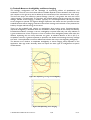
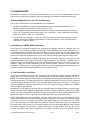
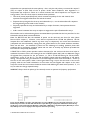
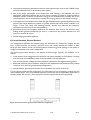
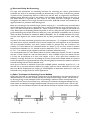
Flying a V-DOSC array is fast and easy. When properly prepared and organized, handling time can be
significantly reduced (especially in comparison with conventional systems). Installation is optimum
when 3 people are available (16 V-DOSC can be flown in 20 minutes!) although it is possible for 2
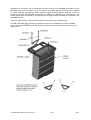
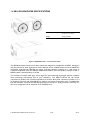
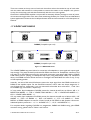
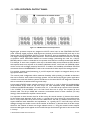
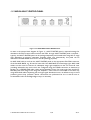
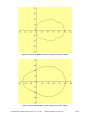
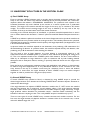
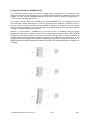
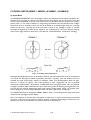
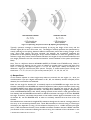
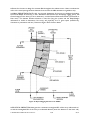
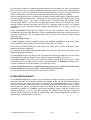
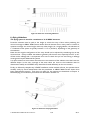
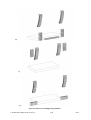
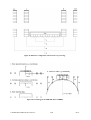
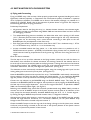
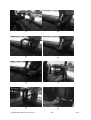
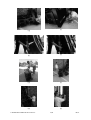
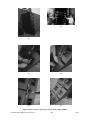
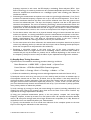
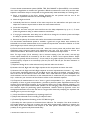
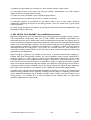
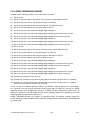
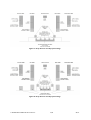
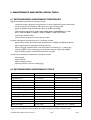
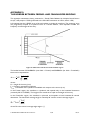
people to fly V-DOSC. Please refer to the sequence of photos shown in Figure 36 with respect to
the following description of flying procedures.
Preliminary Preparations:
All geometric data for the flying the array (i.e., bottom element elevation, inter-element angles,
site angles) has been pre-calculated using ARRAY 2000 and mechanical data has been checked
for safe rigging conditions
Two independent flying points are available, one behind the other with a spacing of 1.05 meters
(43 ¼”) between points and with the desired onstage rotation angle for the array. Alternatively,
three points can be used along with a swivel shackle connecting a delta plate to the rear
BUMPER point for pan adjustment of the flown array
Each flying point should be equipped with a chain motor of 0.5T for a 4-element array, 1.0T for
a 5- to 10-element array, 2.0T for an 11- to 16-element array
Access is available beneath the flying points, i.e., a flat surface where it is possible to roll VDOSC elements into position – preferably from behind the flying location but it is possible to fly
when boxes are lined up perpendicular to the fly points (eg. from the floor along the front of a
stage)
Given the above conditions:
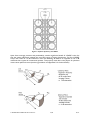
The first step is to line up all the elements at the flying location (while they are still face down on
their dollies). As a reference for cabinet orientation, the stacking runners for the element that is to
be at the top of the array should be visible at the flying location. Looking down the line of enclosures
from the flying location, the V-DOSC logos on the rear of all cabinets should all be in the correct
orientation. Once flown, the rear panel logos are upside down. (see Fig 36 a)
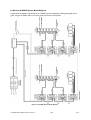
The elements are then mechanically connected together using the rotating legs and U pins. Use the
locking safety pins to secure all U pins in place. (see Figs 36 b-e)
Next the BUMPER is placed at the top end of the array. The BUMPER is mechanically connected to
the top cabinet in the same way that the cabinets are joined together, i.e., by rotating the BUMPER
legs into position on the top enclosure and locking them into place using U pins. (see Fig 36 f-g)
Connect the top element to the BUMPER using two BUMP ANGLE straps. This locks the top
element to the BUMPER (NOTE: the angle for the top element is set by angling the BUMPER during
the final step of array angle adjustment – this is the site angle of Element 1 as specified in ARRAY
2000, not the autofocus adjust angle). (see Fig 36 h)
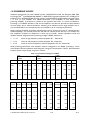
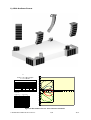
Referring to the ANGLE strap values that have been predetermined using ARRAY 2000, proceed to
connect one end of all ANGLE straps to the flytrack sections on both sides of all elements of the
array (except for the bottom element). Available ANGLE straps are: 0.75, 1.3, 2, 3 and 4 degrees by moving a 0 degree ANGLE strap one hole location closer, 5.5 degrees is obtained.
Although exact flytrack hole location is irrelevant since the length of the ANGLE strap bar actually
controls the angle between enclosures, as a convenient reference you can place ANGLE strap
fittings so that the shackle is located in flytrack location 3.
Orient the ANGLE straps so that the ring end of the fitting is facing to the left (down once cabinets
are flown) and the fitting is located at the left side of the flytrack (bottom of the flytrack section
once flown) in flytrack hole position 3 from the end.
L-ACOUSTICS V-DOSC Manual Version 3.2
10/01
76/119