1
FreeWave Technologies
Spread Spectrum Transceiver User Manual
900 MHz and 2.4 GHz
V4.2f
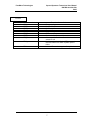
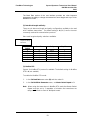
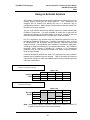
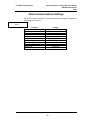
(5) RF Xmit Power
FreeWave offers users the ability to modify the Transmission Power of the
Transceiver. By reducing the Transmission Power when appropriate, users can
ensure the Transceivers do not overwhelm each other when used in close
proximity. There are 9 power settings available (1-9) which are roughly linear,
therefore a setting of 9 is full power or 1 Watt and 1 is ~10% power or 100 mW.
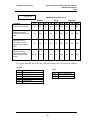
The following guidelines should be followed when setting the RF Transmission
Power:
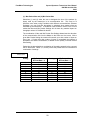
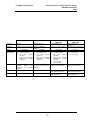
Table 10: Power Transmit
Settings
Setting
1-3
Power Level
Low
4-6
Medium
7-9
Full
Used When
Pair or pairs of transceivers operating within same or
adjoining rooms.
More than one pair of modems operating within same
facility.
Normal operation extending beyond a facility.
(6) Slave Security
With option 6 the user may disable the transceiver’s security so it will accept a
call from any other FreeWave unit. The default setting is 0 where security is
enforced (the caller’s serial number must be in the slave’s Call Book), with a
setting of 1 security is disabled.
As mentioned in mode 6, Slave Security must be set to one when the unit is
operating in a point-to-point system where it may need to accept calls from more
than 10 different FreeWave Transceivers. However, it is important to note that
when Slave Security is set to 1 the Transceiver will accept calls from any other
FreeWave Transceiver, and additional system security measures should be taken
to prevent unauthorized access.
(7) RTS to CTS
Menu selection 7 in the Radio Parameters provides the option of allowing the
RTS line (pin 7) on the Master modem to control the CTS line (pin 8) of the
Slave. This pass-through control can be enabled in point-to-point mode as well
as point-to-multipoint. In the latter the Master RTS line will control all Slaves’
CTS lines. When this mode is enabled the CTS line ceases to function as flow
control. Therefore it is not recommended to enable this feature when operating at
RS-232 speeds above 38.4 kB.
To enable this mode, enter 7 in the Radio Parameters menu. An entry of 1 will
enable the RTS-CTS control, 0 will disable it.
Just before the time the Master is scheduled to transmit a packet, it will sense the
state of the RTS line. If the state has changed, the Master will then transmit a
message to the Slave with the new status. This transmission will occur
regardless of data to be sent or not. In the former case the RTS status message
will be sent in addition to the data. In point-to-point mode the Master will continue
sending the new status message until it receives an acknowledgment from the
31