1
Software Installation
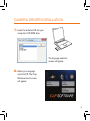
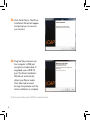
1. Click Install iCap and follow the prompts to complete installation.
2. Click Install RegiStax and follow the prompts to complete installation.
Connecting the Camera
to a Telescope
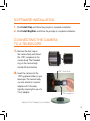
1. Remove the dust cap on
the camera body and thread
the 1.25” nosepiece to the
camera body. The threaded
ring on the camera body
should still be attached.
2. Insert the camera into the
1.25” eyepiece holder on your
telescope. The camera body
can also attach to a camera
adapter with C-threads,
typically requiring the use of a
T-to-C adapter.
1.25” visual back
1.25” nosepiece
Optional T-to-C Adapter (not included)
5