1
MOUNTING CHECKLIST
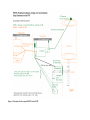
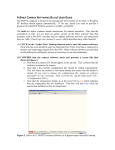
See the schematic in Figure 1 for the IRTF POETS setup.
Important note: power should be off when attaching and detaching cables. The best way
to setup is to have all power off, connect everything, then turn all power on.
Items to check in order to confirm proper hardware setup for POETS usage:
! Foreoptics box mounted on side of SpeX
! Camera mounted on bottom of fore-optics box
! Manual shutter between POETS and SpeX is open
! BNC cable attached to GPS antenna at top of telescope
! BNC cable attached to “antenna” port on back of GPS
! Serial octopus cable plugged into the back of the GPS
! 36-pin white cable attached to camera and back of computer
! Camera power cable plugged into jack on camera and an outlet
! SMB plugged into the “external trigger” connection on camera and the “output” BNC
on the GPS octopus cable
! Warm room cable connected to back of computer
! Computer power cable plugged into computer and an outlet
! GPS power cable plugged into jack on the GPS octopus cable and an outlet
! Power on for the following:
(i)
GPS [lights on front will glow];
(ii)
camera [can’t confirm power on until software is started];
(iii) computer [lights on front will glow].
! Confirm that computer power and connection are functional by bringing up display in
the warm room
! Can confirm that GPS is connected by clicking on “Spectrum” icon on the Windows
desktop: if no connection is made, an error message will appear
! Can confirm that camera is working by clicking on the “Andor iXon” icon on
Windows desktop: if no connection is made, an error message will appear
! Can confirm that camera power is working by watching the red cooling notice at the
bottom left of the camera software display – it should read below “0º C” within a minute
or two of the software startup