1
2.0
MOUNTING THE UNIT
WARNING
!
Ensure that the Liebert RDU-S is Off and that all local and remote input power sources have
been disconnected before beginning to install the unit. Never open, alter or move the unit
while input power is present.
NOTE
All external circuits must be safety extra-low voltage (SELV) circuits. The insulation and
isolation must be enhanced between the SELV circuits and the power grid.
Mount the Liebert RDU-S securely before connecting equipment, typically in a 19" rack or mounted on a wall.
• The Liebert RDU-S must be installed near a power outlet or socket within easy reach using the supplied
power cord.
• The unit must be connected to the power outlet or socket with protective earthing terminal.
• The unit must be securely installed in a rack or on a wall BEFORE using or connecting any equipment.
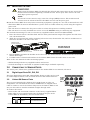
For horizontal mounting in a rack, use the factory-supplied brackets and screws (M3 and M6):
1. Place the shorter side of a bracket flush with the front panel and the longer side against one side of the
unit, shown below left.
2. Align the rear bracket hole with a mounting hole on the unit, shown below left, and use an M3 screw to
fasten the bracket to the side of the unit.
Mounting hole
for rack mounting
Unit with both side
brackets attached
FRONT OF UNIT
Bracket flush with front of unit
3. Repeat Steps 1 and 2 for the bracket on the other side. The Liebert RDU-S with both brackets attached is
shown above right.
4. Use M6 screws to fasten both brackets of the Liebert RDU-S onto the rack’s front or rear rails.
Refer to the user manual for other mounting options:
• Wall mounting with factory-supplied brackets and screws
• Vertical mounting in a rack with an optional round hanger available separately.
3.0
CONNECTING TO SENSOR PORTS
For sensor ports, follow these guidelines and see the Liebert RDU-S user manual, SL-31310.
3.1
Digital Input Ports DI1, DI2, DI3
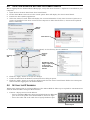
The three digital input ports DI1, DI2 and DI3, shown at right, may be used
to connect digital sensors, such as smoke detectors and motion detectors.
Digital
3.2
Liebert SN Sensor Ports
The two ports labeled with a Liebert SN icon , shown at right, are
designed for use with Liebert SN sensors. Each sensor is shipped with a
cable to connect to one of the Liebert SN ports on the Liebert RDU-S. You
may use this cable or another standard straight-through cable.
To connect the sensor:
• Insert either end of an RJ45 connector on the factory-supplied RJ45RJ45 cable (or user-supplied cable) into the Liebert SN port on the
Liebert RDU-S, identified by the icon shown below.
Icon
Description
Liebert SN
ports
Purpose
Use these ports ONLY
for Liebert SN sensors.
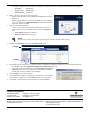
• Connect the other end of the cable to the sensor.
Liebert® RDU-S™
2
input
ports
DI1-3
Liebert SN ports
Connect
one end
of an RJ45
cable to a
Liebert SN
port
Connect
other end
to sensor