1
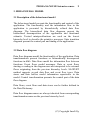
PROSA/SA/M-USE Intensive course
65
8.4 Behavioural model
8.4.1 Data flow diagram
1. Point data transformation of the context diagram and
select Push.
2. Give name dgate0.dfd for the child data flow diagram.
3. Save the context diagram when Prosa asks
Save/Nosave.
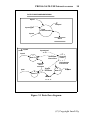
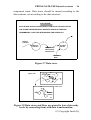
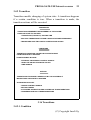
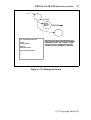
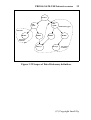
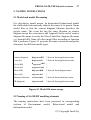
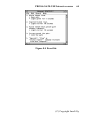
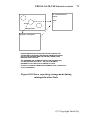
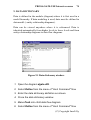
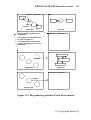
4. Create the child diagram shown below.
Host
command
.1
Interpret
Host
Command
Ticket
data
Person
passed
gate
.2
Manage
Gate
Equipment
Gate
control
Display
data
.3
Parameters
Gate passing
data
Make
Report
Report
Figure 8.5 Data flow diagram.
5. Place and name the data transformations first.
6. Flow stubs can be moved with Move selection from flow
menu.
(C) Copyright Insoft Oy