1
4
Getting Started
Getting Started
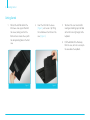
1.
out the tab from behind the
Pull
iPad sleeve. Line up your iPad with
the sleeve, making sure that the
front and rear cameras line up with
the corresponding holes in the iPad
case.
Figure 3
2. Insert the iPad into the sleeve
(Figure 3), and secure it by fitting
the tab between the iPad and the
case (Figure 4).
3.
T o convert the case to a stand for
viewing and working, open the folio
so the iPad is at a right angle to the
keyboard.
4. P
ull the bottom of the iPad away
from the case, so it rests securely on
the area above the keyboard.
Figure 4