1
Chapter 2
Data
Stata is pretty useless without data. Since you’re here, I’m sure you already have
a dataset in mind. Nonetheless, when just starting out, you may hesitate to put
it through Training Day. If you’re careful, there’s nothing to worry about —
Stata doesn’t actually make any permanent changes without your explicit sayso. In the interest of public safety however, let’s practice on a sample dataset
that came preinstalled with Stata.
2.1
Loading example data
To see what those sample data files are, type the following command
sysuse dir
sysuse tells Stata you’re interested in the example datasets which came preinstalled with your particular version of Stata; dir asks Stata to list their names.
Those of you familiar with Unix will already recognise dir: it tells Unix to list
the contents of a folder. It has the exact same functionality in Stata.1
For most of this document, we’ll use the auto.dta dataset. Load it up with
the following command:
sysuse auto.dta
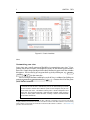
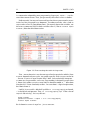
Once the data is loaded, you’ll notice that your Variables and Properties windows have changed. For obvious reasons, the Variables window lists the variables in the dataset. The Properties window provides more detailed information
on the variable currently selected in the Variables window. It also has information on the dataset.
1
In fact, dir also works on its own. Test it out to see what it does.
11