1
installed on internal or eSATA drives. Firewire can also be acceptable.
External USB drives may give somewhat less optimized performance. We
also recommend 7200 or 10,000rpm drives regardless of the interface used.
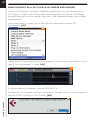
Once Kontakt is installed, launch the standalone application, or open it as an
instrument plug-in from within your preferred host application. Click on the
Libraries tab from the Kontakt browser on the left side of the Kontakt
interface. Just below “Libraries,” click on “Add Library.” A “Locate Folder”
window will appear. Navigate to the STUDIO KIT BUILDER Library folder,
highlight it, then click choose. STUDIO KIT BUILDER should now appear in
Kontakt’s library browser.
UPDATING
After installation, please make sure that you are fully updated to the most
recent versions of the three components that make up the STUDIO KIT
BUILDER package: the library (which contains all the patch information
and programming), the engine (which is powered by Kontakt), and the
authorizer (Service Center). It is possible that any of these components
may have a more recent version than you originally received, so you should
check for updates to each of these three. You can do this by visiting the
vir2.com web site and checking the Support area.
AUTHORIZING
After you’ve completed installation, STUDIO KIT BUILDER will be working
in demo mode, meaning it will only work for 15 minutes at a time. To fully
authorize it, launch Service Center (found in the Applications folder on a
Mac, or the Program Files folder on Windows) and follow its instructions.
You will be prompted to enter your e-mail address and password that make
up your Native Instruments account, or will be given an option to create an
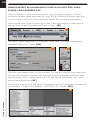
account if you don’t already have one. Once inside the Service Center, it
will give you a list of all the Native Instruments and NI-powered products
on your hard drive and give you the option to activate them. You are
allowed to install and use STUDIO KIT BUILDER on up to two computers
simultaneously.
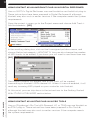
Service Center will guide you through the process for either online (instant)
activation, or offline activation if the computer on which you installed
STUDIO KIT BUILDER does not have direct access to the internet.
04