1
User Guide
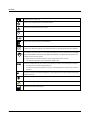
Caution • Indicates that there is a risk of injury to the user or patient or risk of damage to data or the device.
Note • Indicates that you should take special notice.
3
Unpacking FreeFit
1. Unpack the device carefully.
When you unpack the device and accessories, it is a good idea to keep the packing material in which they were
delivered. If you need to send the device in for service, the original packing material will protect against damage during transport, etc.
2. Visually inspect the equipment for possible damage.
If damage has occurred, do not put the device into operation. Contact your local distributor for assistance.
3. Check with the packing list to make sure that you have received all necessary parts and accessories. If your package is
incomplete, contact your local distributor.
4
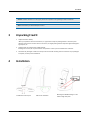
Installation
Installation for desk top use
Otometrics - AURICAL FreeFit
Wall mount installation
Mounting the NOAHLink charger on the
FreeFit charger base plate
5