1
QUICK REFERENCE GUIDE
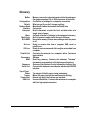
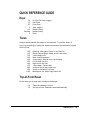
Keys
OL
LF
FF
V
0-9
Decimal
E
On-Line/Off-Line (toggle)
Line-Feed
Form-Feed
View (toggle)
Numeric entry
Numeric entry
Enter
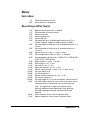
Tones
Various sounds indicate the status of the embosser. Try out the tones (it
won't hurt anything) by typing the sequences below on the embosser's keypad
while off-line.
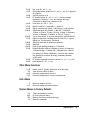
1.0E
1.1E
1.2E
1.3E
1.4E
1.5E
1.6E
1.7E
1.8E
1.9E
1.10E
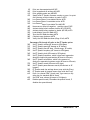
Romeo & Juliet tune--Power on self test OK
Chopin Funeral Dirge--Power on self test failed
2 short beeps--OK
Buzz--Invalid sequence
4 long beeps--Overrun error (serial data)
Low to high--On-line
High to low--Off-line
1 short beep--Console bell
Series of low to high--Paper out
Series of low beeps--Exit tone
Beethoven's 5th--Multi-Copy buffer full
Top-of-Form Reset
Do this after you change menu settings or add paper.
OL
2E
Takes the embosser off-line
Set top-of-form. Embosser resets automatically
Romeo Pro LE
29