1
Index
License Summary
2
About Log Evolve
10
Buttons and Functions
11
Menu Options
12
Side Graph Options
14
Starting Project
Opening File
15
Photo Editing
16
Setting up Graph
17
Adding Data Points
18
Adding Tops
19
Advance Chart
20
Exporting Data
21
Log Evolve Manual
Page 1
License Summary
Purchased License does not expire.
License is computer specific
Commercial use allowed
Cannot modify source-code for any purpose (cannot create derivative works)
Support provided as follows :
We at Gray Technical reserve the right to answer valid support questions via email. We reserve the
right to change any terms with or without notice.
For more information on the license summary topics
Log Evolve - Terms and conditions
Preamble: This Agreement, signed on Aug 16, 2015 (hereinafter: Effective Date) governs the
relationship between Individual / Business name, a Business Entity, (hereinafter: Licensee) and Gray
Technical, LLC, a duly registered company in whose principal place of business is {location} (hereinafter:
Licensor). This Agreement sets the terms, rights, restrictions and obligations on using Log Evolve
(hereinafter: The Software) created and owned by Licensor, as detailed herein
License Grant: Licensor hereby grants Licensee a Personal, Non-assignable & non-transferable,
Pepetual, Commercial, Without the rights to create derivative works, all with accordance with the terms
set forth and other legal restrictions set forth in 3rd party software used while running Software.
Limited: Licensee may use Software for the purpose of:
Running Software on Licensee’s Website[s] and Server[s];
Allowing 3rd Parties to run Software on Licensee’s Website[s] and Server[s];
Publishing Software’s output to Licensee and 3rd Parties;
Log Evolve Manual
Page 2
Distribute verbatim copies of Software’s output (including compiled binaries);
Modify Software to suit Licensee’s needs and specifications.
This license is granted perpetually, as long as you do not materially breach it.
Binary Restricted: Licensee may sublicense Software as a part of a larger work containing more than
Software, distributed solely in Object or Binary form under a personal, non-sublicensable, limited
license. Such redistribution shall be limited to unlimited codebases.
Non Assignable & Non-Transferable: Licensee may not assign or transfer his rights and duties under
this license.
Commercial, Royalty Free: Licensee may use Software for any purpose, including paid-services,
without any royalties
With support & maintenance: Licensor shall provide Licensee support and maintenance as follows We at Gray Technical reserve the right to answer valid support questions via email. We reserve the
right to change any terms with or without notice.
Term & Termination: The Term of this license shall be until terminated. Licensor may terminate this
Agreement, including Licensee’s license in the case where Licensee :
became insolvent or otherwise entered into any liquidation process; or
exported The Software to any jurisdiction where licensor may not enforce his rights under this
agreements in; or
Licensee was in breach of any of this license's terms and conditions and such breach was not cured,
immediately upon notification; or
Licensee in breach of any of the terms of clause 2 to this license; or
Log Evolve Manual
Page 3
Licensee otherwise entered into any arrangement which caused Licensor to be unable to enforce
his rights under this License.
Payment: In consideration of the License granted under clause 2, Licensee shall pay Licensor a fee, via
Credit-Card, PayPal or any other mean which Licensor may deem adequate. Failure to perform payment
shall construe as material breach of this Agreement.
Upgrades, Updates and Fixes: Licensor may provide Licensee, from time to time, with Upgrades,
Updates or Fixes, as detailed herein and according to his sole discretion. Licensee hereby warrants to
keep The Software up-to-date and install all relevant updates and fixes, and may, at his sole discretion,
purchase upgrades, according to the rates set by Licensor. Licensor shall provide any update or Fix free
of charge; however, nothing in this Agreement shall require Licensor to provide Updates or Fixes.
Upgrades: for the purpose of this license, an Upgrade shall be a material amendment in The
Software, which contains new features and or major performance improvements and shall be marked as
a new version number. For example, should Licensee purchase The Software under version 1.X.X, an
upgrade shall commence under number 2.0.0.
Updates: for the purpose of this license, an update shall be a minor amendment in The Software,
which may contain new features or minor improvements and shall be marked as a new sub-version
number. For example, should Licensee purchase The Software under version 1.1.X, an upgrade shall
commence under number 1.2.0.
Fix: for the purpose of this license, a fix shall be a minor amendment in The Software, intended to
remove bugs or alter minor features which impair the The Software's functionality. A fix shall be marked
as a new sub-sub-version number. For example, should Licensee purchase Software under version 1.1.1,
an upgrade shall commence under number 1.1.2.
Support: Software is provided with limited support, as detailed in the Software’s SLA detailed under
the License Grant. Licensor shall provide support via the Binpress issue tracker and / or electronic mail
and on regular business days and hours.
Bug Notification: Licensee may provide Licensor of details regarding any bug, defect or failure in The
Software promptly and with no delay from such event; Licensee shall comply with Licensor's request for
Log Evolve Manual
Page 4
information regarding bugs, defects or failures and furnish him with information, screenshots and try to
reproduce such bugs, defects or failures.
Feature Request: Licensee may request additional features in Software, provided, however, that (i)
Licensee shall waive any claim or right in such feature should feature be developed by Licensor; (ii)
Licensee shall be prohibited from developing the feature, or disclose such feature request, or feature, to
any 3rd party directly competing with Licensor or any 3rd party which may be, following the
development of such feature, in direct competition with Licensor; (iii) Licensee warrants that feature
does not infringe any 3rd party patent, trademark, trade-secret or any other intellectual property right;
and (iv) Licensee developed, envisioned or created the feature solely by himself.
Liability: To the extent permitted under Law, The Software is provided under an AS-IS basis. Licensor
shall never, and without any limit, be liable for any damage, cost, expense or any other payment
incurred by Licensee as a result of Software’s actions, failure, bugs and/or any other interaction
between The Software and Licensee’s end-equipment, computers, other software or any 3rd party,
end-equipment, computer or services. Moreover, Licensor shall never be liable for any defect in source
code written by Licensee when relying on The Software or using The Software’s source code.
Warranty:
Intellectual Property: Licensor hereby warrants that The Software does not violate or infringe any
3rd party claims in regards to intellectual property, patents and/or trademarks and that to the best of its
knowledge no legal action has been taken against it for any infringement or violation of any 3rd party
intellectual property rights.
No-Warranty: The Software is provided without any warranty; Licensor hereby disclaims any
warranty that The Software shall be error free, without defects or code which may cause damage to
Licensee’s computers or to Licensee, and that Software shall be functional. Licensee shall be solely liable
to any damage, defect or loss incurred as a result of operating software and undertake the risks
contained in running The Software on License’s Server[s] and Website[s].
Prior Inspection: Licensee hereby states that he inspected The Software thoroughly and found it
satisfactory and adequate to his needs, that it does not interfere with his regular operation and that it
does meet the standards and scope of his computer systems and architecture. Licensee found that The
Log Evolve Manual
Page 5
Software interacts with his development, website and server environment and that it does not infringe
any of End User License Agreement of any software Licensee may use in performing his services.
Licensee hereby waives any claims regarding The Software's incompatibility, performance, results and
features, and warrants that he inspected the The Software.
No Refunds: Licensee warrants that he inspected The Software according to clause 7(c) and that it is
adequate to his needs. Accordingly, as The Software is intangible goods, Licensee shall not be, ever,
entitled to any refund, rebate, compensation or restitution for any reason whatsoever, even if The
Software contains material flaws.
Indemnification: Licensee hereby warrants to hold Licensor harmless and indemnify Licensor for any
lawsuit brought against it in regards to Licensee’s use of The Software in means that violate, breach or
otherwise circumvent this license, Licensor's intellectual property rights or Licensor's title in The
Software. Licensor shall promptly notify Licensee in case of such legal action and request Licensee’s
consent prior to any settlement in relation to such lawsuit or claim.
Governing Law, Jurisdiction: Licensee hereby agrees not to initiate class-action lawsuits against
Licensor in relation to this license and to compensate Licensor for any legal fees, cost or attorney fees
should any claim brought by Licensee against Licensor be denied, in part or in full.
-------------------------------------------------------------------------------------------
Web Site Terms and Conditions of Use
1. Terms
By accessing this web site, you are agreeing to be bound by these web site Terms and Conditions of Use,
all applicable laws and regulations, and agree that you are responsible for compliance with any
applicable local laws. If you do not agree with any of these terms, you are prohibited from using or
accessing this site. The materials contained in this web site are protected by applicable copyright and
trade mark law.
Log Evolve Manual
Page 6
2. Use License
Permission is granted to temporarily download one copy of the materials (information or software) on
Gray Technical, LLC's web site for personal, non-commercial transitory viewing only. This is the grant of a
license, not a transfer of title, and under this license you may not:
modify or copy the materials;
use the materials for any commercial purpose, or for any public display (commercial or noncommercial);
attempt to decompile or reverse engineer any software contained on Gray Technical, LLC's web site;
remove any copyright or other proprietary notations from the materials; or
transfer the materials to another person or "mirror" the materials on any other server.
This license shall automatically terminate if you violate any of these restrictions and may be
terminated by Gray Technical, LLC at any time. Upon terminating your viewing of these materials or
upon the termination of this license, you must destroy any downloaded materials in your possession
whether in electronic or printed format.
3. Disclaimer
The materials on Gray Technical, LLC's web site are provided "as is". Gray Technical, LLC makes no
warranties, expressed or implied, and hereby disclaims and negates all other warranties, including
without limitation, implied warranties or conditions of merchantability, fitness for a particular purpose,
or non-infringement of intellectual property or other violation of rights. Further, Gray Technical, LLC
does not warrant or make any representations concerning the accuracy, likely results, or reliability of the
use of the materials on its Internet web site or otherwise relating to such materials or on any sites linked
to this site.
4. Limitations
In no event shall Gray Technical, LLC or its suppliers be liable for any damages (including, without
limitation, damages for loss of data or profit, or due to business interruption,) arising out of the use or
inability to use the materials on Gray Technical, LLC's Internet site, even if Gray Technical, LLC or a Gray
Log Evolve Manual
Page 7
Technical, LLC authorized representative has been notified orally or in writing of the possibility of such
damage. Because some jurisdictions do not allow limitations on implied warranties, or limitations of
liability for consequential or incidental damages, these limitations may not apply to you.
5. Revisions and Errata
The materials appearing on Gray Technical, LLC's web site could include technical, typographical, or
photographic errors. Gray Technical, LLC does not warrant that any of the materials on its web site are
accurate, complete, or current. Gray Technical, LLC may make changes to the materials contained on its
web site at any time without notice. Gray Technical, LLC does not, however, make any commitment to
update the materials.
6. Links
Gray Technical, LLC has not reviewed all of the sites linked to its Internet web site and is not responsible
for the contents of any such linked site. The inclusion of any link does not imply endorsement by Gray
Technical, LLC of the site. Use of any such linked web site is at the user's own risk.
7. Site Terms of Use Modifications
Gray Technical, LLC may revise these terms of use for its web site at any time without notice. By using
this web site you are agreeing to be bound by the then current version of these Terms and Conditions of
Use.
8. Governing Law
Any claim relating to Gray Technical, LLC's web site shall be governed by the laws of the State of
Kentucky without regard to its conflict of law provisions.
General Terms and Conditions applicable to Use of a Web Site.
Privacy Policy
Your privacy is very important to us. Accordingly, we have developed this Policy in order for you to
understand how we collect, use, communicate and disclose and make use of personal information. The
following outlines our privacy policy.
Log Evolve Manual
Page 8
Before or at the time of collecting personal information, we will identify the purposes for which
information is being collected.
We will collect and use of personal information solely with the objective of fulfilling those purposes
specified by us and for other compatible purposes, unless we obtain the consent of the individual
concerned or as required by law.
We will only retain personal information as long as necessary for the fulfillment of those purposes.
We will collect personal information by lawful and fair means and, where appropriate, with the
knowledge or consent of the individual concerned.
Personal data should be relevant to the purposes for which it is to be used, and, to the extent
necessary for those purposes, should be accurate, complete, and up-to-date.
We will protect personal information by reasonable security safeguards against loss or theft, as well as
unauthorized access, disclosure, copying, use or modification.
We will make readily available to customers information about our policies and practices relating to
the management of personal information.
We are committed to conducting our business in accordance with these principles in order to ensure
that the confidentiality of personal information is protected and maintained.
-----------------------------------------------------------------------------
By installing this software you are agreeing that Gray Technical, LLC is not responsible for any loss of
data, profit, property, software, hardware or any other items during the use of this product or any other
products produced or affiliated with Gray Technical, LLC. All software or products provided by Gray
Technical, LLC are strictly “Use at your own risk” and come with no warranty.
Log Evolve Manual
Page 9
About Log Evolve
Log Evolve is a graph digitizer, originally created to aid in the digitizing of very large charts
(known as logs) in the geology field. With Log Evolve you can take still images (such as scans or
downloaded image files) of graphs and convert them directly into tangible data. You can export all of
this data in three options, Excel Format, CSV Data Table Format or Compressed Zip Format.
Log Evolve is more than capable of digitizing many formats of small, large, horizontal or vertical
graphs and charts. With its own built-in AI (artificial intelligence) Unit, Log Evolve can automatically
adjust the values of the viewable image when the graph is moved. This in return will allow the user to
graph a portion of the image, move the digitizer to another section, and continue the digitization
without compromising data.
Log Evolve is not limited to Log Files though. Log Evolve can work with Bubble Charts, Line
Charts, Scatter Plots, Bar Graphs, Column Graphs, Spline Images, Step Line Graphs and many more.
Log Evolve offers customization options as well. From the Data Points, Lines and even the Tops
(data set dividers) can all be customized with color and names. You can also put in preset data for
publishing well data. For instance your company name, graph creation date, email, phone number,
personnel name, original graph data and custom images of the original image as well.
Creating the tangible data is very easy and simple. Within only a couple clicks you can open an
image, draw a graph and start digitizing. And with the aid of the AI called ‘Chart Synchronization’ you
can easily convert a multi thousand foot log in a matter of minutes.
The exported information can be exported in ZIP format, to be read on other computers with
Log Evolve, exported to a CSV comma delimited table, or exported directly into Microsoft Excel. With
the capability to export directly into Excel, Log Evolve can easily convert data points into editable cell
blocks, image files, and embed all of those into the standard .XLSX file that everyone uses. This means
that you can export and anyone with Microsoft Office Excel version 2007 and above can read and write
to it.
Log Evolve also has the possibility to save your current progress in to a Zip file and pick it right
back up where you left off. The Zip file is not proprietary or locked so all the information inside is
completely open and can be read from many different devices.
Log Evolve Manual
Page 10
Buttons and Functions
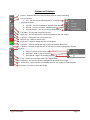
1. Pointer – Select this when you want to select, move or stretch something.
2. Pen Tool Options
a. Pen – Use this to draw individual points, or hold down
to auto draw points
b. Pen Add – Use this to add points between other points
c. Pen Sub – Use this to remove individual points
d. Pen Sub Selector – Use this to remove selected points
3. Top Adder – This will add a top where clicked
4. Move Top – This will relocate the selected top wherever the user drops it
5. Top Color – Change the color of a selected Top
6. Remove Top – Select to remove a top
7. Point Color – Select to change the color of data points
8. Line Color – Select to change the color of the lines between data points
9. Top Color – Select to change the color of new top or one that is going to be changed
10. Zoom
a. Zoom In – Hold or click to zoom in
b. Zoom Out – Hold or click to zoom out
c. Zoom Speed – Higher the number the faster
11. Crop – Use this to Crop images before you digitize them
12. Brightness – Use this to increase or decrease the brightness of an image
13. Screen Shot – Use this to take a screenshot of either your screen or a PDF to digitize
14. Rotation – Use this to rotate your image
Log Evolve Manual
Page 11
Menu Options
1. File
a. Open
i. Image – Allows user to open image to digitize
ii. Project – Allows user to open project to digitize
iii. PDF – Allows user to open PDF in default PDF viewer
b. Save As
i. Image – Allows user to save back image
ii. Project – Allows user to save project file
iii. Excel – Allows user to export project into Excel (.xlsx format)
iv. CSV – Allows user to export project/data into CSV database table
c. Close Project
2. Edit
a. Undo – Only available for image edits (limit to 1 step)
b. Rotation – Will allow user to rotate image 90 or 270 degrees, or flip Horizontally or
Vertically
3. Options
a. Chart Options
i. Reverse Y – Chart the graph in reverse Y order (smallest number at top)
ii. Reverse X – Chart the graph in reverse X order (smallest number at right)
iii. Vertical Points – Chart the graph with vertical array of points
iv. Horizontal Points – Chart the graph with horizontal array of points
b. Auto Locate – Will automatically locate the points on the data table when they are
moussed over
c. Publish Options – Set the options for the publish document. This will allow the user to
put custom information into the published well file.
d. Chart Synchronization – The built in AI system that will allow the user to automatically
advance the graph without losing any data points previously input.
4. Effects
a. Sharpen – Will sharpen the image
b. Smoothing – Will blur the image
c. Emboss – Will emboss the image
5. About
a. Log Evolve – Information about your version of Log Evolve
b. Email/Web Support
i. Bug Report – Allow the user to ether submit an email or post on our website for
a bug or error report
Log Evolve Manual
Page 12
ii. Request Feature – Allow the user to either submit an email or post on our
website for a future feature request
iii. Support – Email or Web based support for questions.
c. Leave Feedback – Leave us feedback on our website if you like our product enough to do
so
Log Evolve Manual
Page 13
Side Graph Options
13-14 15-16
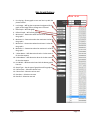
1. Line-Up Log – Shows graph so user can line it up with the
picture behind
2. Lock Image – Will log the transparent background of the
graph so the image will not change even if moved
3. Hide Graph – Will hide graph
4. Refresh Graph – Will refresh graph
5. Minimum X – Determines what the minimum X value for
the graph is
6. Maximum X – Determines what the maximum X value for
the graph is
7. Minimum Y – Determines what the minimum Y value for
the graph is
8. Maximum Y – Determines what the maximum Y value for
the graph is
9. Y Value Name – Will determine what the Y value name is
for the data exports
10. X Value Name – Will determine what the X value name is
for the data exports
11. Line Width – Will determine how thick the drawn graphs
lines are
12. Graph Type – Set the type of graph that will be graphed
13. Column Start – Selection column start
14. Column End – Selection column end
15. Row Start – Selection row start
16. Row End – Selection row end
Log Evolve Manual
Page 14
Starting a Project
Opening Files
When starting a project with Log Evolve you will need to know the basic buttons and features. If
you have not read the previous section of this manual, please go back and read that now.
The first thing you want to do is decide if you would like to open an
IMAGE, PROJECT or PDF file. With ‘File’ > ‘Open’ > ‘IMAGE’ you can open any
different type of images. To view all the file types together on this selection
screen select ‘All Files (*.*)’. Image formats can be in JPG, JPEG, PNG, GIF, TIF
or BMP format.
Project files are zipped files of combined project data files that were
saved on your product or from another product. Simply select the zip file and
open it.
PDF files cannot natively be opened inside of Log Evolve. Instead what Log Evolve will do is open
the PDF file inside of the default PDF Reader installed on your machine. To import the PDF into Log
Evolve you will need to take a Screen Shot (refer to buttons section) of the chart/graph, or convert the
PDF to an image file. Once the screen shot is taken or the PDF has been converted you man then open it
as an image file from ‘File’ > ‘Open’ > ‘IMAGE’.
Log Evolve Manual
Page 15
Photo Editing
Once the image is loaded into Log Evolve you can make adjustments to the image as needed.
There are several tools you can use to make sure that your image file is the best quality for graphing.
You can use the Rotate button on the left side to rotate the image by a set degree (able to be rotated
down to 0.25 degrees at a time), adjust the brightness of the image with the Brightness button (also
located on the left), crop the image if needed with the Crop Tool button, and Zoom in or out as needed.
The options for photo editing on the top menu is under the Edit and Effects tabs.
‘Edit’ has an Undo option, which is used only for the Photo Editing, and also only steps back one
level. Also under ‘Edit’ is ‘Rotate’ which will allow the user to rotate the image by either 90 degrees or
270 degrees. Rotate also has an option for Horizontal Flip and Vertical Flip.
‘Effects’ will allow the user to either Sharpen, Smooth or Emboss the image. Sometimes using
these filtering effects will make the chart more readable.
Log Evolve Manual
Page 16
Setting up Graph
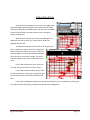
Once you have your image set up where you would like it (level, straight and legible),
go ahead and click the ‘Line-Up Log’ button. This button will make a graph appear overtop of
the image you have previously edited.
You will notice that with this new blank graph, that when
you mouse over it the dark gray background will change to show
what is behind the graph itself. There will be a slight red overcast so
you can see the graph vs image and distinguish between the two.
Now you will need to set up the Vertical/Horizontal points,
as well as the inverted points. Go to ‘Options’ > ‘Chart Options’ and
set the switches as needed. For more information on this please
review the last section on ‘Menu Options’.
Now that you have your Graph populated, move the graph so
that the lines on the Chart inside of the Graph line up with the
imported image. You can use the black box on the Graph at the top
and the bottom right to move and relocate the Graph as needed. You
will also need to use the Bottom and Right stretch bars to stretch your
Graph to line up with the image behind it that you want to digitize.
Once you have the Chart, Graph and
Image all lined up you will need to set the
Minimum and Maximum for both the X and Y
axis, which is located on the Right hand side of
the screen under the graph buttons. Make
sure to set the numbers accurately so they line
up with the graph you want to digitize.
When you have your Image, Graph
and Chart set you it is good practice to click
the ‘Lock Image’ button on the right. This will
disable the auto refresh on the background of the Graph, locking the background image in place.
At this point you are ready to start adding in data points and digitizing your graph.
Log Evolve Manual
Page 17
Adding Data Points
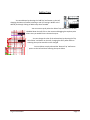
Once you have your graph set up you can start adding data
points and digitizing by selecting the ‘Pen’ tool button and simply
clicking into the graph to add data points. For more of a breakdown
of these features please read the previous section coving the
buttons and features.
With the ‘Pen’ selected you can now start adding points.
Add them from the 0,0 point. Or, in other words, where the
digitized data will start.
To add points click with the Left Click on the Graph where
point is needed. For easier ‘Auto Click’ simply hold
down the Left Click and run your mouse of the line
you want digitized. This will automatically add data
points for you as you trace the image. This works
well with tablets as well if you would prefer to use
a pen.
If you need to delete one point, select the
‘Pen Sub’ and then Left Click to remove a point.
If you need to delete multiple points, select
the ‘Pen Sub Selector’, select the starting point with
the Left Click and then the End Point with the Left
Click.
If you need to add points between two already specified points you can add them by clicking the
‘Pen Add’ and then Left Clicking to add points between two existing points.
Log Evolve Manual
Page 18
Adding Tops
You can add tops by selecting the ‘Add Top’ tool button on the Left,
changing the Name as needed, selecting a color (or leaving it WHITE as the
default) and simply clicking to add the top where needed.
You can move a top by select the ‘Move Top’ tool button on the left,
HOLDING down the Left Click on the mouse and dragging the top data point
where ever you would like to relocate the top to.
You can change the color of the selected top by selecting the ‘Top
Color Editor’ tool button on the Left, changing the color pallet and then
selecting the top that needs the color changed.
You can delete a top by selected the ‘Remove Top’ tool button
option on the Left and then selecting the top to delete.
Log Evolve Manual
Page 19
Advancing Chart
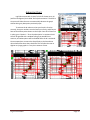
Log Evolve comes with its own, for lack of a better term, AI
(artificial intelligence) Unit called ‘Chart Synchronization’. The built in
AI system will allow the user to automatically advance the graph
without losing any data points previously input.
To activate the AI make sure that your Graph is lined up
correctly, that your numbers are also lined up correctly, and that you
have at least 3 data points drawn on the Graph. Once all of those are
in place, go to ‘Options’ > ‘Chart Synchronization’ to activate the AI.
You will be greeted with a window asking if you would like to
continue, and what options will be disabled while the AI is activated.
Once accepted you can move the Graph freely as the Data Points
reline themselves where they should be. This will allow the user to
digitize very large graphs in a very short amount of time.
Log Evolve Manual
Page 20
Exporting Data
Once your Image has been digitized and you are
finished with your graph you can export your data in
three different options.
The first option is a Project file, which is actually
a ZIP file that is comprised of all of your data (both
system settings and digitized data). This will allow you to
email this project file to anyone to open in Log Evolve,
or to see the core data in simple .txt format.
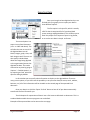
The second option is to
export into an Excel document
(.xlsx – or 2007 and above). This
will allow the user to save all of
the digitized data into cell
blocks, images, graph, chart, and
back image as well. The user can
also specify individual data
about the image being digitized
or the organization/person that
digitized the data. This can be
accessed at any time by going to
‘Options’ > ‘Publish Options’, or
by exporting to Excel, which will
open the dialog by default.
In this window you can specify what information to display on the digitized data. There are
many pre-set options, as you also have the possibility to set your own data (like name, email, address,
business, ect.) All of this information will be viewable on the second page of the exported Excel
document.
Once your data is set click the ‘Export To Excel’ button to have all of your data automatically
transferred into Excel format for you.
The third option for exportation of data is into a CSV common delimited .txt document. This is a
standard database table that man programs use as a default.
Examples of the exported data can be seen on the next page.
Log Evolve Manual
Page 21
Log Evolve Manual
Page 22