1
INITIAL SETUP
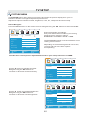
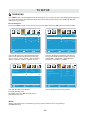
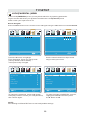
How to Navigate
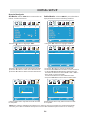
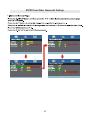
Air Mode: Select AIR when connected to an
Cable Mode: Select CABLE if you subscribe to
indoor/outdoor antenna.
a pay television service includ ing satellite.
12
12
6
6
Picture
Audio
Tim e
Setup
LOCK
Picture
CHANNEL
Favorite
Favorite
Show Hide
Show Hide
Cable
Channel No
Channel No
KOCE LB
Channel label
Channel label
DTV Signal
DTV Signal
Move
Select
MENU
Move
Return
Select
Tim e
Return
12
6
6
Audio
MENU
Using the ◄► button to highlight CABLE.
button to highlight AIR.
12
Picture
CHANNEL
Setup
Auto Scan
Auto Scan
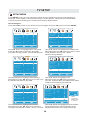
Press the
Tim e
Air /Cable
Air
Air /Cable
Audio
Setup
CHANNEL
Picture
Auto
Cable System
Audio
Tim e
Setup
CHANNEL
Auto
Cable System
Start to Scan
Start to Scan
Move
Next
MENU
Move
Return
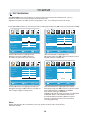
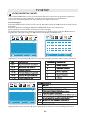
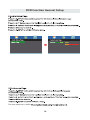
Press the ▼ button to select AUTO SCAN then
press the ► button to enter the submenu and
press the ► button to start Channel Auto Scan.
Next
MENU
Return
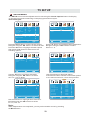
Press the ▼ button to select AUTOSCAN.
Press the ENTER button and the cursor will move
up and CABLE SYSTEM will be displayed next.
Press ► the button to select STD > IRC > HRC >
Auto (Auto is recommended).
Press the ▼ button to select Start to Scan
and press ENTER to start Channel Auto Scan.
12
12
6
Picture
Audio
Move
Ti m e
Setup
Picture
CHANNEL
Audio
Ti m e
Setup
RF CH
7
RF CH
7
Found
4
Found
4
Next
MENU
Move
Return
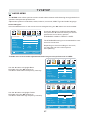
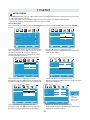
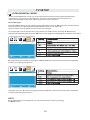
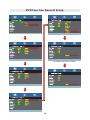
Channel Auto Scan may take several minutes
to complete.
Next
CHANNEL
MENU
Return
Channel Auto Scan may take several minutes
to complete.
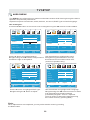
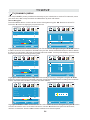
NOTE: For cable or satellite users with no TV antenna, there no need to run Channel Auto Scan.
Connect your cable or satellite set top box to one of the available inputs on the TV for viewing.
14