1
T V SETUP
Audio
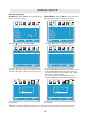
AUDIO MENU
The AUDIO menu offers options to make sound enhancements while listening through the built-in
speakers and personal preferences.
Adjustment options include bass, treble, balance, surround ,SPDIF Type and audio language.
How to Navigate:
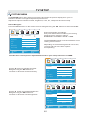
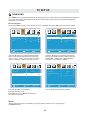
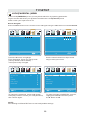
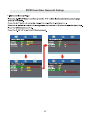
Press the MENU button on the remote control. Navigate using the ◄► buttons to select AUDIO.
12
12
6
6
Picture
Audio
Tim e
Setup
Picture
Tim e
Setup
Standard
Sound Mode
Standard
Sound Mode
Audio
50
Bass
50
Treble
50
Treble
50
Balance
50
Balance
50
Bass
Surround
Surround
Off
SPDIF Type
PCM
Audio Language
English
Move
Adjust
Off
SPDIF Type
PCM
Audio Language
MENU
Move
Return
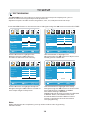
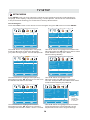
Use the ▼ button to highlight Balance.
Navigate using the ◄► buttons to adjust sound
towards the right or left speaker.
English
Select
MENU
Return
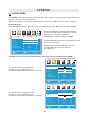
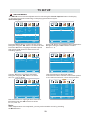
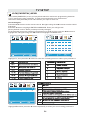
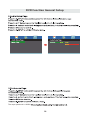
Use the ▼ button to highlight Surround.
Navigate using the ► button to turn the
dimensional surround effect ON or OFF.
(for built-in speakers only).
12
12
6
6
Picture
Audio
Sound Mode
Tim e
Setup
Picture
Standard
Audio
Sound Mode
Tim e
Setup
Standard
Bass
50
Bass
50
Treble
50
Treble
50
Balance
50
Balance
50
Surround
SPDIF Type
Audio Language
Move
Off
Surround
SPDIF Type
PCM
English
Select
Audio Language
MENU
Return
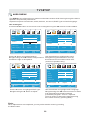
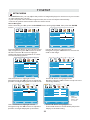
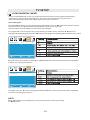
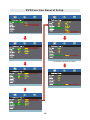
Use the ▼ button to highlight SPDIF Type.
Navigate using the ► button to adjust.
Move
Off
PCM
English
Select
MENU
Return
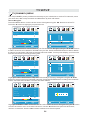
Use the ▼ button to highlight Audio Language.
Navigate using the ◄► buttons to select to listen
to an alternative language broadcast
(if available) English > French > Spanish .
You may select an alternative language using
the remote control by pressing MTS)
Note:
When adjustments are completed, you may select another menu by pressing
the Menu button.
18