1
 Controls - Names and Functions
Basic Operations
Connecting to AC source
VOLTMETER
1. Place the PS on horizontal, stable surface avoiding direct sunshine.
2. Place the PS at least 10 cm away from the walls for good air circulation.
3. Check the correspondence of the position of input voltage value switch to the specifications of
AC circuit, to which you connect the PS.
In case there is no such correspondence the Power Supply may be damaged.
Do not use the DC or another AC which does not correspond 110-120 V or 200 – 240 V, 50-60
Hz.
4. Put the AC cord into the socket on the backside of the PS.
AMPEREMETER
COARSE
STABILIZATION
VOLTAGE
OFF
CURRENT
ON
FINE
OPERETING
LOAD
LIMITING
“ON”
CARRENT LOAD
10
Check the correspondence of the position of input voltage value switch to the specifications of
the network.
1. Plug the AC cord into the outlet.
2. Connect the load to the output terminals with the help of DC cable.
3. Put the voltage and current regulators into the extreme left position.
4. Put the power switch into the position “ON”.
9
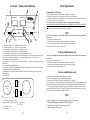
1. Terminal to connect to “ – “ stabilized voltage (current)
2. Terminal to connect to “ + “ stabilized voltage (current)
3. Voltage regulator. Controls the value of stabilized voltage
4. Current regulator. Controls the value of stabilized current
5. Voltage indicator. Displays the value of voltage on the terminals 1, 2
6. Current indicator. Depending on switch 9 position displays the present value of current in the
external circuit, connected to terminals 1, 2, or the maximum possible value of the current
7. Voltage stabilization mode indicator.
The green arrow of indicator shows that Power Supply is working in the mode of voltage
stabilization
8. Current stabilization mode indicator.
The red arrow of indicator shows that Power Supply is working in the mode of current stabilization
9. The switch of the current indicator mode.
In “OPERATING” position the current indicators 6 show the present value of the current in the
external network.
10. Load switch.
Voltage stabilization mode
Check the correspondence of the position of input voltage value switch to the specifications of
the network.
1. Plug the AC cord into the outlet.
2. Connect the load to the output terminals with the help of DC cable.
3. Put the voltage and current regulators into the extreme left position.
4. Put the power switch into the position “ON”.
Current stabilization mode
1. Put the current regulator into the maximum left position;
2. Put the voltage regulator into the maximum right position;
3. Set the switch “CURRENT LOAD” in the “OPERATING” position;
4. Set the necessary value of current which is flowing through the load, on the appropriate digital
indicator with the help of current regulator. The current indicator constantly shines (red arrow);
5. If necessary set maximum possible value of the current in the external network. To do this put
the switch “CURRENT LOAD” in “LIMITING” position and set the maximum possible value of
the current in the external network on digital indicator.
13
Cooling
Fan
12
“OFF”
11
11. The input voltage value switch.
Controls the value of input voltage: 115 V, 60 Hz
230 V, 50 Hz
12. Socket for AC cord
13. Power switch.
1. Put the voltage and current regulators into the extreme left position.
2.Switch off the power switch (“OFF” position).
or
3. Switch off the clamps of DC cord from the load.
4. Take the plug out of the outlet.
3
2
2