1
User Manual
ISDN connection
Your fax machine is not an ISDN fax (group 4), but an
analogue fax machine (group 3). Therefore it cannot be
used directly on an ISDN connection. You will need an
(analogue) adapter or an ISDN connection for analogue
devices. For further information please refer to your
ISDN instructions.
In case your PABX requires R to obtain an outside
line but it is still not possible to get through to the
line, your system may not meet the most recent regulations. Therefore some technical settings have to be
changed on your fax machine. Please refer to your Fax
Call Centre (you will find the telephone number on
the back cover).
If problems occur with fax reception over the ISDN line,
please note that many ISDN systems must be specially
configured for this (refer to the operating manual of your
ISDN system).
For device with SMS function: Analog terminals
must be SMS-compatible.
Private branch exchange
Private branch exchange systems are very common in
large companies. ISDN connections are private branch
exchanges and are used very often in private households.
To get a connection from a private branch exchange to
the public network you have to dial a key to obtain the
outside line.
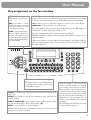
1 Select function 15 on your fax machine by pressing
MENU and then entering the digits 15. Press
OK.
2 You can switch on the PABX operation using u.
PABX: YES
PABX: NO
3 Then press OK.
4 Now enter the key that has to be pressed to obtain an
outside line.
This outside line access code must be obtained from the
manufacturer. This is either 0 or R (in some systems
also described as FLASH) or a number key.
5 Press OK.
6 Use u to select CHECK: YES and press OK.
Your machine will then check that the outside line can be
obtained. If the check is successful, the following message
appears briefly:
check OK.
If the check is successful, the following message appears
briefly:
check NOT OK.
You will be asked to repeat the entry. Change the outside
line access code. If you have entered the correct code but
the display continues to read check NOT OK then delete the code by pressing C.
17