1
Easy Install
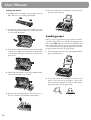
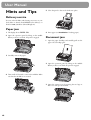
Ink film
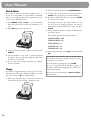
Your fax machine is supplied complete with a free ink
film for a few trial pages.
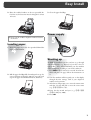
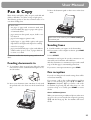
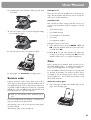
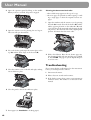
5 Close the machine by swinging the operation panel
forward, until it snaps in.
A new Plug’n’Print card has to be inserted with each new
ink film (only the first free ink film will work without a
Plug’n’Print card).
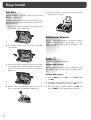
1 Open the fax machine by lifting the operating panel
in the middle until it clicks in place.
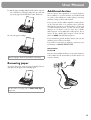
Additional devices
2 Lay the large roll in the grooves in the rear ink film
compartment.
You can connect additional devices (telephones, cordless
telephones, answering device, PC modem) to your telephone line (see user manual, chapter Installation / Additional devices).
SMS W
(for device with SMS functionality)
3 Now take the small roll and lay it in the front ink film
compartment. Make sure that the blue toothed wheel
is on the right and the pin on the left is inserted in the
depressions.
Reading SMS messages
When you receive an SMS message you will hear a beep.
The message will be stored and automatically printed
out.
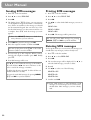
Sending SMS messages
1 Press the SMS key, then u to select SEND SMS
and OK.
2 The display shows TEXT. Enter your text message
(maximum of 160 characters) and press OK.
4 Break out the new Plug’n’Print card and insert it in
the slot to the left of the ink film compartments.
4
3 Enter the recipient’s number. Confirm with OK and
press the SMS key. Your SMS message will be sent.