1
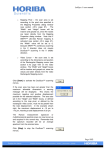
Not all values need to be specified in InitGuiDriver.dat and when values are not
specified, the defaults of Figure 3 (e.g., Lowpass Filtering Parameters) will be used
unless the user subsequently changes the values directly in the GUI. IMPORTANT:
InitGuiDriver.dat needs to be located in the current working directory (e.g.
GOM/mat_data/) or in the Read Directory specified in the GUI (prior to pressing
Initialize), otherwise MATLAB will prompt the user for the directory location.
3.5 IES_GUIDRIVER
This program performs the following steps:
-
Step 1:
Step 2:
Step 3:
Step 4:
Step 5:
Step 6:
Step 7:
Step 8:
windowing and hourly values
despiking
initial detiding
dedrifting
final detiding
velocity processing (if CPIES)
lowpass filtering
plotting
IES_GUIDRIVER creates two subdirectories “wrkspc” and “figs” (if not already
created by IES_GUIDAT2MAT) in the “Write Directory” (e.g. GOM/mat_data/wrkspc/
and GOM/mat_data/figs/). The “wrkspc” subdirectory holds intermediate MATLAB
workspaces created by IES_GUIDRIVER as well as a tide log generated during detiding.
The “figs” subdirectory holds the final figures created during plotting, Step 8.
The .mat files produced by IES_GUIDAT2MAT listed in Table 2 are the input
data sets for IES_GUIDRIVER. At various steps, the MATLAB workspace is saved (e.g.
in the wrkspc subdirectory: WindowedXXX_#.mat is saved after the windowing step,
DespikedXXX_#.mat is saved after the despiking step, etc). In general, you will not need
to use these intermediate MATLAB workspaces (WindowedXXX_#.mat,
DespikedXXX_#.mat). However, do not delete them since they allow you to process the
data starting at any step, not just step 1. For example, it is common to iterate and improve
drift removal after all the IES data sets have been processed.
IES_GUIDRIVER creates a log file documenting which steps were carried out
and the processing parameters specified. Information is appended to this log file after
27