1
Precautions for Safe Use
1)
2)
3)
4)
5)
6)
7)
8)
9)
10)
11)
12)
13)
14)
15)
16)
17)
18)
19)
20)
x
The product is designed for indoor use only. Do not use the product outdoors or in any of the following
locations.
• Places directly subject to heat radiated from heating equipment.
• Places subject to splashing liquid or oil atmosphere.
• Places subject to direct sunlight.
• Places subject to dust or corrosive gas (in particular, sulfide or ammonia gas)
• Places subject to intense temperature change.
• Places subject to icing or condensation.
• Places subject to vibration or strong shocks.
Use and store the product within the rated temperature and humidity ranges. Provide forced-cooling if
required.
To allow heat to escape, do not block the area around the temperature controller. Also, do not block its
ventilation holes.
Be sure to wire properly with correct polarity of terminals.
Use crimped terminals of specified sizes (M3, width: 5.8 mm or less) for wiring. To connect bare wires to
the terminal block, use wires with a gage of AWG22 to AWG14 (cross-sectional area: 0.326 mm 2 to
2.081 mm2). For wirings other than power supply, use wires with a gage of AWG28 to AWG14 (crosssectional area: 0.081 mm2 to 1.309 mm2). (The stripping length: 6 to 8 mm).
Do not wire terminals that do not have an identified use.
Secure as much space as possible between the product and devices that generates a strong highfrequency or surge. Separate the high-voltage or large-current power lines from other lines, and avoid
parallel or common wiring with the power lines when you are wiring to the terminals.
Use the product within the rated load and power supply voltage.
Make sure that the rated voltage is attained within 2 s of turning ON the power.
The switch or circuit breaker must be located within an easy reach of the operator, and must be marked as
a disconnecting means for this unit.
Do not use paint thinner or similar chemical to clean with. Use standard grade alcohol.
Never touch the electric components, connectors, or patterns in the product with bare hands. Always hold
the product by its enclosure. Inappropriate handling of the product may occasionally damage internal
components due to static electricity.
Use a switch, relay, or other device for turning OFF the power supply quickly. Gradually lowering the
voltage of the power supply may result in incorrect outputs or memory errors.
Connect only the specified number of products in only a specified configuration.
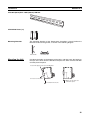
Mount the product to a DIN Rail mounted vertically to the ground.
Always turn OFF the power before wiring, replacing the product, or changing the configuration.
Before installing the product, attach the enclosed cover seal to the connector opening on the left end of
the product.
Make sure that the data transfer distance for DeviceNet is within the specified range, and use the
specified cable only. Also, refer to this manual for specifications including appropriate data transfer
distance and cable.
Do not bend or pull data transfer cable for DeviceNet forcibly.
Turn OFF the DeviceNet before connecting/disconnecting connectors. Not doing so may result in
equipment failure or malfunction.