1
USING THE EXTERNAL BATTERY CASE
(AA batteries not included)
The external battery case allows you to:
• increase playtime by using fully charged rechargeable batteries and new AA
alkaline batteries at the same time.
• have a convenient backup power supply if your
rechargeable batteries are flat. Operate the set on
just 2 x AA batteries instead.
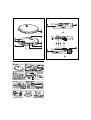
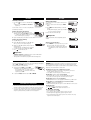
1 Push on PUSH/ OPEN to open the battery case,
and lift off the case cover as indicated.
AC/ DC ADAPTER
(supplied or optionally available)
For best playback quality connect the set to AC/DC. Use
only the AY3170 adapter (4.5 V/ 300 mA direct
current, positive pole to the center pin). Any other product may damage the player.
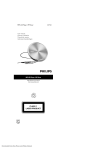
1 Make sure the local voltage corresponds to the AC/
DC adapter’s voltage.
2 Connect the AC/ DC adapter to the 4.5V DC jack of the player and to the wall
outlet.
2 Insert 2 alkaline batteries, type AA/ LR6/ UM3 with
correct polarity, and replace the case cover.
3 Connect the battery case to the EXT BATT jack on the set.
Helpful Hint: Always disconnect the adapter when you are not using it.
Helpful Hint:
– When using the external battery case, avoid jolting the player and swinging the
case. Sudden movements may cause damage to the external battery connection
and pose a hazard.
– This player includes a motor mechanism that extends battery lifetime by varying the motor’s rotation rate. Motor noise may increase when the rate changes.
If the noise bothers you, use the AC/DC adapter to power the player. The motor
rotation rate does not change when operating on AC power.
ABOUT MP3/ WMA
MP3/ WMA music files
The music compression technology MP3 (MPEG Audio Layer 3) and WMA
(Windows Media Audio) reduces the digital data of an audio CD significantly
while maintaining CD-like sound quality. With MP3/ WMA you can record up to
10 hours of CD-like music on a single CD-ROM.
How to get music files
Either download legal music files from the internet to your computer hard disk
or create them from your own audio CDs. For this, insert an audio CD into
your computer´s CD-ROM drive and convert the music using an appropriate
encoder software. To achieve a good sound quality, a bit rate of 128 kbps is
recommended for MP3 music files, and 96 kbps for WMA files.
How to make a CD-ROM with MP3/ WMA files
Burn the music files from your computer hard disc on CDR or CDRW using your CD
burner. For more information, you can use the by-packed EXPANIUM CD-ROM (free
MUSICMATCH Jukebox software) to create your own MP3 CD.
Helpful Hint:
– Make sure that the file names of the MP3 files end with .mp3 and WMA files
and with .wma.
– Total number of music files and albums: around 500
– For more information on creating music files, please check out the free
MUSICMATCH Jukebox software on the by-packed CD-ROM.
– Make sure your WMA files are not protected.
Windows Media Audio® is a registered trademark of Microsoft Corporation.
MUSICMATCH Jukebox® is a registered trademark of Musicmatch, Inc.
Battery playtime
Average playing time of 2 alkaline AA and/ or AY3365 rechargable batteries
under normal conditions:
2 x AA alkaine + Ni-MH
2 x AA alkaine, Power Saving mode
2 x Ni-MH, Power Saving mode
Audio CD MP3/ WMA
65 hr
102 hr
46 hr
70 hr
20 hr
30 hr
FM Tuner
108 hr
73 hr
30 hr
CD PLAYER AND CD HANDLING, p
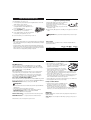
• Do not touch the lens A of the CD player.
• Do not expose the unit, batteries or CDs to humidity,
rain, sand or excessive heat (caused by heating
equipment or direct sunlight).
• You can clean the CD player with a soft, slightly
dampened, lint-free cloth. Do not use any cleaning
agents as they may have a corrosive effect.
• To clean the CD, wipe it in a straight line from the center toward the edge
using a soft, lint-free cloth. A cleaning agent may damage the disc! Never
write on a CD or attach a sticker to it.
• The lens may cloud over when the unit is moved suddenly from cold to warm
surroundings. Playing a CD is not possible then. Leave the CD player in a
warm environment until the moisture has evaporated.
• Active mobile phones in the vicinity of the CD player may cause malfunctions.
• Avoid dropping the unit as this may cause damage.
Headphones HE570, LINE OUT
• Connect the remote control to p/ LINE OUT jack of the
player and your headphones to the remote control.
• p/ LINE OUT can also be used for connecting the
player to your HiFi system (with a signal lead) or to
your car radio (with a cassette adapter/ FM stereo transmitter or signal lead).
In both cases, the volume of the player must be set to volume level 22.
IMPORTANT!
Hearing safety: listen at a moderate volume. using headphones at high volume can
impair your hearing.
Traffic safety: do not use headphones while driving or cycling as you may cause an
accident.
All trademarks used are owned by their respective owners.