1
FM TUNER
FM TUNER
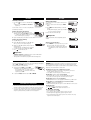
Switching radio on/off
Storing radio stations
• Press FM/
once or more to switch the radio on/
off.
➜ Display shows briefly Radio on or Radio off
respectively.
You can store up to 30 radio stations. Select a preset
number 1-30.
Use the remote control or set to tune to any FM station
automatically or manually.
2 Press PROG while PROG is blinking to confirm the
Tuning to radio stations automatically
1 Tune to a desired radio station and press PROG
briefly.
storage.
➜ PROG, the FM frequency and the preset number of
the stored station are displayed.
1 Press and hold ∞ or § for at least 2 seconds.
3 Store all desired stations this way.
2 Repeat searching until you find the desired radio station.
Already stored stations can be recognized by a preset
number.
➜ Display shows briefly Searching.The radio tunes
to a station with sufficient strength and radio play
starts. The FM frequency is displayed.
Helpful Hint:
Tuning to radio stations manually
1 Keep ∞ or § pressed.
2 Release ∞ or §, then briefly press ∞ or § again
when you are close to the desired frequency.
3 Briefly press ∞ or § repeatedly until you reach the
desired frequency.
➜ Radio play starts. The FM frequency is displayed.
• To switch from radio play to CD play, press 2;.
• Press
to switch the radio off.
Tuning to a stored radio station
1 Press ALBUM + / - repeatedly if necessary to select
the preset number of the desired radio station.
➜ Radio play starts. The FM frequency and the preset number (P1-30) of the stored station are displayed.
Helpful Hint:
– To improve reception: The headphone wire is used as an FM antenna.
If necessary, move it for optimum reception.
– Tuner operation is not affected if you open the CD lid to change a disc.
LOCK
TROUBLESHOOTING
You can lock the buttons of the set/ remote control respectively by switching the
slider to LOCK. With LOCK activated, you can avoid
accidental activation of other functions.
WARNING: Under no circumstances should you try to repair the unit yourself as
this will invalidate the warranty. If a fault occurs, first check the points listed,
before taking the unit for repair. If you are unable to solve a problem by following
these hints, consult your dealer or service center.
1 Switch the slider to LOCK to activate LOCK.
➜ All buttons are locked. Hold is shown when you
press any button on the set / remote control
respectively. If the set is locked and switched off, Hold will be shown
only when pressed 2; .
2 To deactivate LOCK, switch the slider to OFF or UNLOCK.
The CD player has no power, or playback does not start
• Check that your batteries are not dead or empty, that they are inserted
correctly, that the contact pins are clean.
• Your adapter connection may be loose. Connect it securely.
The indication Please insert CD is displayed
• Check that the CD is clean and correctly inserted (label-side upward).
• If your lens has steamed up, wait a few minutes for this to clear.
The indication Unfinalized CD is displayed
• CD-RW (CD-R) was not recorded properly. Use FINALIZE on your CD-recorder.
ENVIRONMENTAL INFORMATION
• All redundant packing material has been omitted. We have done our utmost to
make the packaging easily separable into 4 materials: paper, PET, PE and PS.
• Your set consists of materials which can be recycled if disassembled by a
specialized company. Please observe the local regulations regarding the
disposal of packing materials, dead batteries and old equipment.
The indication Hold is on and/or there is no reaction to controls
• If LOCK is activated, then deactivate it.
• Electrostatic discharge. Disconnect power or remove batteries for a few seconds.
The CD skips tracks
• The CD is damaged or dirty. Replace or clean the CD.
•
,
or PROG is active. Switch off whichever is on.
No sound or bad sound quality.
• pause might be active. Press 2;.
• Loose, wrong or dirty connections. Check and clean connections.
• Volume might not be appropriately adjusted. Adjust the volume.
• Strong magnetic fields. Check player’s position and connections. Also keep
away from active mobile phones.