1
TROUBLESHOOTING
TROUBLESHOOTING
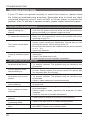
If your TV does not operate normally or cannot be turned on, please check
the following troubleshooting questions. Remember also to check any other
connected electronic device, such as DVD or blu-ray player to pinpoint the
problem. If the TV still fails to operate normally, please contact technical support.
The TV does not operate properly
The TV does not respond • The TV may freeze up during use. Disconnect the power
when pressing any
cord from the power socket for a few minutes. Reconnect the
buttons
power cord and try to operate it again as usual.
• Check that the TV is connected to the power supply.
TV cannot be switched on • Make sure all connected AV devices are switched off before
switching on your TV.
• Check to see if there are any objects between the TV and the
remote control causing an obstruction. Ensure that you are
The remote control does
pointing the remote control directly at the TV.
• Ensure that the batteries are installed with the correct polarity
not work
(+ to +, - to -).
• Install new batteries.
• Check the power of the TV. The power supply maybe
Power is suddenly turned
interrupted.
off
• Check if the sleep timer is set.
• Check whether the Auto Standby is activated.
The video function does not work
• Check whether the TV is switched on.
No picture & No Sound
• Try another channel. The problem may be caused by the
broadcaster.
• This is normal; the image is muted during the TV startup
Picture appears slowly
process. Please contact your service centre if the picture has
after switching on
not appeared after five minutes.
• Adjust the settings in the PICTURE menu.
No or poor color or poor
• Try another channel. The problem may be caused by the
picture
broadcaster.
• Check if video cables are connected properly.
Horizontal/Vertical bar or • Check for local interference such as an electrical appliance
picture shaking
or power tool.
• Station or cable channel may be experiencing problems, tune
to another station.
Poor reception on some
• Station signal is weak, reposition the antenna for better
channels
reception.
• Check for sources of possible interference.
Lines or streaks in
• Check antenna (change the position of the antenna.)
pictures
No pictures when
• Check if the input source is HDMI1/HDMI2/HDMI3.
connecting HDMI
Pictures appears in wrong • Adjust the Aspect Ratio settings in the SETUP menu or press
ratio
the ASPECT button on the remote control.
20