1
Contents
5
5
5
6
11
12
13
Chapter 1:  Getting Started
14
14
16
19
20
22
26
27
28
28
Chapter 2:  Basics
29
29
31
36
38
39
Chapter 3:  Music and Video
40
40
40
42
43
43
43
43
Chapter 4:  Photos
2
What You Need
Registering iPod touch
Syncing with iTunes
Mail, Contacts, and Calendar Accounts
Installing Configuration Profiles
Disconnecting iPod touch from Your Computer
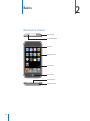
iPod touch at a Glance
Home Screen
Sleep/Wake Button
Touchscreen
Onscreen Keyboard
Connecting to the Internet
Charging the Battery
Cleaning iPod touch
Restarting and Resetting iPod touch
Getting Music, Video, and More
Music and Other Audio
Videos
Setting a Sleep Timer
Changing the Browse Buttons
Syncing Photos with Your Computer
Viewing Photos
Slideshows
Wallpaper
Saving Images from an Email Message or Webpage
Emailing a Photo
Sending a Photo to a MobileMe Gallery