1
5.Operations
EM9 User's Manual
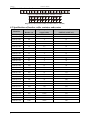
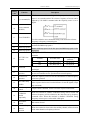
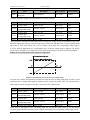
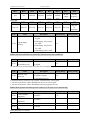
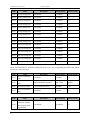
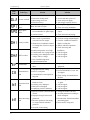
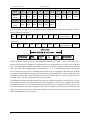
Button Symbol
Name
Shortcut Multifunction Key
+
Combination Key
Function Description
Determined by function code F7.03:
0: Jog operation
1: Switch between forward and reverse
2: Clear the UP/DOWN settings.
Pressing the RUN and STOP/RESET at the
same time can achieve inverter coast to stop
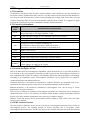
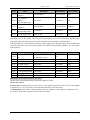
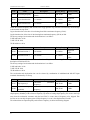
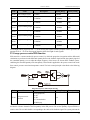
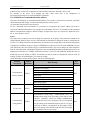
5.1.3 Indicator light description
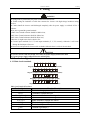
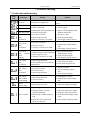
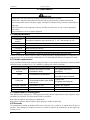
1. Function indicator light description:
Indicator Light
Name
RUN/TUNE
Indicator Light Description
Light Off: stop status Blinking: parameter auto tuning status Light on: operating status
FWD/REV
Light Off: forward operation .Light on: reverse operation.
TRIP
Light Off: normal operation status, Light on: Fault status
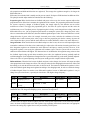
2. Unit indicator light description:
Symbol
Description of Symbol content
Hz
Frequency
A
Current
V
Voltage
RPM
Rotation
%
Percentage
3. Digital display:
Have 5 digit LED , which can display all kinds of monitoring data and alarm codes such as reference frequency,
output frequency and so on.
5.2 Operation process
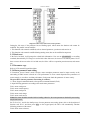
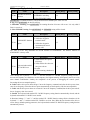
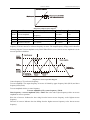
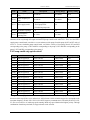
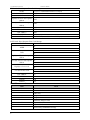
5.2.1 Parameter setting
Three levels of menu are:
1. Function code group (1st level);
2. Function code (2nd level);
3. Function code value (3rd level).
Remarks:
Press both the PRG/ESC and the DATA/ENT can return to the 2nd class menu from the 3rd class menu. The
difference is: pressing DATA/ENT will save the set parameters into the control panel, and then return to the
2nd class menu with shifting to the next function code automatically; while pressing PRG/ESC will directly
return to the 2nd menu without saving the parameters, and keep staying at the current function code.
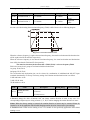
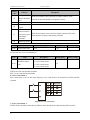
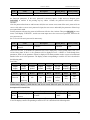
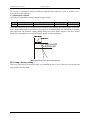
Example: Change function code F1.01 from 00.00Hz to 02.00Hz:
16