1
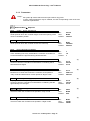
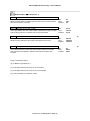
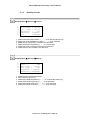
POLYCLIM 21A
+ Timer + Fog
User’s Manual
POLYCLIM 21A+Timer+Fog – User’s Manual
11.. GENERAL PRESENTATION
1.1. Functions
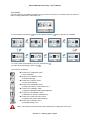
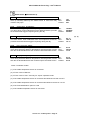
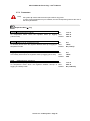
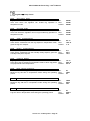
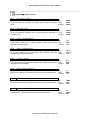
The device is designed to manage the climate in your greenhouses and horticultural or market
gardening tunnels and provides the following functions :
Control of 2 independent single side vents.
Control of a shade curtain (Or thermal screen).
installation
Control of thermostatic heating.
safety
Control of dehumidification.
(refer to § 5.2)
Control of an inflation system.
Control of a timer system.
Control of a fog system.
Control of alarms (With control output).
and in option :
archiving.
« 4 periods » management.
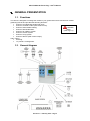
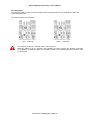
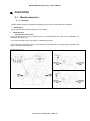
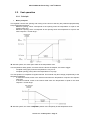
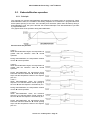
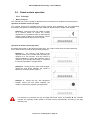
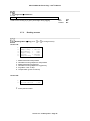
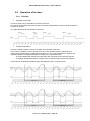
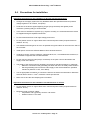
1.2. General diagram
Version 3.x – February 2010 – Page 2
POLYCLIM 21A+Timer+Fog – User’s Manual
22.. USE OF THE DEVICE
2.1. Browsing
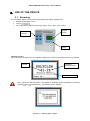
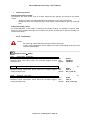
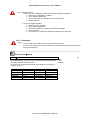
For information display, menu browsing and parameter setting, regulator has:
a 28x64 pixel graphic screen
4 keys :
4 five-way selector switches of the type "Open - Stop - Auto - Stop - Close"
Graphic
screen
4 selector
switches
4 keys
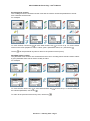
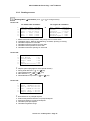
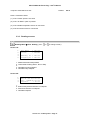
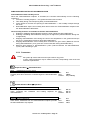
Start-up screens:
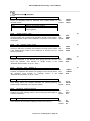
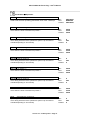
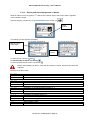
When the power is switched on, the regulator displays the version and operating mode. For example
:
Version
Number of
managed zones
Operating mode
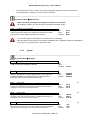
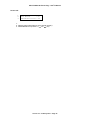
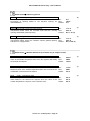
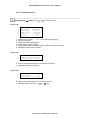
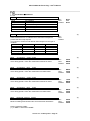
Note : During the start-up phase, it is possible to reinitialize all the parameters by pressing
the keys
and
simultaneously. The following screen appears:
Version 3.x – February 2010 – Page 3
POLYCLIM 21A+Timer+Fog – User’s Manual
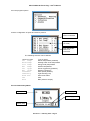
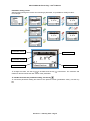
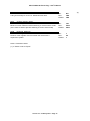
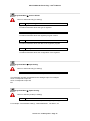
then the program options :
and the configuration of inputs and sensors present:
Input defined and
sensor connected
Input not defined
(not used)
Input defined but
sensor not
connected
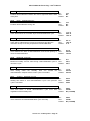
The followings sensors can be defined:
Label on screen
Int
Temp°
Water Temp°
Soil Temp°
Ext
Temp°
Int
Hygro
Ext
Hygro
Sunniness
Luminosity
Wind vane
CO2
Rain
Type of sensor
Interior temperature (ambient)
Heating water circuit temperature
Soil (ground) temperature
Exterior temperature
Interior hygrometry (ambient)
Exterior hygrometry
Solar power (Watt/m²)
Light intensity (Lux)
Wind vane 0/360°
CO2
Rain (4/20 mA output)
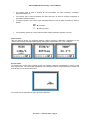
Screen fields and symbols:
Display field
Alarm symbol
Operating symbol
Display strip
Version 3.x – February 2010 – Page 4
POLYCLIM 21A+Timer+Fog – User’s Manual
The display field is used to display all the information for menu browsing, messages,
parameter setting, etc.
The display strip is used to display the date and time, as well as scrolling messages or
information during browsing.
The alarm symbol is one of two icons indicating whether or not an alarm is present (current or
stored).
no alarm
alarm present
The operating symbol is a moving thermometer showing that the regulator is active.
Home screen:
After the start-up phase, the regulator displays various screens in alternation, depending on the
version and sensors connected (wind speed, solar power, temperature, etc.). For example:
Screen saver:
To preserve the screen and increase its life, the regulator switches automatically to "saver" mode
after a given time. The information disappears, any changes made to the parameters are saved and
a small logo moves around the screen:
The home screen reappears as soon as a key is pressed.
Version 3.x – February 2010 – Page 5
POLYCLIM 21A+Timer+Fog – User’s Manual
Icon screen:
This icon screen is accessed by pressing any key on the home screen. It is used to open the menus in
order to modify parameters, read values, etc.
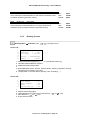
To move around, use the key
to go to the right and the key
to go to the left. For example:
To run the action represented by the icon, press the key
To return to the home page, use the key
The icons are as follows:
access to the "Setpoints" menu
(= main setpoints)
access to the "Weather" menu
(= weather settings)
access to the "Alarms" menu
(= list of stored alarms)
access to the "Readings" menu
(= reading of sensors, control status, etc.)
access to the "Settings" menu
(= setting of parameters other than setpoints)
access to the "Installation" menu
(= calibration of sensors, maintenance)
access to the "Date and Time" menu
(= setting of the system date and time)
access to the "System" menu
(= language setting, etc.)
Note : The symbol means that the menu opens after a long press on the icon.
Version 3.x – February 2010 – Page 6
POLYCLIM 21A+Timer+Fog – User’s Manual
Scrolling menu screens:
The scrolling menus are accessed via the icons and are used to choose the parameters to be set
from a list with several levels.
For example:
To move around, use the key
to move down and the key
to move to up. To run the action
shown on the menu (expand or reduce a level, open a parameters menu, etc.) use the key
The key
can be pressed at any time to return to the previous screen (icons).
Parameter menu screens:
The parameter menu screens are accessed from the icons or scrolling menus and are used to select
a given parameter from a list in order to modify its value.
For example:
To move around, use the key
to move down and the key
the selected parameter, use the key
to move to up. To access setting of
To return to the previous screen at any time, use the key
Version 3.x – February 2010 – Page 7
POLYCLIM 21A+Timer+Fog – User’s Manual
Parameter setting screen
After browsing through the menus and choosing a parameter, it is possible to modify its value.
For example:
Parameter name
Current value
Parameter number
Minimum value
Maximum value
To change the value, use the key
to increase and the key
maximum values indicate the limit values of the parameter.
to decrease. The minimum and
To validate and save the parameter setting, use the key
To cancel the parameter setting and return to the previous screen (parameters menu), use the key
Version 3.x – February 2010 – Page 8
POLYCLIM 21A+Timer+Fog – User’s Manual
Error or information screens
If there is a problem, the regulator displays information screens such as:
The regulator cannot read the parameters
battery or memory problem
The regulator cannot save the parameters
memory problem
The regulator cannot acknowledge an alarm
memory problem or alarm not recognized
The regulator cannot create menu or alarm lists
memory problem
The regulator cannot read the time
problem with real-time clock component
To solve any problems, proceed as follows in every case:
1. Cut off the power supply for around ten seconds
2. Restore the power to the device
3. Repeat the operation that seems to have caused the problem
4. If the problem persists, contact the retailer of the device.
Version 3.x – February 2010 – Page 9
POLYCLIM 21A+Timer+Fog – User’s Manual
2.2. Integrated manual operation
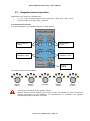
Depending on the version, the regulator has:
1, 2, 3 or 4 five-way selector switches of the type "Open - Stop - Auto - Stop - Close"
1 two-way switch of the type "Auto – Override"
Five-way selector switches
E.g. for the regulator 31 (3 ventilation switches, 1 shade switch)
Roof ventilation
control
Shade curtain
control
Left-hand side
ventilation control
Right-hand side
ventilation control
Type of
regulator
The various selector switch positions:
Manual
« Open »
Manual
« Stop »
Automatic
Manual
« Stop »
Manual
« Close »
The selector acts directly on the regulator outputs.
When a selector is set to "Manual" (open, close or stop), the regulator no longer monitors the
function concerned (e.g. roof ventilation). On switching back to "Automatic", the regulator
automatically resets the function concerned.
Version 3.x – February 2010 – Page 10
POLYCLIM 21A+Timer+Fog – User’s Manual
Two-way switch
The two-way switch is used to control inflation and is located inside the case between the input and
output terminal blocks.
The various positions of the switch:
« On » : Override
« Auto » : Automatic
The switch acts directly on the R9 output of the regulator.
When the switch is set to "Override", the regulator no longer monitors the function concerned
(e.g. inflation). On switching back to "Automatic" position, the regulator restarts the inflation cycle
on an interval.
Version 3.x – February 2010 – Page 11
POLYCLIM 21A+Timer+Fog – User’s Manual
2.3. General Parameters
2.3.1.
Date and Time
Date and Time Menu
WA01
System Time
Internal time of the device
This is the time used by the device for the various regulation
functions
WA02
System Date
Internal date of the device
This is the date used by the device to record events such as alarms
WA03
Summer/Winter Auto.
Automatic management of the hour summer/winter
Allows an automatic adjustment of the hour at the time of the
passage of summer to winter (–1h at the end of October) and of
winter to summer (+1h at the end of March)
2.3.2.
Min :
Max :
Default :
00.00
23.59
12.00
Min :
Max :
Default :
01/01/2005
31/12/2099
01/01/2005
Min :
Max :
Default:
NO
YES
YES
Sensor Calibration and Maintenance Mode
For each sensor, it is possible to apply a correction to the measurement made by the device.
Installation Menu Calibration
YA01
Sensor name
Min :
Max :
Default :
The title depends on the sensor defined on the analogue input (see
start-up screen)
The minimum and maximum values change for each type of sensor as shown in the table below
Sensor type
Temperature
Humidity
Sunlight
Light intensity
Wind vane 0/360°
CO2
Min
-5.0 °C
-10 %
-100 Watt/m²
-1000 Lux
-50 °
-100 ppm
Max
+ 5.0 °C
+ 10 %
+100 Watt/m²
+1000 Lux
+50 °
+100 ppm
ON/OFF type sensors cannot be calibrated.
For example: Wind speed sensor, 2-sides wind vane, Rain, etc.
(measurement correction not possible for these sensors)
Version 3.x – February 2010 – Page 12
POLYCLIM 21A+Timer+Fog – User’s Manual
The "Maintenance" menu is used only to test the regulator outputs in order to check that the
controls (ventilation, heating, etc.) are correctly connected
Installation Menu Maintenance
When this menu is displayed, all regulation functions are inhibited.
ventilation, heating, etc. are no longer monitored in automatic mode.
YX01
Output to activate
Output that the operator wishes to activate
Used to select the output to be activated in maintenance mode
(see section "Power supply and output connections).
Min :
Max :
Default :
None
R12
None
The selected output is activated as soon as this menu is displayed
after exiting from this menu, the regulator reinitializes all the regulation functions (readjustment
of air vents, etc.) and resumes in automatic mode.
2.3.3.
System
System Menu Settings
XA01
Language
Language currently used
Used to modify the language of all titles
XA02
Operating Mode
General operating process
Allows to activate or not certain adjustments in other menus, in
particular related on the weather influences and automatic
calculations of the hours of sunrise and sunset
XA03
Latitude
Latitude of geographic point
Min :
Max :
Default :
French
Min :
Max :
Default:
SIMPLE
EXPERT
SIMPLE
Min.
Max.
Default
90° S
90° N
47° N
Min.
Max.
Default
180° W
180° E
0°54’ W
(1)
Latitude of the site where the regulator is installed intervening in the
calculation of the hours of sunrise and sunset
XA04
Longitude
Longitude of geographic point
(1)
Longitude of the site where the regulator is installed intervening in the
calculation of the hours of sunrise and sunset
XA05
GMT Hour
GMT Hour
(1)
Shift compared to GMT hour of the site where the regulator is installed
intervening in the calculation of the hours of sunrise and sunset
Version 3.x – February 2010 – Page 13
Min.
Max.
Default
-12h
+12h
+1h
POLYCLIM 21A+Timer+Fog – User’s Manual
XA06
Winter/Summer time
Winter/Summer time
Taking automatically into account of Winter/Summer time.
(1)
Min.
Max.
Default
NO
YES
YES
XA07
Screen Saver Delay
Screen saver delay
Minimum screen hold time before switching to "screen saver" mode
(set a value of 1000 to prevent switching to screen saver mode)
Min :
Max :
Default :
30 s
999 s
600 s
XA08
Network Address
Address of the regulator on the network
Number of the regulator used to network the device with a
supervision system.
Min :
Max :
Default :
1
99
1
Notes : Parameter visible
(1) If “XA02” is set to “Expert”
Version 3.x – February 2010 – Page 14
POLYCLIM 21A+Timer+Fog – User’s Manual
System Menu Version & Date
Menu in read mode only (no setting)
XB01
Polyclim Type
Type of regulator
Provides information about the type of regulator
XB02
Version
Version of the regulator
Provides information about the regulator program version
XB03
Date
Date of the regulator
Provides information about the date of the regulator program
XB04
Configuration Number
Configuration Number
Provides information about the configuration of the regulator
System Menu Input Config.
Menu in read mode only (no setting)
XC01
Sensor name
Indicates whether or not a sensor is present when switching on
The parameter number corresponds to the analogue input. For example:
XC01 corresponds to input A1,
XC01 corresponds to input A2,
Etc.
System Menu Option Config.
Menu in read-only mode (no setting)
XD01
Option name
Provides information about the options managed by the regulator
For example: "Thermostatic heating", "Dehumidification", "Air Mixer", etc.
Version 3.x – February 2010 – Page 15
POLYCLIM 21A+Timer+Fog – User’s Manual
33.. FUNCTIONS
3.1. Weather detection
3.1.1. Principle
Several safety systems are possible, depending on the sensors connected to the controller.
Wind speed
The measured wind speed the degree of vent closing.
Wind direction
o Two directions wind vane
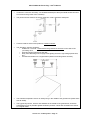
A two directions wind vane is sufficient when all compartments and vents of the installation are
directed in the same way.
The screw of the 2D vane by convention is called the right side.
In the case of a single slope vents, a parameter permit to define if the vent physically is located at the
right or left side of the wind vane.
Double slope vents
Case “A” : wind from the right
Case “B” : wind from the left
Version 3.x – February 2010 – Page 16
POLYCLIM 21A+Timer+Fog – User’s Manual
Rain
Rain also determines vent closing. The degree of closing depends on the ventilation settings on the
sheltered or exposed side.
Sunniness
The power of the sun, measured in Watt/m², is used during the day to control opening and closing of
the shade curtain in order to protect the plants in the greenhouse against excessive solar radiation.
Under a bright sun, solar power may reach 1000 Watt/m², but reduces as soon as a cloud appears.
The sunlight curve for a cloudy day may look like this:
Luminosity
Light intensity is measured in Lux and is used to automatically detect the Day and Night periods. A
typical light intensity curve might be:
At the same time, light intensity can also be used to control when the greenhouse lamps switch on to
artificially "extend" the length of the day and give the plants more light.
If the light intensity sensor is not connected, the day and night start times can be set
“manually” by two parameters.
Version 3.x – February 2010 – Page 17
POLYCLIM 21A+Timer+Fog – User’s Manual
3.1.2. Parameters
Notes :
- the symbol means that the menu opens after a long press
- in some cases parameters may be masked; see the corresponding notes at the end
of the list of parameters
Weather Menu Setpoints
BA01
Light Wind Threshold
Speed at which a light wind is detected
Wind speed at which the controller begins to limit the opening of the
vents in ventilation position
Min :
Max :
Default :
0 km/h
BA02
30 km/h
Min :
Max :
Default :
BA01
100 km/h
50 km/h
BA03
Wind Threshold Number
Number of wind thresholds
Value indicating how many thresholds the controller must take into
account between the light and strong wind thresholds
Min :
Max :
Default :
1
10
1
BA04
Wind Threshold Tempo
Wind threshold temporizing
Amount of time the controller must wait before considering that a
threshold has changed
Min :
Max :
Default :
0 min
99 min
5 min
BA02
Strong Wind Threshold
Speed at which a strong wind is detected
Wind speed at which the controller closes the vents fully.
(1)
BA05
Lux Threshold (D/N)
Lux threshold for Day / Night detection
Measured Lux value above which the controller must operate in
"Day" mode and below which it must operate in "Night" mode
Min :
Max :
Default :
0 Lux
9999 Lux
600 Lux
BA06
Lux Temporizing (D/N)
Day/Night detection temporizing
Amount of time the controller must wait before considering that the
light intensity has changed
Min :
Max :
Default :
0 min
30 min
5 min
Min :
Max :
Default :
0h00
BA08
8.00
BA07
Start of Day Time
Start of day time
Time from which the controller must operate in "Day" mode
BA08
Start of Night Time
Start of night time
Time from which the controller must operate in "Night" mode
Version 3.x – February 2010 – Page 18
(2)
(2)
(3)
(3)
Min :
Max :
Default :
BA07
23h59
20h00
POLYCLIM 21A+Timer+Fog – User’s Manual
Weather Menu Constructor
BX01
Rain/Wind Det. Delay
Rain or wind detection delay
Minimum time before a weather phenomenon (rain or wind) is taken
into account by the controller
Min :
Max :
Default :
0s
30 s
5s
BX02
Wind/Rain Stop Delay
Delay in detecting end of rain or wind
Time lag between the end of the weather phenomenon (rain or wind)
and the time when the controller acts on this information
Min :
Max :
Default :
0 min
30 min
2 min
Min :
Max :
Default :
0 km/h
30 km/h
15 km/h
Min :
Max :
Default :
0s
999 s
300 s
BX03
Wind Speed Side Chang
Wind speed for wind vane to change side
Minimum wind speed for wind vane to be taken into account
BX04
Delay Side Change
Time-delay for wind vane side change
Time during which the wind vane must remain stable on one side
with minimum wind speed in order for this side to be taken into
account
Notes : Parameter visible
(2) If “BA03” is greater than 1
(3) If the light intensity sensor (Lux) is connected
(4) If the light intensity sensor (Lux) is not connected
(5) If the controller is in "Master" mode
Version 3.x – February 2010 – Page 19
(4)
(4)
POLYCLIM 21A+Timer+Fog – User’s Manual
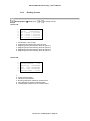
3.1.3.
Reading screens
Reading Menu Sensors Interior
1.
2.
3.
4.
5.
6.
1.
2.
3.
4.
5.
6.
Air Temp°
Water Temp°
Soil Temp°
Hygrometry
Sunniness
CO2
> +xx.x°C
> +xx.x°C
> +xx.x°C
>
xxx%
>xxxxW/m²
>xxxxxppm
Measured ambient temperature (--- °C if not detected at start-up)
Measured circuit temperature of 3WV (--- °C if not detected)
Measured soil temperature (invisible if not detected)
Measured ambient hygrometry (--- % if not detected)
Measured inside sunniness (invisible if not detected)
Measured CO² rate (invisible if not detected)
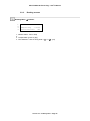
Reading Menu Sensors Exterior
1.
2.
3.
4.
5.
6.
1.
2.
3.
4.
5.
6.
Wind >xxxKm/h xxxxxx
Rain >
xxx
Ext. Temp° > +xx.x°C
Ext. Hygro >
xxx%
Sunniness > xxxxW/m²
Luminosity >xxxxxxLux
Measured wind speed and direction
Rain presence (yes or no)
Measured outside temperature (--- °C if not detected at start-up)
Measured outside Hygrometry (--- % if not detected)
Measured outside sunniness (----W/m² if not detected)
Measured outside luminosity (-----Lux if not detected)
Version 3.x – February 2010 – Page 20
POLYCLIM 21A+Timer+Fog – User’s Manual
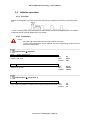
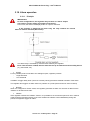
3.2. Vent operation
3.2.1. Principle
Basic principles
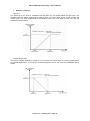
The regulator controls the opening and closing of the vents so that they are positioned proportionally
to the temperature between:
- Minimum opening, which corresponds to the opening when the temperature is equal to the
setpoint value and
- Maximum opening, which corresponds to the opening when the temperature is equal to the
value “setpoint + control range”.
with this system, the vents open wider as the temperature rises.
Two temperature safety points, one below and one above the setpoint, are used to trigger:
- complete closing (0%) when the temperature is very low or
- complete opening (100%) when the temperature is very high.
The vent position is computed at regular intervals. This interval may also change proportionally to the
temperature between:
- a maximum interval, which is the interval used when the temperature is equal to the setpoint
value and
- a minimum interval, which is the interval used when the temperature is equal to the value
“setpoint + control range”.
with this system, the vents change their position more frequently as the temperature rises.
Version 3.x – February 2010 – Page 21
POLYCLIM 21A+Timer+Fog – User’s Manual
In addition, 3 operating modes are possible for the vents (with 2 sides):
1) Simultaneous operation: both sides open and close at the same time in relation to the main
setpoint. In weather safety mode, both sides open to the defined "exposed side" opening position if
necessary.
2) Operation in cascade (only possible with wind vane sensor connected): the side sheltered from the
wind opens first after the main setpoint is reached, then the exposed side (facing the wind) opens after
the main setpoint + a temperature offset is reached. During closing, the exposed side closes first, then
the sheltered side. In weather safety mode, the opening position will depend on the wind direction and
the setting of the "sheltered side" and "exposed side" opening positions.
3) Operation with priority to one side (right or left): the side with priority opens first after the main
setpoint is reached, then the other side opens after the main setpoint + a temperature offset is
reached. In weather safety mode, the side with priority opens to the "exposed side" position.
If only one side is ventilated, the operating mode must be "simultaneous".
Weather safety functions:
If there is a light wind or rain, the controller allows the vents to open up to a certain percentage.
If there is a strong wind, the vents are closed completely.
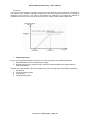
The "light wind" opening positions depend on the wind speed as shown in the following diagram:
If there is a light wind and rain, the controller uses whichever is smaller, the "Wind" opening
position or the "Rain" opening position.
Regardless of the reasons for opening (high temperature, dehumidifying, etc.), closing by the
weather safety function always has priority.
Version 3.x – February 2010 – Page 22
POLYCLIM 21A+Timer+Fog – User’s Manual
Weather influences
The wind
The influence of the wind on ventilations will be valid only for speeds below the light wind. The
regulation with the stages winds remains valid beyond. The goal of wind influence is to increase the
control range of a value proportional to the speed of wind. The more there is wind, the more the
ventilations will be closed
Outside temperature
The goal of outside temperature influence is to increase the control range of a value proportional to
the outside temperature. The more the outside temperature is low, the more the ventilations will be
closed
Version 3.x – February 2010 – Page 23
POLYCLIM 21A+Timer+Fog – User’s Manual
Sunniness
The value of the sunniness to be taken into account is the average over the last hour. The influence
acts directly on the ventilation setpoint by adding or by removing a value proportional to the average of
sunniness of the last hour. The goal of the influence for example is to increase the setpoint of
ventilation the summer in the case of strong sunniness in order to make work the plant more.
Influencing factors:
Even if the temperature is below the setpoint, the vents may open in the following situations:
1. dehumidification (Interior humidity level too high)
2. thermal inversion (only during the night, when the outside temperature is greater than the
inside temperature).
Likewise, if the temperature is above the setpoint, the vents may still close in the following situations:
1. fog injection
2. use of the cooling system
3. CO2 injection
4. imposed closing times.
Version 3.x – February 2010 – Page 24
POLYCLIM 21A+Timer+Fog – User’s Manual
3.2.2. Parameters
Notes :
- the symbol means that the menu opens after a long press
- in some cases parameters may be masked; see the corresponding notes at the end
of the list of parameters
Setpoints Menu Ventilation
AA01
Ventil. Main Setp. X
Main setpoint of the vents
Temperature at which the controller begins to open the vents on the
priority side
Min :
Max :
Default :
-9.9 °C
99.9 °C
25.0 °C
Min :
Max :
Default :
LEFT
WIND VANE
SIMULTAN.
Min :
Max :
Default :
SIMPLE
WIND VANE
SIMPLE
No interlock in relation to heating setpoints
Ventilation Menu Operation
CA01
Operating mode
Operating mode
Vent opening or closing mode (simultaneous, wind-dependent or
priority side)
SIMULTAN.
Both sides open and close at the same time
after the main setpoint has been reached.
RIGHT
The right side opens first after the main
setpoint is reached, then the left side opens
after the main setpoint + a temperature offset
is reached.
LEFT
The left side opens first after the main
setpoint is reached, then the right side opens
after the main setpoint + a temperature offset
is reached.
WIND VANE
The side sheltered from the wind opens first
after the main setpoint is reached, then the
exposed side (facing the wind) opens after
the main setpoint + a temperature offset is
reached.
or
CA01
Operating mode
Operating mode (single slope vent)
Vent opening or closing mode
SIMPLE
The vents open and close according to the
ventilation setpoint.
WIND VANE
The vents open and close according to the
ventilation setpoint by respecting sheltered and
exposed sides indicated by the wind vane
Version 3.x – February 2010 – Page 25
POLYCLIM 21A+Timer+Fog – User’s Manual
CA02
Setp. Offset Exp.Side
Setpoint offset on exposed side
Value added to the ventilation setpoint to provide the vent opening
setpoint on the side without priority
Min :
Max :
Default :
0.0 °C
20.0 °C
2.0 °C
CA03
Control Range
Ventilation control range
Range situated above the ventilation setpoint in which the vents
open proportionally to the temperature
Min :
Max :
Default :
1.0 °C
50.0 °C
5.0 °C
CA04
Night Variation
Night variation setpoint
Number of degrees removed or added to the ventilation setpoint
during the night
Min :
Max :
Default :
-10.0 °C
10.0 °C
0.0 °C
Min :
Max :
Default :
0h00
23h59
No (=24h00)
CA05
Forced Cl. Start Time
Forced closing start time
Time when the controller begins to close the vents by the
percentage set without taking the temperature into account
(set to 24.00 to disable this function => display "No")
CA06
Forced Cl. End Time
Forced closing end time
Time from which the controller begins to open and close the vents
according to the temperature
(1)
(2)
(3)
Min :
Max :
Default :
0h00
23h59
No (=24h00)
CB01
Rain Posit. Sh. Side
Rain opening position on sheltered side
Maximum authorized opening percentage of the vents on the side
sheltered from the wind during rain
Min :
Max :
Default :
0%
100 %
30 %
CB02
Rain Posit. Exp Side
Rain opening position on exposed side
Maximum authorized opening percentage of the vents on the side
exposed to the wind during rain
Min :
Max :
Default :
0%
100 %
30 %
CB03
Wind Min.Pos Sh. Side
Light wind minimum opening position on sheltered side
Minimum authorized opening percentage of the vents on the side
sheltered from light wind
Min :
Max :
Default :
0%
CB05
30 %
CB04
Wind Min.Pos Exp Side
Light wind minimum opening position on exposed side
Minimum authorized opening percentage of the vents on the side
exposed to a light wind
Min :
Max :
Default :
0%
CB06
30 %
Ventilation Menu Vents
Version 3.x – February 2010 – Page 26
(1)
(1)
POLYCLIM 21A+Timer+Fog – User’s Manual
CB05
Wind Max.Pos Sh. Side
Light wind maximum opening position on sheltered side
Maximum authorized opening percentage of the vents on the side
sheltered from light wind
(1)(4)
Min :
Max :
Default :
CB03
100 %
30 %
CB06
Wind Max.Pos Exp Side
Light wind maximum opening position on exposed side
Maximum authorized opening percentage of the vents on the side
exposed to a light wind
Min :
Max :
Default :
CB04
100 %
30 %
CB07
Mini Opening Sh. Side
Minimum opening of sheltered side vent
Minimum opening imposed on sheltered side regardless of the
weather conditions (except for strong wind)
Min :
Max :
Default :
0%
CB09
0%
CB08
Mini Opening Exp Side
Minimum opening of exposed side vent
Minimum opening imposed on exposed side regardless of the
weather conditions (except for strong wind)
Min :
Max :
Default :
0%
CB10
0%
Min :
Max :
Default :
CB07
100 %
100 %
Min :
Max :
Default :
CB08
100 %
100 %
CC01
Forced Op. Dehum. Sh.
Forced opening for dehumidification on sheltered side
Percentage opening imposed on the sheltered side vent for
dehumidification
Min :
Max :
Default :
0%
100 %
20 %
CC02
Forced Op. Dehum. Exp
Forced opening for dehumidification on exposed side
Percentage opening imposed on the exposed side vent for
dehumidification
Min :
Max :
Default :
0%
100 %
20 %
CC03
Forced Cl. Fog
Sh.
Forced closing for fogging on sheltered side
Percentage closing imposed on sheltered side vent while the fogging
system is operating
Min :
Max :
Default :
0%
100 %
0%
CB09
Maxi Opening Sh. Side
Maximum opening of sheltered side vent
Maximum authorized opening percentage on sheltered side
CB10
Maxi Opening Exp Side
Maximum opening of exposed side vent
Maximum authorized opening percentage on exposed side
(4)
(1)
(1)
Ventilation Menu Influences
Version 3.x – February 2010 – Page 27
(1)(5)
(5)
(1)(6)
POLYCLIM 21A+Timer+Fog – User’s Manual
CC04
Forced Cl. Fog
Exp
Forced closing for fogging on exposed side
Percentage closing imposed on exposed side vent while the fogging
system is operating
(6)
Min :
Max :
Default :
0%
100 %
0%
CC05
Forced Cl. Cool. Sh.
Forced closing for cooling on sheltered side
Percentage closing imposed on sheltered side vent while the cooling
system is operating
(1)(7)
Min :
Max :
Default :
0%
100 %
0%
CC06
Forced Cl. Cool. Exp
Forced closing for cooling on exposed side
Percentage closing imposed on exposed side vent while the cooling
system is operating
Min :
Max :
Default :
0%
100 %
0%
(7)
CC07
Forced Cl. CO2
Sh.
Forced closing for CO2 on sheltered side
Percentage closing imposed on sheltered side vent while the CO2
system is operating
Min :
Max :
Default :
0%
100 %
0%
CC08
Forced Cl. CO2
Exp
Forced closing for CO2 on exposed side
Percentage closing imposed on exposed side vent while the CO2
system is operating
Min :
Max :
Default :
0%
100 %
0%
CC09
Therm. Inversion Setp
Thermal inversion setpoint
Difference between the inside and outside temperature which, if
exceeded, triggers the controller to open the vents at night
Min :
Max :
Default :
0,5 °C
50.0 °C
No ( = 50.0 °C)
CC10
Forced Op. T.Inv. Sh.
Forced opening during thermal inversion on sheltered side
Percentage opening imposed on the sheltered side vent during
thermal inversion
Min :
Max :
Default :
0%
100 %
20 %
CC11
Forced Op. T.Inv. Exp
Forced opening during thermal inversion on exposed side
Percentage opening imposed on the exposed side vent during
thermal inversion
Min :
Max :
Default :
0%
100 %
20 %
CC12
Forced Cl. Time
Sh.
Forced closing at imposed times on sheltered side
Percentage closing imposed on sheltered side vent from the
indicated time
Min :
Max :
Default :
0%
100 %
0%
CC13
Forced Cl. Time
Exp
Forced closing at imposed times on exposed side
Percentage closing imposed on exposed side vent from the indicated
time
Version 3.x – February 2010 – Page 28
(1)(8)
(8)
(9)
(1)(9)
(9)
(1)(3)
(3)
Min :
Max :
Default :
0%
100 %
0%
POLYCLIM 21A+Timer+Fog – User’s Manual
Ventilation Menu Weather Influences (accessible only in “Expert” mode)
CD01
Wind influence start
Wind influence start
Value of the wind from which the regulator will modify the control
range of ventilations
Min :
Max :
Default :
0Km/h
CD02
10Km/h
CD02
Wind influence end
Wind influence end
Maximum value of the wind taken into account for the modification of
the control range of ventilations
Min :
Max :
Default :
CD01
99Km/h
30Km/h
CD03
Wind influence max
Wind influence maximum
Value added to the control range of ventilation when the value of the
wind is equal to “Wind influence end”
Min :
Max :
Default :
0.0°C
9.9°C
0.0°C
CD04
OutT° influence start
Outside Temperature influence start
Value of the outside temperature from which the regulator will modify
the control range of ventilations
Min :
Max :
Default :
CD05
99.9°C
15.0°C
CD05
OutT° influence end
Outside Temperature influence end
Maximum value of the outside temperature taken into account for the
modification of the control range of ventilations
Min :
Max :
Default :
-9.9°C
CD04
5.0°C
CD06
OutT° influence max
Outside Temperature influence maximum
Value added to the control range of ventilation when the value of the
outside temperature is equal to “OutT° influence end”
Min :
Max :
Default :
0.0°C
9.9°C
0.0°C
CD07
Watt influence start
Sunniness influence start
Value of the Sunniness from which the regulator will modify the
ventilations setpoint
Min :
Max :
Default :
0W/m²
CD08
200W/m²
CD08
Watt influence end
Sunniness influence end
Maximum value of the Sunniness taken into account for the
modification of the ventilations setpoint
Min :
Max :
Default :
CD07
1500W/m²
500W/m²
CD09
Watt influence max
Sunniness influence maximum
Value added to the ventilations setpoint when the value of the
Sunniness is equal to “Watt influence end”
Version 3.x – February 2010 – Page 29
(8)
(8)
(8)
(10)
(10)
(10)
Min :
Max :
Default :
-9.9°C
9.9°C
0.0°C
POLYCLIM 21A+Timer+Fog – User’s Manual
Ventilation Menu Constructor
CX01
Movement Time
Movement time of vents
Time (in seconds) taken by the vents to move from fully close to fully
open
CX02
Orientation
Orientation of ventilations
Orientation of the air vents in relation to the wind rose
Min :
Max :
Default :
10 s
999 s
60 s
Min :
Max :
Default :
N
NE
N
Min :
Max :
Default :
RIGTH
LEFT
RIGTH
Min :
Max :
Default :
No
Yes
No
Min :
Max :
Default :
0h00
24h00 (= No)
8h00
Min :
Max :
Default :
0h00
24h00 (= No)
20h00
Min :
Max :
Default :
-1.0°C
-50.0°C
- 5°C
Min :
Max :
Default :
1.0°C
50.0°C
10°C
Min :
Max :
Default :
0s
CX09 – 5
30s
(11)
or
CX03
Orientation
Orientation of ventilations (Single slope vent)
Orientation of the air vents in relation to the 2D wind vane
CX04
Safety Repositioning
Safety repositioning
Used to force reset of the vents before setting the opening for rain or
light wind
CX05
1st Reposition. Time
First repositioning time
Used to trigger automatic reset of the vents at the indicated time
CX06
2nd Reposition. Time
Second repositioning time
Used to trigger automatic reset of the vents at the indicated time
CX07
Low Safety
Low safety threshold
Safety temperature setting below the setpoint at which the vents
close completely (without taking minimum into account)
CX08
High safety
High safety threshold
Safety temperature setting above the setpoint + control range at
which the vents open completely (without taking the maximum into
account)
CX09
Mini Pulse Interval
Minimum pulses interval
Minimum time interval between two successive calculations of the
vent positions
Version 3.x – February 2010 – Page 30
(12)
POLYCLIM 21A+Timer+Fog – User’s Manual
CX10
Maxi Pulse Interval
Maximum pulses interval
Maximum time interval between two successive calculations of the
vent positions
Min :
Max :
Default :
CX08 + 5
999s
200s
CX11
Minimum Movement
Minimum movement as percentage
Minimum opening or closing percentage applied by the controller for
each positioning pulse
Min :
Max :
Default :
1%
50%
5%
CX12
Thermal Invers. Diff.
Thermal inversion differential
Value which, added to the thermal inversion setpoint, provides the
inversion stop setpoint.
Min :
Max :
Default :
0.5°C
50.0°C
5°C
(9)
Notes : Parameter visible:
(1) For double-slope vents, set to “left side priority", "right side priority" or "wind vane" operating
mode
(2) If the "Period" option is not used
(3) If “CA05” and “CA06” are other than NO.
(4) If the number of wind thresholds (BA03) is greater than 1
(5) If the "Fog" option is used
(6) If the "Cooling" option is used
(7) If the "CO2 injection" option is used
(8) If the outside temperature sensor is connected
(9) If the outside temperature sensor is connected and “CC09” is other than 50.0°C
(10)If the sunniness sensor is connected
(11) For double-slope vents only and if the 0/360° wind vane sensor is connected
(12)For single-slope vents only and if the 0/360° wind vane sensor is not connected
Version 3.x – February 2010 – Page 31
POLYCLIM 21A+Timer+Fog – User’s Manual
3.2.3. Reading screens
Reading Menu Ventilation (next :
or
to change screen)
Screen 1/4 :
for double side ventilation
1.
2.
3.
4.
5.
6.
1.
2.
3.
4.
5.
6.
+xx.x°C Left | Right
Status> xxxxxx|xxxxxx
Setp. > +xx.x°|+xx.x
Mini > xxx% | xxx%
Pos. > xxx% | xxx%
Maxi > xxx% | xxx%
for single side ventilation
or
Air
Temp° >+xx.x°C
Status
> xxxxxx
Setpoint
> +xx.x°
Minimum Open.> xxx%
Position
> xxx%
Maximum Open.> xxx%
Measured ambient temperature and priority side in reverse video
Ventilation status : Manual, Repositioning, Immobile, Opening or Closing
Calculated setpoint for each side
Calculated minimum opening for each side
Calculated actual position for each side
Calculated maximum opening for each side
Screen 2/4 :
1.
2.
3.
4.
5.
6.
1.
2.
3.
4.
5.
6.
Weather
D/N Period
Strong Wind
Light Wind
Rain
Dehumidification
>
>
>
>
>
D.
xx
xx
xx
xx
Daytime period (day/night or active period number)
Strong wind detected ? ( : no / : yes)
Light wind detected ? ( : no / : yes)
Rain detected ? ( : no / : yes)
Dehumidification in process ? ( : no / : yes)
Screen 3/4 :
1.
2.
3.
4.
5.
6.
1.
2.
3.
4.
5.
6.
Influences Weather
Wind
xxxKm/h>+x.x°C
Ext.T° +xx.x°C>+x.x°C
Sun. xxxxW/m²>+x.x°C
Princ. Setp. > xx.x°C
Regul. Range > xx.x°C
Wind influence on principal setpoint
External temperature influence on principal setpoint
Sunniness influence on principal setpoint
Calculated principal setpoint
Calculated regulation range
Version 3.x – February 2010 – Page 32
POLYCLIM 21A+Timer+Fog – User’s Manual
Screen 4/4 :
1.
2.
3.
4.
5.
6.
1.
2.
3.
4.
5.
6.
Influences
Time Closing
Therm. Inversion
Cooling
Fog
CO2 Injection
>
>
>
>
>
xx
xx
xx
xx
xx
Time closing active ? ( : no / : yes)
Thermal inversion active ? ( : no / : yes)
Cooling active ? ( : no / : yes)
Fog active ? ( : no / : yes)
CO² injection active ? ( : no / : yes)
Version 3.x – February 2010 – Page 33
POLYCLIM 21A+Timer+Fog – User’s Manual
3.3. Thermostatic heating operation
3.3.1. Principle
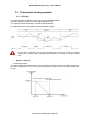
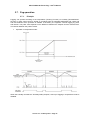
The heating operates in ON/OFF mode, with a programmable differential.
Automatic setpoint lowering can be selected for during the night.
The setpoint can be automatically increased for dehumidification.
The graph below shows the operation of the thermostatic heating:
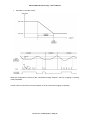
If a luxmeter is connected, the day and night start times cannot be set the controller
changes the operating mode automatically (DAY/NIGHT) according to the light intensity
(Lux).
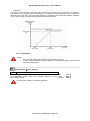
Weather influences
Outside temperature
The goal of outside temperature influence is to increase the heating setpoint of a value proportional to
the outside temperature. The more the outside temperature is low, the more the heating setpoint will
be high.
Version 3.x – February 2010 – Page 34
POLYCLIM 21A+Timer+Fog – User’s Manual
Sunniness
The value of the sunniness to be taken into account is the average over the last hour. The influence
acts directly on the heating setpoint by adding or by removing a value proportional to the average of
sunniness of the last hour. The goal of the influence for example is to decrease the setpoint of heating
in the case of strong sunniness and anticipate the greenhouse effect.
3.3.2. Parameters
Notes :
- the symbol means that the menu opens after a long press
- in some cases parameters may be masked; see the corresponding notes at the end
of the list of parameters
Setpoint Menu Ther. Heating
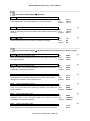
AB01
Ther.Heating Setpoint
Thermostatic heating setpoint
Air temperature below which the controller switches on the
thermostatic heating
No Interlock in relation to ventilation setpoints
Version 3.x – February 2010 – Page 35
Min :
Max :
Default :
-9.9 °C
99.9 °C
19.0 °C
POLYCLIM 21A+Timer+Fog – User’s Manual
Thermostatic Heating Menu Operation
DA01
Differential
Heating thermostat differential
Value added to the air heating setpoint to provide the heating
DA02
Night Variation
Setpoint variation during the night
Number of degrees removed or added to the heating setpoint during
the night
DA03
Air Mixer Interlock
Air mixer interlock
Used to start up the air mixer when the heating is operating
Min :
Max :
Default :
0.5 °C
10.0 °C
1.0 °C
Min :
Max :
Default :
-10.0 °C
10.0 °C
0.0 °C
(1)
(2)
Min :
Max :
Default :
Yes
No
No
Thermostatic Heating Menu Weather influences (accessible only in “Expert” mode)
DB01
OutT° influence start
Outside Temperature influence start
Value of the outside temperature from which the regulator will modify
the heating setpoint
Min.:
Max.:
Default:
DB02
99.9°C
15.0°C
DB02
OutT° influence end
Outside Temperature influence end
Maximum value of the outside temperature taken into account for the
modification of the heating setpoint
Min.:
Max.:
Default:
-9.9°C
DB01
5.0°C
DB03
OutT° influence max
Outside Temperature influence maximum
Value added to the heating setpoint when the value of the outside
temperature is equal to “OutT° influence end”
Min.:
Max.:
Default:
0.0°C
9.9°C
0.0°C
DB04
Watt influence start
Sunniness influence start
Value of the Sunniness from which the regulator will modify the
heating setpoint
Min.:
Max.:
Default:
0W/m²
DB05
200W/m²
DB05
Watt influence end
Sunniness influence end
Maximum value of the Sunniness taken into account for the
modification of the heating setpoint
Min.:
Max.:
Default:
DB04
1500W/m²
500W/m²
DB06
Watt influence max
Sunniness influence maximum
Value added to the heating setpoint when the value of the Sunniness
Version 3.x – February 2010 – Page 36
(3)
(3)
(3)
(4)
(4)
(4)
-9.9°C
9.9°C
POLYCLIM 21A+Timer+Fog – User’s Manual
is equal to “Watt influence end”
Default:
Notes : Parameter visible
(1) If the "Period" option is not used
(2) If the "Air Mixer" option is present
(3) If the outside temperature sensor is connected
(4) If the sunniness sensor is connected
3.3.3. Reading screens
Reading Menu Ther. Heating (next :
or
to change screen)
Screen 1/3 :
1.
2.
3.
4.
5.
1.
2.
3.
4.
5.
Air Temp°
Status
> +xx.x°C
> xxxxxxx
Running T° > +xx.x°C
Stopping T° > +xx.x°C
Measured ambient temperature
Thermostatic heating status : Run or Stop
Calculated running setpoint
Calculated stop setpoint
Screen 2/3 :
1.
2.
3.
4.
Influences Weather
Ext.T° +xx.x°C>+x.x°C
Sun. xxxxW/m²>+x.x°C
Setpoint
> xx.x°C
1.
2. External temperature influence on setpoint
3. Sunniness influence on setpoint
4. Calculated setpoint
Version 3.x – February 2010 – Page 37
0.0°C
POLYCLIM 21A+Timer+Fog – User’s Manual
Screen 3/3 :
1.
2.
3.
Influences
D/N Period
> D.
Dehumidification > xx
1.
2. Daytime period (day/night or active period number)
3. Dehumidification in process ? ( : no / : yes)
Version 3.x – February 2010 – Page 38
POLYCLIM 21A+Timer+Fog – User’s Manual
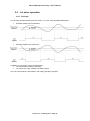
3.4. Air mixer operation
3.4.1. Principle
The Air mixer operates based upon two criteria, “on-or-off,” with adjustable differentials.
Operation based upon temperature:
Operation based upon hygrometry:
In addition, the Air mixer can be controlled when:
The thermostatic heating is operating.
The “three-way valve” heating is operating (open).
(see “Air mixer interlock” parameters in the heating operation principle)
Version 3.x – February 2010 – Page 39
POLYCLIM 21A+Timer+Fog – User’s Manual
3.4.2. Parameters
Notes :
- the symbol means that the menu opens after a long press
- in some cases parameters may be masked; see the corresponding notes at the end
of the list of parameters
Setpoints Menu Air mixer
AF01
Temperature Setpoint
Temperature air mixer setpoint
Air temperature above which the controller activates the Air mixer
Min:
Max:
Default:
-9.9°C
99.9°C
30°C
Min:
Max:
Default:
0%
100%
80%
JA01
Temp. Differential
Temperature differential
Value which, added to the Air mixer temperature setpoint, provides
the Air mixer stop setpoint
Min:
Max:
Default:
0.5°C
10.0°C
1°C
JA02
Hygro. Differential
Hygrometry differential
Value which, added to the Air mixer hygrometry setpoint, provides
the Air mixer stop setpoint
Min:
Max:
Default:
2%
20%
10%
AF02
Hygrometry Setpt.
Hygrometry air mixer setpoint
Air hygrometry above which the controller activates the Air mixer
Air mixer Menu Operation
Version 3.x – February 2010 – Page 40
POLYCLIM 21A+Timer+Fog – User’s Manual
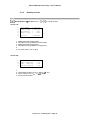
3.4.3.
Reading screens
Reading Menu Air mixer (next :
or
to change screen)
Screen 1/2 :
1.
2.
3.
4.
5.
6.
1.
2.
3.
4.
5.
6.
Air Temp°
Temp° Setp.
Hygrometry
Hygro Setp.
> +xx.x°C
> +xx.x°C
>
xxx%
>
xxx%
Status
> xxxxxxx
Measured ambient temperature
Calculated running setpoint for temperature
Measured ambient hygrometry
Calculated running setpoint for hygrometry
Air mixer status : Run or Stop
Screen 2/2 :
1.
2.
3.
4.
Influences
Ther. Heating
3WV
Heating
Active Period
> xx
> xx
> xx
1.
2. Thermostatic heating in use ? ( : no /
3. 3WV heating in use ? ( : no / : yes)
4. Active period number
: yes)
Version 3.x – February 2010 – Page 41
POLYCLIM 21A+Timer+Fog – User’s Manual
3.5. Dehumidification operation
3.5.1. Principle
The controller can monitor dehumidification automatically if a humidity sensor is connected or. When
dehumidification starts, the ventilation and heating setpoints are increased for a programmable time
before partial opening of the vents. If the humidity level increases (rather than decreases) during a
dehumidification cycle, the cycle is aborted: the controller attempts a new dehumidification cycle after
a programmable time.
The graphs below show operation during dehumidification:
Several cases are possible:
Case A :
When dehumidification begins, the temperature is
greater than the tolerance value normal
operation
During dehumidification, the temperature remains
correct normal operation
Case B :
When dehumidification begins, the temperature is
greater than the tolerance value normal
operation
During dehumidification the temperature drops
below the tolerance threshold forced opening
stops until the temperature returns to the setpoint
plus 2°C
Case C :
When dehumidification starts, the tolerance
setpoint is not reached before forced opening of
the vent wait until setpoint is exceeded by 2°C
During dehumidification, the temperature remains
correct normal operation
Case D :
When dehumidification starts, the tolerance
setpoint is not reached before forced opening of
the vent wait until setpoint is exceeded by 2°C
During dehumidification the temperature drops
below the tolerance threshold forced opening
stops until the temperature returns to the setpoint
plus 2°C
Version 3.x – February 2010 – Page 42
POLYCLIM 21A+Timer+Fog – User’s Manual
SIMPLIFIED DESCRIPTION OF DEHUMIDIFICATION
Dehumidification with humidity sensor
When the "Dehumidification setpoint" is exceeded, the controller automatically runs the following
operations:
1. Increase of "Heating setpoint" the greenhouse becomes too warm
2. Time-delay during "Forced opening delay for dehumidification"
3. Vents opened to "Forced vent opening for dehumidification" the humidity escapes through
the vents.
4. Dehumidification stops if the humidity level returns below the "Dehumidification setpoint" less
the "Dehumidification differential"
Various safety features are available to monitor dehumidification
1. Enabling or disabling dehumidification during the night ("Night-time dehumidification")
2. Enabling or disabling dehumidification during rain or slight wind ("Dehumidification during rain
or slight wind")
3. Stopping dehumidification and closing the vents if the temperature in the greenhouse drops
too much ("Temperature tolerance during dehumidification").
4. Stopping dehumidification if the humidity level increases to a given value ("Maximum overrun
during dehumidification") for a given time "Overrun duration during dehumidification").
5. Minimum time between 2 dehumidification cycles ("Interval between two dehumidification
cycles") after cancelling a cycle.
3.5.2. Parameters
Notes :
- the symbol means that the menu opens after a long press
- in some cases parameters may be masked; see the corresponding notes at the end
of the list of parameters
Setpoints Menu Dehumidification
AE01
Dehumidification Setp
Dehumidification setpoint
Humidity level above which the controller begins the dehumidification
cycle
Min :
Max :
Default :
0%
100 %
no (= 101 %)
Min :
Max :
Default :
0.0 °C
5.0 °C
2.0 °C
Min :
Max :
Default :
2%
20 %
10 %
Dehumidification Menu Operation
HA01
Setpoints Increase
Value of setpoints increase
Value increasing the ventilation
dehumidification
and
heating
setpoints
for
HA02
Differential
Dehumidification differential
Value which, subtracted from the dehumidification setpoint provides
the dehumidification stop setpoint
Version 3.x – February 2010 – Page 43
POLYCLIM 21A+Timer+Fog – User’s Manual
HA03
Night Dehumidificat.
Night-time dehumidification
Enables dehumidification between the start of night time and the start
of day time
Min :
Max :
Default :
Yes
No
No
Min :
Max :
Default :
Yes
No
No
Min :
Max :
Default :
-9.9 °C
99.9 °C
15.0 °C
HA06
Temp. tolerance diff.
Temperature tolerance differential
Value which, added with the tolerance temperature provides the
instruction of stop of security temperature in dehumidification
Min :
Max :
Default :
0.0 °C
10.0 °C
2 °C
HA07
Opening Delay
Forced opening delay during dehumidification
Time between the start of dehumidification and forced opening of
vents for dehumidification
Min :
Max :
Default :
0 min
99 min
15 min
HA08
Maximum Overrun
Maximum overrun during dehumidification
Maximum humidity overrun value during a dehumidification cycle to
cancel the cycle
Min :
Max :
Default :
0%
20 %
20 %
HA09
Overrun Duration
Overrun duration during dehumidification
Time during which the humidity level can exceed
dehumidification setpoint before current cycle is cancelled
Min :
Max :
Default :
1 min
99 min
99 min
HA10
Interv. between Cycle
Interval between two dehumidification cycles
Waiting time before a new dehumidification cycle if the previous
cycle is cancelled
Min :
Max :
Default :
0h10
9h50
9h50
HA11
Forc.Dehum Start Time
Time at which forced dehumidification starts
Time from which a forced dehumidification cycle must start
regardless of the humidity level
Min :
Max :
Default :
0h00
23h59
No (= 24h00)
Min :
Max :
Default :
0h00
23h59
No (= 24h00)
HA04
Rain Dehumidificat.
Dehumidification if there is rain
Enables dehumidification during rain
HA05
Temperature Tolerance
Temperature tolerance during dehumidification
Value below which the controller stops the dehumidification cycle
the
HA12
Forc.Dehum End Time
Time at which forced dehumidification stops
Time at which a forced dehumidification cycle must stop
Version 3.x – February 2010 – Page 44
POLYCLIM 21A+Timer+Fog – User’s Manual
HA13
Authoriz. Start Time
Authorization start time
Time at which the dehumidification is authorized in automatic mode
(in relation with the hygrometry sensor)
Min :
Max :
Default :
0h00
23h59
0h00
HA14
Authoriz. End Time
Authorization end time
Time at which the dehumidification is no longer authorized in
automatic mode (in relation with the hygrometry sensor)
Min :
Max :
Default :
0h00
23h59
23h59
3.5.3.
Reading screens
Reading Menu Dehumid. (next :
or
to change screen)
Screen 1/2 :
1.
2.
3.
4.
5.
6.
1.
2.
3.
4.
5.
Hygrometry
Setpoint
Air Temp°
Status
Tempo
>
xxx%
>
xxx%
> +xx.x°C
> xxxxxxxxxxx
>
xx:xx
Measured ambient hygrometry (--- % if not detected at start-up)
Calculated dehumidification setpoint
Measured ambient temperature
Dehumidification status : Inactive, Opening Delay, Opening ventilation, Security
Temperature, Exceeding, Cycle Gap
6. Temporization in process (before opening, when exceeding, …)
Screen 2/2 :
1.
2.
3.
4.
5.
1.
2.
3.
4.
5.
Influences
D/N Period
Time Segment
Rain
Active Period
>
>
>
>
D.
xx
xx
xx
Daytime period (day/night)
Dehumidification according to time period active ? (
Rain detected ? ( : no / : yes)
Active period number
: no /
Version 3.x – February 2010 – Page 45
: yes)
POLYCLIM 21A+Timer+Fog – User’s Manual
3.6. Shade curtain operation
3.6.1. Principle
Basic principles
The controller can control a shade (or thermal) screen according to the incident solar power (W/m²).
Operation as thermal screen (at night)
The evening closing time (nightfall) and morning opening time (daybreak) can be programmed
according to the season so that the plants gain maximum benefit from the length of the daylight.
Example 1 : During the night, the curtain is closed
as a thermal screen to reduce the heating
requirement. It is possible to leave a night opening
position. Night is defined by programming 2 times
or detected automatically by the Lux sensor.
Operation as shade curtain (day time)
Excessive solar power on the plants may burn them. The curtain closes when the value measured
on the Watt sensor exceeds the programmed threshold.
Example 2 : The morning cycle begins at the
daybreak setting; the controller starts by setting an
opening for a few minutes. Then the screen is
opened gradually by pulses and intervals. Once it
reaches a given opening percentage, it completes
the opening operation in a single stroke.
Example 3 : During the day, with normal sunlight,
(below the solar power setpoint), the curtain is
opened to maximum position (100 %).
Example 4 : During the day, with dangerous
sunlight, (above the solar power setpoint), the
curtain is closed to the daytime opening position.
If a luxmeter is connected, the day and night start times cannot be modified the controller
changes the operating mode (shade or thermal screen) automatically according to the light
intensity (Lux).
Version 3.x – February 2010 – Page 46
POLYCLIM 21A+Timer+Fog – User’s Manual
Influencing factors:
Ambient temperature (inside)
Temperature, like solar power, may be a factor influencing the opening and closing of the shade
curtain:
- Closing in case of too high temperature (Thermal high) or too low (Thermal low);
- Reopening when the temperature goes down again (Thermal high) or goes up (Thermal
low)
Ambient humidity (inside)
For dehumidification, if the curtain is closed by the position setting, it is possible to add an extra
opening to allow greater exchange of air between the ground and the roof so that the humidity can
escape more easily.
3.6.2. Parameters
Notes :
- the symbol means that the menu opens after a long press
- in some cases parameters may be masked; see the corresponding notes at the end
of the list of parameters
Setpoint menu Shade
AD01
Sunniness Setpoint
Shade setpoint based on solar power (Watt/m²)
Measured Watt value above which the controller triggers closing
during the day
Min :
Max :
Default :
0 W/m²
999 W/m²
300 W/m²
AD02
Thermal high Stpt
Thermal high setpoint
Measured inside temperature above which the controller triggers
closing during the day
Min :
Max :
Default :
AD03
99.9 °C
No (= 100 °C)
AD03
Thermal low Stpt
Thermal low setpoint
Measured inside temperature below which the controller triggers
closing during the day
Version 3.x – February 2010 – Page 47
(1)
(1)
Min :
Max :
Default :
AD02
99.9 °C
Non (=-10.0 °C)
POLYCLIM 21A+Timer+Fog – User’s Manual
Shade menu Operation
FA01
Shade/Th.Screen Mode
"Shade screen" or "thermal screen" mode
Choice of operating mode for switching from "shade screen" to
"thermal screen".
HOUR
based on programmed times
LUX
based on Lux sensor reading
CALC.
Based on Sunrise and sunset hour calculated
by the regulator
Min :
Max :
Default :
HOUR
CALC.
CALC.
FA02
Shade Start Time
Start time for operation in "shade screen" mode
Time from which the controller must operate in shade screen mode if
the Shade/Screen mode is set to "Manual" or if there is no lux sensor
connected
Min :
Max :
Default :
0.00
FA03
8.00
FA03
Th. Screen Start Time
Start time for operation in "thermal screen" mode
Time from which the controller must operate in thermal screen mode
if the Shade/Screen mode is set to "Manual" or if there is no lux
sensor connected
Min :
Max :
Default :
FA02
23.59
20.00
FA04
Shade var. Sunrise T
Variation compared to the hour of Sunrise for “shade screen” mode
Variation compared to the Sunrise hour giving the hour as from
which the regulator must function in “Shade screen” if the
“Shade/Th.Screen Mode” is set on " Calc. "
Min :
Max :
Défaut :
-180mn
+180mn
0mn
FA05
Th.Scr. var. Sunset T
Variation compared to the hour of Sunset for “Thermal screen” mode
Variation compared to the Sunset hour giving the hour as from which
the regulator must function in “Thermal screen” if the
“Shade/Th.Screen Mode” is set on " Calc."
(2)
(2)
(3)
(3)
Min :
Max :
Défaut :
-180mn
+180mn
0mn
FA06
Morning Op. Hold Time
Morning opening hold time
Time during which the controller maintains the morning opening
position before switching to the day time setting
Min :
Max :
Default :
0 min
99 min
5 min
FA07
Morning Opening Pulse
Morning opening pulse
Duration of screen opening pulses in the morning (as percentage of
movement duration)
Min :
Max :
Default :
1%
99 %
5%
Min :
Max :
Default :
0s
99 s
5s
FA08
Morning Opening Inter
Interval between morning opening pulses
Time between two successive opening pulses in the morning
Version 3.x – February 2010 – Page 48
POLYCLIM 21A+Timer+Fog – User’s Manual
FA09
Morning Control Zone
Morning regulation range
Percentage of opening during which the controller opens the screen
in successive pulses in the morning before moving to full opening
Min :
Max :
Default :
0%
100 %
75 %
FB01
Day Opening Vent
Day-time opening for sunlight
Percentage of opening that the controller must leave during the day
regardless of the day-time period
Min :
Max :
Default :
0%
100 %
10 %
FB02
Night Opening Vent
Night-time thermal screen opening
Percentage of opening that the controller must leave during nighttime
Min :
Max :
Default :
0%
100 %
0%
FB03
Morning Opening Vent
Morning thermal screen opening
Percentage of opening that the controller must leave in the morning
during the switch from "thermal screen" to "shade screen" mode
Min :
Max :
Default :
0%
100 %
10 %
FB04
Thermal high Vent
Thermal high day-time opening for temperature
Percentage of opening that the controller must leave during the day
when the temperature is above the thermal high setpoint
Min :
Max :
Default :
0%
100 %
10 %
FB05
Thermal low Vent
Thermal low day-time opening for temperature
Percentage of opening that the controller must leave during the day
when the temperature is below the thermal low setpoint
Min :
Max :
Default :
0%
100 %
0%
Shade menu Opening positions
Version 3.x – February 2010 – Page 49
(4)
(5)
POLYCLIM 21A+Timer+Fog – User’s Manual
Shade menu Influencing factors
FC01
Dehumid. Opening Vent
Additional opening for dehumidification
Percentage of opening added to the day-time opening for
dehumidification
Min :
Max :
Default :
0%
100 %
5%
(6)
FC02
Morn. Op. Forced Temp
Temperature forcing a hold of morning opening
Temperature below which the controller must hold the morning
opening and disable gradual opening
Min :
Max :
Default :
-9.9 °C
99.9 °C
No (= -10 °C)
FC03
Morn. Op. Cancel Temp
Morning opening cancellation temperature
Temperature above which the controller cancels gradual opening
and opens in a single stroke
Min :
Max :
Default :
-9.9 °C
99.9 °C
No (= 100 °C)
(1)
(1)
Shade menu Weather Influences (accessible only in “Expert” mode)
FD01
OutT° influence start
Outside Temperature influence start
Value of the outside temperature from which the regulator will modify
the thermal low setpoint
Min :
Max :
Défaut :
99.9°C
FD02
15.0°C
FD02
OutT° influence end
Outside Temperature influence end
Maximum value of the outside temperature taken into account for the
modification of the thermal low setpoint
Min :
Max :
Défaut :
-9.9°C
FD01
5.0°C
FD03
OutT° influence max
Outside Temperature influence maximum
Value added to the thermal low setpoint when the value of the
outside temperature is equal to “OutT° influence end”
Version 3.x – February 2010 – Page 50
(7)
(7)
(7)
Min :
Max :
Défaut :
0.0°C
9.9°C
0.0°C
POLYCLIM 21A+Timer+Fog – User’s Manual
Shade menu Constructor
FX01
Movement Time
Screen movement time
Time (in seconds) taken by the shade screen to move from fully
closed to fully open
Min :
Max :
Default :
10 s
999 s
60 s
FX02
Sunniness Different.
Watt differential triggering screen reopening
The value which, when subtracted from the Watts threshold, provides
the threshold that triggers reopening during the day
Min :
Max :
Default :
10 W/m²
999 W/m²
50 W/m²
FX03
Temperature Differ.
Temperature differential triggering screen reopening
The value which, when subtracted from the temperature threshold,
provides the threshold that triggers reopening during the day
Min :
Max :
Default :
0.5 °C
10.0 °C
1.0 °C
FX04
Day Closing Tempo.
Temporization for day closing
Time during which the Watts or temperature must be greater or lower
than the set thresholds before the controller closes the shade screen
Min :
Max :
Default :
0 min
30 min
1 min
FX05
Day opening Tempo.
Temporization for day opening
Time during which the Watts or temperature must be greater or lower
than the set thresholds before the controller opens the shade screen
Min :
Max :
Default :
0 min
30 min
4 min
(4)(5)
Notes : Parameter visible:
(1) If the inside temperature sensor is connected
(2) If FA01 is set to "Manual"
(3) If FA01 is set to "Calc." and only for “expert” operation mode
(4) If the inside temperature sensor is connected and AD02 is less than 100.0°C
(5) If the inside temperature sensor is connected and AD03 is more than -10.0°C
(6) If the "Dehumidification" option is used
(7) If the outside temperature sensor is connected
Version 3.x – February 2010 – Page 51
POLYCLIM 21A+Timer+Fog – User’s Manual
3.6.3. Reading screens
Reading Menu shade (next :
or
to change screen)
Screen 1/2 :
1.
2.
3.
4.
5.
6.
1.
2.
3.
4.
5.
6.
Sunniness
Watt Setp.
Air Temp°
Temp° Setp.
Status
Position
>xxxxW/m²
>xxxxW/m²
> +xx.x°C
> +xx.x°C
> xxxxxxx
>
xxx%
Measured sunniness (----W/m² if not detected at start-up)
Sunniness setpoint
Measured ambient temperature
Ambient temperature setpoint
Shade status : Manual, Repositioning, Immobile, Opening or Closing
Calculated actual position of valve
Screen 2/3 :
1.
2.
3.
Influences Weather
Ext.T° +xx.x°C>+x.x°C
L.Therm.Setp > xx.x°C
1.
2. External temperature influence on thermal low setpoint
3. Calculated thermal low setpoint
Screen 3/3 :
1.
2.
3.
Influences
D/N Period
> D.
Dehumidification > xx
1.
2. Daytime period (day/night or active period number)
3. Dehumidification in process ? ( : no / : yes)
Version 3.x – February 2010 – Page 52
POLYCLIM 21A+Timer+Fog – User’s Manual
3.7. Fog operation
3.7.1.
Principle
Fogging can operate according to the temperature ("Cooling" function) or humidity ("Humidification"
function). In both cases control is based on a setpoint with an adjustable differential and a start and
end time between which operation is enabled. If necessary, the regulator controls fogging by pulse
and interval. The pulse value depends on the difference between the setpoint and the measurement.
The interval between the pulses is fixed.
Operation in temperature mode:
When the humidity exceeds the "Humidity safety setpoint", start-up of fogging in temperature mode is
disabled.
Version 3.x – February 2010 – Page 53
POLYCLIM 21A+Timer+Fog – User’s Manual
Operation in Humidity mode:
When the temperature is less than the "Temperature safety setpoint", start-up of fogging in humidity
mode is disabled.
In both cases, forced closure can be imposed on the air vents when fogging is operating.
Version 3.x – February 2010 – Page 54
POLYCLIM 21A+Timer+Fog – User’s Manual
3.7.2. Parameters
Note:
-
the symbol means that the menu opens after a long press
In some cases parameters may be masked; see the corresponding notes at the end of
the list of parameters.
Setpoints Menu Fog
AH01
Temperature Setpoint
Fogging high temperature setpoint
Air temperature above which the regulator starts up fogging
(100.0°C=No)
Min.
Max.
Default
-9.9 °C
99.9 °C
30.0 °C
AH02
Hygrometry Security
Humidity safety point in temperature mode
Air humidity above which the regulator disables start-up of fogging in
temperature mode
Min.
Max.
Default
0%
100 %
No (=101%)
Min.
Max.
Default
0%
100 %
50%
Min.
Max.
Default
-9.9 °C
99.9 °C
No (=100.0°C)
AH03
Hygrometry Setpoint
Fogging low humidity setpoint
Air humidity below which the regulator starts up fogging (101%=No)
AH04
Temperature Security
Temperature safety setpoint in humidity mode
Air temperature below which the regulator disables start-up of
fogging in humidity mode
Version 3.x – February 2010 – Page 55
POLYCLIM 21A+Timer+Fog – User’s Manual
Fog Menu Temp. Funct.
LA01
Fog Start Time
Fog operation start time in temperature mode
Time from which the regulator can enable fog operation in
temperature mode
Min.
Max.
Default
00h00
23h59
00h00
LA02
Fog End Time
Fog operation end time in temperature mode
Time from which the regulator can no longer enable fog operation in
temperature mode
Min.
Max.
Default
00h00
23h59
23h59
LA03
Temp. Differential
Fog differential in temperature mode
Value which, subtracted from the fog setpoint in temperature mode,
gives the fog OFF setpoint
Min.
Max.
Default
0.5 °C
10.0 °C
1 °C
LA04
Hygro. Differential
Humidity safety differential
Value which, subtracted from the humidity safety setpoint, gives the
humidity safety OFF setpoint
Min.
Max.
Default
2%
20 %
10 %
LA05
Control Range
Fog regulation range in temperature mode
Zone above the fog setpoint in temperature mode in which fog pulses
are proportional to the temperature
Min.
Max.
Default
1.0 °C
50.0 °C
5.0°C
LA06
Mini Pulse Duration
Minimum duration of fog pulses in temperature mode
Minimum fog ON time in temperature mode during the operating
period
Min.
Max.
Default
0s
LA07
5s
LA07
Maxi Pulse Duration
Maximum duration of fog pulses in temperature mode
Maximum fog ON time in temperature mode during the operating
period
Min.
Max.
Default
LA06
999 s
30 s
Min.
Max.
Default
0s
9999 s
60 s
LA08
Interv. between Pulse
Interval between fog pulses in temperature mode
Fog OFF time in temperature mode during the operating period
Version 3.x – February 2010 – Page 56
POLYCLIM 21A+Timer+Fog – User’s Manual
Fog Menu Humid. Function
LB01
Fog Start Time
Fog start time in humidity mode
Time from which the regulator can enable fog operation in humidity
mode
Min.
Max.
Default
00h00
23h59
00h00
LB02
Fog End Time
Fog end time in humidity mode
Time from which the regulator can no longer enable fog operation in
humidity mode
Min.
Max.
Default
00h00
23h59
23h59
LB04
Hygro. Differential
Fog differential in humidity mode
Value which, added to the humidity setpoint, gives the fog OFF
setpoint in humidity mode
Min.
Max.
Default
2%
20 %
10 %
LB03
Temp. Differential
Temperature safety setpoint differential
Value which, added to the temperature safety setpoint, gives the
temperature safety OFF setpoint
Min.
Max.
Default
0.5 °C
10.0 °C
1 °C
LB05
Control Range
Fog regulation range in humidity mode
Zone below the fog setpoint in humidity mode in which fog pulses are
proportional to the humidity
Min.
Max.
Default
5%
50%
20%
Min.
Max.
Default
0s
LB07
5s
Min.
Max.
Default
LB06
999 s
30 s
Min.
Max.
Default
0s
9999 s
60 s
LB06
Mini Pulse Duration
Minimum duration of fog pulses in humidity mode
Minimum fog ON time in humidity mode during the operating period
LB07
Maxi Pulse Duration
Maximum duration of fog pulses in humidity mode
Maximum fog ON time in humidity mode during the operating period
LB08
Interv. between Pulse
Interval between fog pulses in humidity mode
Fog OFF time in humidity mode during the operating period
Version 3.x – February 2010 – Page 57
POLYCLIM 21A+Timer+Fog – User’s Manual
Fog menu Influences
LC01
Ventilation Influence
Influence on air vents
Used to force closing by a given percentage during fogging
3.7.3.
Reading screens
Reading Menu Fog (next :
or
to change screen)
Screen 1/2 :
1.
2.
3.
4.
5.
6.
1.
2.
3.
4.
5.
6.
Air Temp°
Temp° Setp.
Hygrometry
Hygro Setp.
Status
Temporizing
> +xx.x°C
> +xx.x°C
>
xxx%
>
xxx%
> xxxxxxx
> xx:xx
Measured ambient temperature
Calculated running setpoint for temperature
Measured ambient hygrometry
Calculated running setpoint for hygrometry
Fog status : Run or Stop
Temporization (pulse or interval)
Screen 2/2 :
1.
2.
Influences
Active Period
> xx
1.
2. Active period number
Version 3.x – February 2010 – Page 58
Min.
Max.
Default
Yes
No
No
POLYCLIM 21A+Timer+Fog – User’s Manual
3.8. Operation of the timer
3.8.1. Principle
Operation at set times
The timer output can be activated at 4 set times each day.
The periods of operation after each activation can be set independently but they must all be either in
seconds or minutes.
The graph below shows the operation of the timer:
Conditional operation
It is also possible to define a sensor to condition the operation of the timer.
In this mode, in addition to the 4 start-ups each day, timer operation will be conditioned by a
measurement (temperature, humidity, light intensity (Lux), etc.) compared against a setpoint and
adjustable positive or negative differential according to the required function:
- A positive differential activates the output when the measurement is below the setpoint.
- A negative differential activates the output when the measurement is above the setpoint.
This mode can be disabled outside two daily operating time slots, as shown below:
Version 3.x – February 2010 – Page 59
POLYCLIM 21A+Timer+Fog – User’s Manual
Some examples of use:
- To control an air-conditioning system according to ambient temperature:
1. Select the "Temperature" condition,
2. Set a negative differential,
3. Set the time slots (e.g. operating only during the day),
4. Set the setpoint.
-
To control a lighting system:
1. Select the "Lux" condition,
2. Set a positive differential,
3. Set the time slots (e.g. operating only during the night),
4. Set the setpoint,
5. If necessary, set a minimum waiting time between two start-ups.
3.8.2. Parameters
Notes:
- the symbol means that the menu opens after a long press,
- in some cases parameters may be masked; see the corresponding notes at the end of
the list of parameters.
Setpoint Menu Clock
AI01
Clock Setpoint
Measurement setpoint for the timer
Value below which (or above which) the timer will be activated when
the measurement condition is used.
The minimum, maximum and default values depend on the type of
condition chosen:
Influence
Temperature
Hygrometry
Sunniness
Luminosity
CO2
Min
-9.9 °C
0%
0 W/m²
0 Lux
0 ppm
Max
+99.9 °C
100 %
1500 W/m²
100.000 Lux
5000 ppm
Default
25.0 °C
50 %
300 W/m²
2000 Lux
2000 ppm
Version 3.x – February 2010 – Page 60
(1)
Min.:
Max.
Default:
POLYCLIM 21A+Timer+Fog – User’s Manual
Clock Menu Operation
MA01
Functioning Unit
Operating unit for the timer
Used to set the timer operating period after each of the 4 start-ups.
MA02
P1 Starting Time
Start time for Period 1
Time when the timer is activated for period 1
MA03
P1 Running Duration
Operating time for Period 1
Time during which the timer operates for period 1 (in seconds or
minutes depending on unit chosen)
MA04
P2 Starting Time
Start time for Period 2
Time when the timer is activated for period 2
MA05
P2 Running Duration
Operating time for Period 2
Time during which the timer operates for period 2 (in seconds or
minutes depending on unit chosen)
MA06
P3 Starting Time
Start time for Period 3
Time when the timer is activated for period 3
MA07
P3 Running Duration
Operating time for Period 3
Time during which the timer operates for period 3 (in seconds or
minutes depending on unit chosen)
MA08
P4 Starting Time
Start time for Period 4
Time when the timer is activated for period 4
MA09
P4 Running Duration
Operating time for Period 4
Time during which the timer operates for period 4 (in seconds or
minutes depending on unit chosen)
Version 3.x – February 2010 – Page 61
Min.:
Max.
Default:
SECONDS
MINUTES
SECONDS
Min.:
Max.
Default:
00.00
23.59
00.00
Min.:
Max.
Default:
0
999
0
Min.:
Max.
Default:
00.00
23.59
00.00
Min.:
Max.
Default:
0
999
0
Min.:
Max.
Default:
00.00
23.59
00.00
Min.:
Max.
Default:
0
999
0
Min.:
Max.
Default:
00.00
23.59
00.00
Min.:
Max.
Default:
0
999
0
POLYCLIM 21A+Timer+Fog – User’s Manual
Clock Menu Influence
MB01
Measurement Influence
Measurement used as condition
None
No condition
Temp°
Ambient temperature used as condition
Hygro
Ambient humidity used as condition
Watt/m²
Sunlight used as condition
Lux
Light intensity used as condition
CO2
CO2 level used as condition
MB02
Measurement Differ.
Measurement differential for the timer
Value subtracted from or added to the measurement setpoint to
provide the timer stop setpoint.
The minimum, maximum and default values depend on the type of
condition:
Condition
Min.
Max.
Default
Temperature
–9.9 °C
+9.9 °C
1.0 °C
Humidity
–20 %
+20 %
10%
Sunniness
–999 W/m²
+999 W/m²
100 W/m²
Luminosity
–9999 Lux
+9999 Lux
500 Lux
CO2
–999 ppm
+999 ppm
500 ppm
MB03
P1 Measur. Start Time
Measurement start time for period 1
Time during period 1 when the measurement becomes active
MB04
P1 Measur. End
Time
Measurement end time for period 1
Time during period 1 when the measurement is deactivated
MB05
P2 Measur. Start Time
Measurement start time for period 2
Time during period 2 when the measurement becomes active
MB06
P2 Measur. End
Time
Measurement end time for period 2
Time during period 2 when the measurement is deactivated
MB07
Minimum Interv. Tempo
Minimum timer gap
Minimum waiting time between two successive timer activations
Notes: Parameter visible:
(1) If "MB01 is other than "NONE".
Version 3.x – February 2010 – Page 62
Min.:
Max.
Default:
None
Lux
None
(1)
Min.:
Max.
Default:
(1)
Min.:
Max.
Default:
00.00
MB04
00.00
(1)
Min.:
Max.
Default:
MB03
24.00
12.00
Min.:
Max.
Default:
12.00
MB06
00.00
Min.:
Max.
Default:
MB05
24.00
24.00
Min.:
Max.
Default:
00.00
03.00
00.00
(1)
(1)
(1)
POLYCLIM 21A+Timer+Fog – User’s Manual
3.8.3.
Reading screens
Reading Menu Clock (next :
or
to change screen)
Screen 1/2 :
1.
2.
3.
4.
5.
6.
1.
2.
3.
4.
5.
6.
Status
> xxxxxxx
xx:xx
(xxxxxxxxxx)
P1 > xx:xx > xx:xx:xx
P2 > xx:xx > xx:xx:xx
P3 > xx:xx > xx:xx:xx
P4 > xx:xx > xx:xx:xx
Clock status : Run or Stop
Actual time and functioning mode of clock
Beginning and end functioning times for period 1
Beginning and end functioning times for period 2
Beginning and end functioning times for period 3
Beginning and end functioning times for period 4
Screen 2/2 :
1.
2.
3.
4.
5.
6.
1.
2.
3.
4.
5.
6.
Influences
Active Period
> xx
Measuring >xxxxxxxxx
Run. Setp.>xxxxxxxxx
Stop. Setp.>xxxxxxxxx
Waiting Time > xx:xx
Active period number
Influence measurement
Running setpoint for influence measurement
Stop setpoint for influence measurement
Temporization between two successive starts
Version 3.x – February 2010 – Page 63
POLYCLIM 21A+Timer+Fog – User’s Manual
3.9. Inflation operation
3.9.1. Principle
Inflation is managed by the pulse and interval principle (for example 30 seconds on and 20 minutes
off)
If there is a strong wind, the pulse duration is automatically increased (multiplied by the over-inflation
coefficient) but the interval duration does not change.
3.9.2. Parameters
Notes :
- the symbol means that the menu opens after a long press
- in some cases parameters may be masked; see the corresponding notes at the end
of the list of parameters
Inflation Menu Operation
IA01
Pulse Duration
Duration of inflation pulses
Inflation "ON" time
IA02
Interv. between Pulse
Interval between inflation pulses
Inflation "OFF" time
Min :
Max :
Default :
0s
999 s
30 s
Min :
Max :
Default :
0 min
60 min
30 min
Min :
Max :
Default :
1.0
2.0
1.5
Inflation Menu Constructor
IX01
Over-inflation Coeff.
Over-inflation coefficient
Value used to increase the inflation pulse duration during strong wind
Version 3.x – February 2010 – Page 64
POLYCLIM 21A+Timer+Fog – User’s Manual
3.9.3.
Reading screens
Reading Menu Inflation
1.
2.
3.
4.
Status
> xxxxxxx
Temporizing
> xx:xx
Over-inflation>
xxx
1. Inflation status : Run or Stop
2.
3. Temporization (pulse or gap)
4. Over-inflation in case of strong wind ? (
: no /
: yes)
Version 3.x – February 2010 – Page 65
POLYCLIM 21A+Timer+Fog – User’s Manual
3.10. Alarm operation
3.10.1. Principle
IMPORTANT:
In some configurations, the regulator may not have an "alarm" output
(see section "Power supply and output connections").
In this case, the alarms are displayed but no output is activated.
If the regulator is fitted with an alarm relay, the relay contacts are closed
when no alarm is detected (NC contact).
The alarm relay is activated by measurements made by the regulator.
Even if this function is fitted, the user must still set up an external electrical safety device
(e.g. thermostat, etc.)
Probes
For any suitable probe connected to the analogue inputs, regulator provides:
- 1 high threshold
- 1 low threshold
In addition a trigger delay timer (common to all the probes) prevents accidental activation of the alarm.
The regulator also triggers an alarm there is a problem on a probe (disconnected or short-circuited).
Network
When it is configured to "Slave" mode, the regulator generates an alarm if it receives no data from the
"Master" for at least 30 seconds.
Inflation
If the regulator includes the "Inflation" function, it is possible to set a maximum period of use in manual
mode (using the R9 output switch). If the user actuates the inflation control deliberately during this
period, the regulator triggers an alarm.
Version 3.x – February 2010 – Page 66
POLYCLIM 21A+Timer+Fog – User’s Manual
3.10.2. Display and Acknowledgement of Alarms
When an alarm occurs, the symbol
emits a series of beeps.
flashes at the bottom right of the screen and the regulator
After this warning, use the keys to access the alarm menu via the icon
.
Alarm
symbol
The following screen appears (example):
For a single-zone device
Date and Time
of the alarm
Alarm title
For a multi-zone device
Zone
number
To select a line, use keys
and .
To acknowledge an alarm, use the key
To return to the previous screen, use the key
Before acknowledging an alarm, check that the problem is solved, otherwise the alarm will
reappear.
Meaning of the alarm titles:
Air x
Air x
Air x ?
High alarm on ambient temperature probe no. x
Low alarm on ambient temperature probe no. x
Problem on ambient temperature probe no. x (disconnected or short-circuited)
Wat x
Wat x
Wat x ?
High alarm on water temperature probe no. x
Low alarm on water temperature probe no. x
Problem on water temperature probe no. x (disconnected or short-circuited)
Soi x
Soi x
Soi x ?
High alarm on ground temperature probe no. x
Low alarm on ground temperature probe no. x
Problem on ground temperature probe no. x (disconnected or short-circuited)
RH x
RH x
RH x ?
High alarm on humidity probe no. x
Low alarm on humidity probe no. x
Problem on humidity probe no. x (disconnected or short-circuited)
Infl.
Netwo.
Manual inflation alarm
Network in "Slave" mode alarm
Version 3.x – February 2010 – Page 67
POLYCLIM 21A+Timer+Fog – User’s Manual
3.10.3. Parameters
Setpoints Menu Alarms
For each connected internal sensor:
AK01
Al. High
xxxxxx
High alarm for indicated sensor (xxxxxx)
Value above which the regulator activates the alarm relay.
To inhibit this alarm: set a value greater than the maximum.
Min :
Max :
Default :
AK02
sensor specific
sensor specific
AK02
Al. Low
xxxxxx
Low alarm for indicated sensor (xxxxxx)
Value below which the regulator activates the alarm relay.
To inhibit this alarm: set a value lower than the minimum.
Min :
Max :
Default :
sensor specific
AK01
sensor specific
Min :
Max :
Default :
0 min
999 min
10 min
Min :
Max :
Default :
0s
999 s
30 s
For the inflation function:
AK09
Tpo Inflation+Manual
Inflation time under manual operation
Maximum operating time of inflation in manual mode before the
regulator activates the alarm relay
Set above 999 minutes to inhibit this alarm.
Alarms Menu Operation
GA01
H & L Alarms Tempo.
High and low alarm temporizing
Minimum time that a high or low alarm must be present before the
regulator activates the alarm relay
Version 3.x – February 2010 – Page 68
POLYCLIM 21A+Timer+Fog – User’s Manual
44.. CONNECTION PRINCIPLE
4.1.
Input connections
Exterior Temperature
White
A1
Blue
–
Interior Temperature
Interior Hygrometry
White
A2
White
+
Blue
–
Blue
A6
Wind Vane 0-360°
Wind Vane both sides
White
+
Blue
+
Blue
A5
Red
T3
White
T4
Luminosity / Sunniness
0-100.000 Lux
0-1.500 Watt/m²
Blue
+
Red
A7
White
A8
Anemometer
Rain Stand-alone
White
+
White
+
Blue
T1
Blue
T2
Red
CH1
Yellow
CH2
The + terminals are for the 15 VDC from the PCB
The – terminals are for the 0 VDC from the PCB
Version 3.x – February 2010 – Page 69
POLYCLIM 21A+Timer+Fog – User’s Manual
4.2. Connection of power supply and outputs
230VAC power supply live
230VAC power supply neutral
L
N
24VAC Output (25VA max.)
24VAC Output (25VA max.)
O
P
Opening Ventilation 1
Closing Ventilation 1
Opening Ventilation 2
Closing Ventilation 2
Opening Shade
Closing Shade
Fog
Timer
Inflation
Thermostatic Heating
Air Mixer
Alarm (N.C. contact)
Output Common
R1
R2
R3
R4
R5
R6
R7
R8
R9
R10
R11
R12
K
The PCB power supply must be protected by a Gg 1A fuse or a Curve C 1A circuit breaker.
The outputs are « 24 V, 1 A max ».
Terminal K is common to all outputs
Direct connections to motor units type C1MA, C1MA/SA/AUTO, C1MG, C1MC, …
Version 3.x – February 2010 – Page 70
POLYCLIM 21A+Timer+Fog – User’s Manual
55.. CHARACTERISTICS AND PRECAUTIONS
5.1. General characteristics
SUPPLY VOLTAGE:
VOLTAGE TOLERANCE:
CONSUMED POWER:
OUTLETS:
WEIGHT:
DIMENSIONS:
PROTECTION:
STORAGE TEMPERATURE:
TEMPERATURE OF USE:
AIR HUMIDITY:
5.2. WARNING
230VAC single-phase 50/60 Hz
+/–10%
50VA maxi
Dry contacts maximum 5A/24V
Approx. 2 kg
L = 220 mm / H = 260 mm / D = 80 mm
IP445
–10°C to +60°C
0°C to 50°C
Maximum 93% without condensation
installation safety
Climate regulation devices installed in a greenhouse do not contain independent alarm devices.
In the event of malfunction caused by the general installation (mechanical or electrical components,
cables, probes, weather sensors, regulation system electronics, operating error, etc.), a climate
regulator or computer cannot be considered to be a safety device capable of rendering the installation
safe or alerting the greenhouse user.
To guarantee the safety of greenhouse, you must install an independent, standalone alarm unit with its
own detectors (such as VIGICLIM or equivalent) capable of triggering real-time alarms and providing
event traceability.
The manufacturer draws greenhouse owners' and/or users' attention particularly to the fact that
regulation systems operate in "open loop" configuration and therefore do not monitor the real position
of vents but only a calculated theoretical position.
In addition, special care must be given to preventive maintenance of equipment, especially weather
probes and sensors.
Periodic inspections and tests are essential for checking the reliability of alarm unit equipment and
sensors.
The manufacturer is only liable for damage resulting from an operating fault on its equipment being
used for its designed climate regulation function and provided that installation, operation and servicing
standards are observed.
5.3. Precautions for use
Avoid direct sun exposure.
Avoid water spraying.
Avoid shocks.
Avoid excessive pressure on keys.
Do not open the device; in this instance, the warranty does not apply.
Do not connect or disconnect a sensor or an outlet without shutting off power.
Do not connect a sensor other than those specified in documentation.
These devices must be installed by authorized technicians. Follow the precautions for
installation and use; otherwise, warranty shall not apply.
Version 3.x – February 2010 – Page 71
POLYCLIM 21A+Timer+Fog – User’s Manual
5.4. Precautions for installation
Important instructions for the installation of devices with microprocessor.
Changes in the supply system are only allowable within the specified tolerances (install a
voltage regulator or an inverter, if required).
Protection of the device against lightning surges (surge diverters) and against phase
inversions (checking relay) is recommended
In the event of interference systems (e.g., thyristor controls), it is recommend that the device
be supplied through a separate transformer.
Do not install the devices under high-voltage power lines.
Do not position sensor or signal cables near control and power cables (required minimum
distance: 50 cm).
Use shielded measuring lines as much as possible and ground them at one end on the side of
the controller.
Install power circuits at a sufficient distance from electronic devices.
If inductive circuits, such as contactors, solenoid valves, etc., are installed near the device, it
is essential to suppress their coil with RC filters.
Do not connect control circuits (relays, contactors) on the quick-connect terminals to the
supply circuit of the device.
The supply of the devices using a generating unit requires special precautions, in particular:
o Make the connection to the generating unit when the unit is in steady-state condition.
o Set the generating unit to ensure a 230V supply of the devices within the specified
tolerances (230VAC ± 10%, 50 or 60Hz).
Use an appropriate screwdriver to connect the wires to the device terminal board. Maximum
2
sectional area of wires: 1.5 mm , maximum 2 wires per terminal.
Make sure to wire the star-shaped ground conductor.
Important instructions for the installation and maintenance of sensors.
Do not position sensor or signal cables near control and power cables (required minimum
distance: 50 cm).
Maximum length of sensor cables:
o temperature and hygrometry sensors: 100 meters
o Weather sensors: 10 meters
Version 3.x – February 2010 – Page 72
POLYCLIM 21A+Timer+Fog – User’s Manual
If extension cords are necessary, use shielded twisted pair cable (the shield should be linked
to one end to the ground of the controller)
The junction boxes used for the sensor extension cords, should be waterproof.
Connect weather sensors and probes to a dead controller.
The "Weather" sensors should be:
o installed on 1 mast at 1 meter above the greenhouse structure on the side of the
“prevailing wind”,
o protected against turbulence and dust,
o away from disturbing sources (high mast lighting structure, high-voltage power lines,
etc.),
o checked and cleaned on a regular basis (without scratching sensor surface).
The ambient temperature sensor is usually hung in the middle of the greenhouse (avoid areas
with air drafts).
The hygrometry sensor, which is also installed in the middle of the greenhouse, should be
protected as much as possible against treatment products. Clean and recondition the sensor
on a regular basis.
Version 3.x – February 2010 – Page 73
POLYCLIM 21A+Timer+Fog – User’s Manual
If the Watt/m² or Lux sensors are installed inside the greenhouse, avoid cast shadows related
to the greenhouse structure.
Check and clean the filter of ventilated sensors weekly.
Direct the weathervane properly.
Install the pluviometry, temperature and external hygrometry sensors on a stand, in a site that
was cleared on a 10 m ray, avoiding ventilated areas. The stand must be well secured in the
ground (mass concrete or equivalent).
Version 3.x – February 2010 – Page 74
POLYCLIM 21A+Timer+Fog – User’s Manual
SUMMARY
11..
1.1.
1.2.
1.3.
GENERAL PRESENTATION ...................................................................................................... 2
Functions ................................................................................................................................. 2
General diagram ...................................................................................................................... 2
Options .................................................................................... Error! Bookmark not defined.
22..
USE OF THE DEVICE ................................................................................................................ 3
2.1.
Browsing .................................................................................................................................. 3
2.2.
Integrated manual operation.................................................................................................. 10
2.3.
Network connection ................................................................. Error! Bookmark not defined.
2.4.
General Parameters .............................................................................................................. 12
2.4.1.
Date and Time ............................................................................................................... 12
2.4.2.
Sensor Calibration and Maintenance Mode .................................................................. 12
2.4.3.
System ........................................................................................................................... 13
33..
FUNCTIONS .............................................................................................................................. 16
3.1.
Weather detection ................................................................................................................. 16
3.1.1.
Principle ......................................................................................................................... 16
3.1.2.
Parameters .................................................................................................................... 18
3.1.3.
Reading screens ............................................................................................................ 20
3.2.
Vent operation ....................................................................................................................... 21
3.2.1.
Principle ......................................................................................................................... 21
3.2.2.
Parameters .................................................................................................................... 25
3.2.3.
Reading screens ............................................................................................................ 32
3.3.
Thermostatic heating operation ............................................................................................. 34
3.3.1.
Principle ......................................................................................................................... 34
3.3.2.
Parameters .................................................................................................................... 35
3.3.3.
Reading screens ............................................................................................................ 37
3.4.
Air mixer operation ................................................................................................................ 39
3.4.1.
Principle ......................................................................................................................... 39
3.4.2.
Parameters .................................................................................................................... 40
3.4.3.
Reading screens ............................................................................................................ 41
3.5.
Dehumidification operation .................................................................................................... 42
3.5.1.
Principle ......................................................................................................................... 42
3.5.2.
Parameters .................................................................................................................... 43
3.5.3.
Reading screens ............................................................................................................ 45
3.6.
Shade curtain operation ........................................................................................................ 46
3.6.1.
Principle ......................................................................................................................... 46
3.6.2.
Parameters .................................................................................................................... 47
3.6.3.
Reading screens ............................................................................................................ 52
3.7.
Fog operation......................................................................................................................... 53
3.7.1.
Principle ......................................................................................................................... 53
3.7.2.
Parameters .................................................................................................................... 55
3.7.3.
Reading screens ............................................................................................................ 58
3.8.
Operation of the timer ............................................................................................................ 59
3.8.1.
Principle ......................................................................................................................... 59
3.8.2.
Parameters .................................................................................................................... 60
3.8.3.
Reading screens ............................................................................................................ 63
3.9.
Inflation operation .................................................................................................................. 64
3.9.1.
Principle ......................................................................................................................... 64
3.9.2.
Parameters .................................................................................................................... 64
3.9.3.
Reading screens ............................................................................................................ 65
3.10. Alarm operation ..................................................................................................................... 66
3.10.1.
Principle ......................................................................................................................... 66
3.10.2.
Display and Acknowledgement of Alarms ..................................................................... 67
3.10.3.
Parameters .................................................................................................................... 68
Version 3.x – February 2010 – Page 75
POLYCLIM 21A+Timer+Fog – User’s Manual
44..
4.1.
4.2.
CONNECTION PRINCIPLE ...................................................................................................... 69
Input connections .................................................................................................................. 69
Connection of power supply and outputs .............................................................................. 70
5.1.
CHARACTERISTICS AND PRECAUTIONS ............................................................................. 71
General characteristics .......................................................................................................... 71
5.2.
5.3.
5.4.
WARNING
installation safety ....................................................................................... 71
Precautions for use ................................................................................................................ 71
Precautions for installation .................................................................................................... 72
55..
Version 3.x – February 2010 – Page 76