1
HL-Server for Linux
5
5-1
HL-Server for Linux
5.1 General
HL-Server for Linux provides the same functionality as the HL-Server for Win32
including LiMaS support. An application using the HL-Server cannot recognize any
difference between a server earmarked for Linux applications and one designed for
Win32 or NLM. The Hardlocks used to protect applications are the same, therefore
when selecting a HL-Server, opt for a system that best fits your customers network
environment. HL-Server for Linux supports IP/UDP protocol and uses port 3047 (IANAregistered) for communication.
When using a demo Hardlock, specify module address 29809, and therefore you can
test the HL-Server without requiring a specific HL-Server-Hardlock.
5.2 Installation
HL-Server can be started either as a daemon (-d), or as a console application (-a). The
console application mode can be used to track possible problems; as it shows a trace of
all client requests, similar to the trace window displayed by HLS32.EXE on Win32, when
double clicking the Hardlock Icon.
HL-Server for Linux can be monitored and administered by the AKSMON (Aladdin
Monitor) utility running on a Win32 terminal.
HL-Server for Linux fully supports the Hardlock LiMaS license management functions
and the Hardlock classic functions, for USB, parallel and internal Hardlocks.
Before HL-Server for Linux can be started, the Hardlock drivers (aksparlnx.o and
aksusbd) must be installed. Please refer to the install.txt file of the Hardlock driver for
further information.
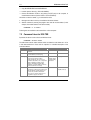
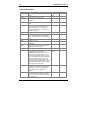
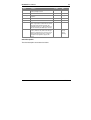
5.3 Command Line Switches
HL-Server is started from the console with
hlserver [options]
HL-Server