1
5.2
Connecting to an analogue telephone line or ISDN PABX
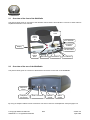
Connect the WebRadio to the mains with the supplied power cable. Connect the telephone line input of the
WebRadio to the main telephone connection. The existing telephone should be connected to the telephone
output on the rear of the WebRadio.
5.2.1
Connecting the WebRadio to an analogue telephone line
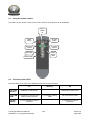
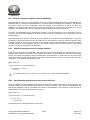
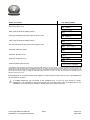
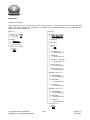
If an alarm or emergency call installation is present, it should be connected bet ween the main telephone
connection and the WebRadio, as shown below. Normally the telephone number that will be dialed has been
pre-programmed, however, it is possible to change the number. For more details, see paragraph 6.5.1.
Alarm or
Emergency
call
(optional)
Phone
5.2.2
Main Telephone
socket
Connecting the WebRadio to an analog PABX
If the PAB X requires a pre-dial 0 to obt ain an outside line, this should be activated in the WebRadio. For
more information on this subject, see paragraph 6.5.2.
If the PAB X requires a different pre-dial digit to obtain an outside line, this should be programmed as part of
the telephone number. In this case the pre-dial digit and the telephone number must be separated by a dial
pause, by inserting a “comma”. For more det ails, see paragraphs 4.3 and 6.5.1.
The WebRadio has a function to detect lifting the handset of a connected telephone. In this case the
WebRadio disconnects and leaves the line to the t elephone. This “extension voltage drop” function can best
be disabled when using a PAB X. More information about disabling this function in paragraph 6. 8.
5.2.3
Connecting the WebRadio to an ISDN line
The WebRadio has been designed for an analogue t elephone line, however, it can be used o n an ISDN line
by using a so-called Terminal Adapter. In this case the WebRadio must be connected to the analog port of
the adapter. When using an ISDN PAB X, use an analog port on the PAB X. Connection is the same as
connection to an analog PAB X (see above).
5.3
Connecting to an audio installation
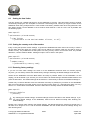
An external amplifier, audio installation or a headphone can be connected to the WebRadio. By connecting
the amplifier or audio installation via the audio cable, or the headphone via the adapter cable to the
WebRadio, the sound from the WebRadio can be heard through the amplifier or the headphone. In that case,
the internal speaker of the WebRadio should be switched off. This can be done in two ways:
For an external amplifier the setting “line out” should be used, the audio level in that case is fixed at
maximum volume. However, when the setting “headphone” is selected, the level is variable and the volume
can still be adjusted on the WebRadio by operating the volume knobs. How t o set these options is explained
in paragraph 6.2.
© Copyright Solutions Radio BV
WebRadio™ is a registered trademark
15/32
Version 3.5
April 2006