1
6.6
Using Ethernet
Normally the default connection mode of t he WebRadio is set as Ethernet. In this mode, the DHCP function
of the net work is used. This means an IP address is automatically assigned t o the WebRadio. The user will
not have to do anything to make this happen.
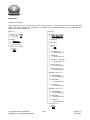
However, if a DHCP server is not available, it is possible to disable this in the WebRadio, and enter an IP
address, Gateway and DNS server data in the WebRadio manually:
Menu:Network
│
└─Ethernet
│
├─DHCP
│ └─[Off]
│
├─IP address
│ └─[Selectable] (example:
│
├─Netmask
│ └─[Selectable] (example:
│
├─Default gateway
│ └─[Selectable] (example:
│
├─DNS Server 1
│ └─[Selectable] (example:
│
└─DNS Server 2
└─[Selectable] (example:
192.168.0.2)
255.255.255.0)
192.168.0.1)
192.168.0.1)
192.168.0.1)
These settings depend on the network in which they are being used. Ask the net work administrat or for the
correct settings. The desired Ethernet settings have to be set as the default connection mode. In order to
connect via Ethernet, the connection mode should be set as follows:
Menu:Network
│
└─Connection mode
└─[Ethernet]
© Copyright Solutions Radio BV
WebRadio™ is a registered trademark
19/32
Version 3.5
April 2006