1
17
5.2. THE BASIC ACQUISITION PROGRAM
I
I
Midas session on the HP 730, a Display Image key to display an image on the
monitor (actually this key is not implemented; a any rate during regular observations
since Midas is used instead) a Filter Autom. key to toggle on and off the automatic
selection of best order-sorting filter when using the FP, a IFilter Curve key to
toggle on and off the drawing of the selected FP orders and the order-sorting filter
profile, again when using the FP, a Snapshot mode to enable a special mode which,
I
I
I
I
I
however, is not yet implemented, and finally an @BSERV. MENU Ikey to return to the
main menu.
I
I
I
.1
I
.1
2. The PPS menu has Store Fixed Patt and Clear Fixed Patt keys to store
the current image in the PPS buffer iuto a Fixed Pattern buffer so that such a fixed
pattern can be subtracted from all the subsequent images until it. is cleared. This is
most useful for performing "on-line" sky subtraction. Then there is an Autocuts
key which sets the PPS display cuts to values based on the pixel values in the
current image, a DISPLAY PARAMS key to interactively send cut values and other
parameters to the PPS (very seldomly used), and finally an I OBSERV. MENU key to
return to the main menu. Note that storing/clearing the fixed pattern and applying
the automatic cuts-is much more conveniently done from the mouse buttons on the
PPS monitor (see next Section), and consequently this menu is seldomly used.
I
I
I
.1
I
I
I
3. The FOCUS menu has provisions to do a focus sequence, but experience has shown
that this is not the most efficient way to focus; focussing is discussed in more detail
below.
4. A Peakup Signal softkey to (re)start the continuous display of every single frame
as It IS acquue
y the PPS. This key is rarely used since the continuous display
mode is enabled automatically upon startup and upon termination of an exposure.
It is not started automatically, however, following an ABORT of an exposure, and
on some occasion it stops when activating the fpat I key of the PPS.
I
I
I
I
I
I
I
5. The Define Exposure and Define Sequence keys to set the parameters for a
I
single exposure and for a sequence of up to 10 exposures, and the Start Exposure
I
I
I
and Start Sequence keys to start them.
I
I
During an integration the ABORT key becomes available for interrupting the measurement.
Once the measurement is aborted it cannot be continued.
I
I
The Def ine Exposure and Def ine Sequence softkeys open a new window containing
a form or table to be filled wit t le re evant parameters. Note that to type into the fields
the cursor must be in the BASIC window rather than in the form window.
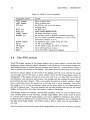
In addition to the softkeys, many operations can be done via typed commands. These are
often quicker and more convenient than entering parameters in windows. Typed commands
can be used only from the main menu, and none can be given while an integra.tion is
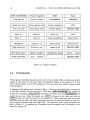
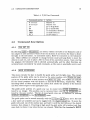
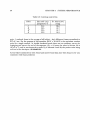
running. A list of typed commands is given in Table5.1; this same list can he obtained on
the terminal by typing "?".