1
Release March 2003
5.4 Choosing an mounting location
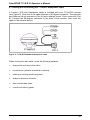
The receiver must be mounted so that it has a clear view of the sky, on the center
line of the vehicle, away from any sources of interference like electric motors. See
Installation, page 6.
5.5 Checking for cable failure
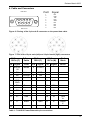
To check a cable for a short, use an ohmmeter. The resistance of a good cable
between connector pins at each end of the cable, is zero. If the cable checks out
fine, but you are confident it is the cable causing the errors, swap out the cable with
another known working cable (if possible). If the cable is defective, contact
OmniSTAR for a replacement.
5.6 Reducing engine noise
An unshielded ignition system can radiate enough noise to block reception of the
OmniSTAR signal. To solve this problem, use resistor spark plug wires. Sometimes
an alternator generates noise that interferes with the signal. Use bypass capacitors,
commonly available in automotive stores for cleaning up interference to CB and
other radios. If the problem persists, engine components can be shielded with
aluminum foil. Before purchasing new engine parts, make sure that there is not a
PC computer or power source near the 7114LR12 receiver. Some PCs and their
power sources generate noise that is disruptive to the GPS & satellite DGPS
signals.
5.7 Why satellite DGPS works in some places but not others
Local canopy cover in the direction of the differential satellite can reduce the
correction signal strength to unusable levels. Wet canopy reduces signals even
more. The same local environmental factors that affect GPS signals, such as radar
sets, microwave transmitters, and the like can interfere with the differential satellite
signals.
5.8 Verifying the unit is outputting NMEA messages
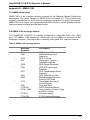
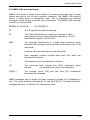
Connect the 7114LR12 receiver to a PC with the Standard Data/Power Cable and
use Windows 95/98’s HyperTerminal or any other terminal program to view the
NMEA messages input through the computer’s serial port. The default NMEA
parameters are 9600-N-8-1.
13