1
Fault finding
FAULT FINDING FAULT FINDING FAULT FINDING FAULT FINDING FAULT FINDING
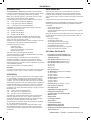
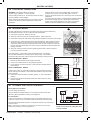
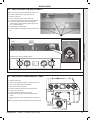
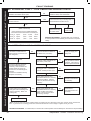
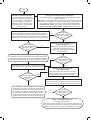
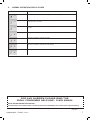
79 aLTERNATING ‘F’ AND ‘9’ - PCB Fault
Replace PCB Ensure that the BCC (boiler chip card - small plastic part) is
fitted to the PCB otherwise replace PCB.
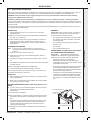
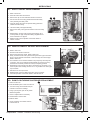
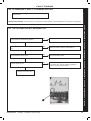
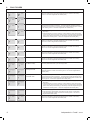
80 aLTERNATING ‘F’ AND ‘4’ - Flow Thermistor Fault
no
Is the wiring securely connected to the Flow Thermistor
(located in the top of the Heat Exchanger?)
Securely connect the wiring to the Flow
Thermistor
yes
Disconnect the wiring from the Flow Thermistor
Check the resistance using a suitable multimeter connected
across the Thermistor’s terminal pins.
At 25 C expect
9,700 -10,300
At 60 oC expect
2,400- 2,600
Ohms
At 85 oC expect
1,000- 1,100
Ohms
o
no
Fit a new Thermistor
Ohms
Is the Thermistor value correct?
no
yes
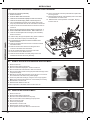
Is the wiring securely connected to the low voltage 6 way
connector at the front left hand side of the PCB?
yes
Securely connect the wiring to the PCB
Replace PCB
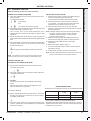
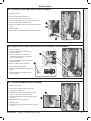
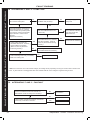
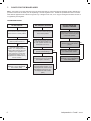
81 aLTERNATING ‘c’ AND ‘2’ - BCC fault (Boiler CHIP card)
Is the correct BCC for the boiler securely inserted into the
slot at the front left of the PCB?
(identified by the label on the BCC)
no
Note. Ensure the correct orientation of BCC by
placing “TOP” side up.
yes
Replace the BCC with a new BCC (that is correct for the
boiler). After switching power on and ‘c0’ being shown,
press restart. Is ‘c2’ still shown?
Securely insert the correct BCC for the boiler
into the PCB and after switching power on and
‘c0’ being shown, restart boiler.
YES
Replace PCB
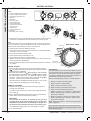
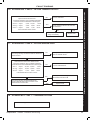
Restart PROCEDURE - To restart boiler, turn mode knob to restart position and immediately turn knob back to required setting.
54
Independent + Combi - Installation and Servicing