1
1
1.2
Preparations
Parts
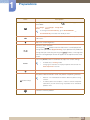
1.2.1 Frontal Buttons
The color and shape of parts may differ from what is shown. Specifications are subject to change
without notice to improve quality.
Icons
Description
z
Open or close the onscreen display (OSD) menu, or return to the
parent menu.
z
OSD control lock: Maintain the current settings, or lock the OSD
control to prevent unintended changes to settings.
To lock the OSD control, press the MENU button [
] for five
seconds.
To unlock the locked OSD control, press the MENU button [
]
for more than five seconds.
If the OSD control is locked,
z
Brightness and Contrast can be adjusted, and INFORMATION
can be viewed.
z
The Customized Key function can be used by pressing the [
]
button. (The Customized Key function specified before the OSD
control was locked is available even when the OSD control is
locked.)
1 Preparations
21