1
1
Preparations
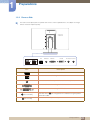
1.2.2 Reverse Side
The color and shape of parts may differ from what is shown. Specifications are subject to change
without notice to improve quality.
LAN
AUDIO OUT
RGB OUT
Port
DVI OUT
DC 14V OUT DC 14V IN
Description
Connect to a USB device.
Connect to a network using the LAN cable.
Connect to an audio output device such as headphones.
Connect to the monitor using the D-SUB cable.
Connect to the monitor using the DVI cable.
[DC 14V OUT]
[DC 14V IN]
Connect to the
extension cable.
[DC 14V] port on the monitor using the power
Connect to the DC power adapter.
1 Preparations
23