1
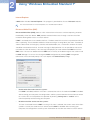
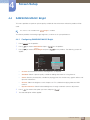
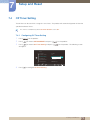
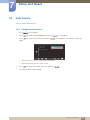
7 7.2 Setup and Reset Language Set the menu language. z A change to the language setting will only be applied to the onscreen menu display. z It will not be applied to other functions on your PC. 7.2.1 Changing the Language 1 2 3 Press [ ] on the product. Press [ ] to move to SETUP&RESET and press [ Press [ ] to move to Language and press [ ] on the product. ] on the product. The following screen will appear. SETUP&RESET Reset Language Off Timer On/Off Off Timer Setting PC/AV Mode Key Repeat Time Customized Key ࢇࢷ֩Ѝ 4 5 Press [ 'HXWVFK (QJOLVK (VSDxRO )UDQoDLV ଥࢿ ,WDOLDQR 0DJ\DU 3ROVNL ଥࢿ 3RUWXJXrV ƧNJLjLjǁƿǀ 6YHQVND 3& 7UNoH ᣣᧄ⺆ ɼܖ؆ـ ଞ˲߭ ∝䇁 ࢇѰ ] to move to the language you want and press [ AUTO ۴ ]. The selected option will be applied. 7 Setup and Reset 69