1
Chapter 4 - Problems and Solutions
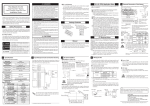
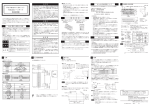
4.1.3 Troubleshooting
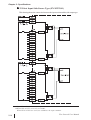
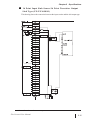
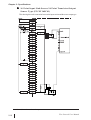
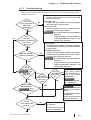
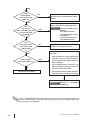
Use the following flowchart to locate the problem cause(s) and take appropriate
countermeasure(s).
<Not lit>
Is
the GLC
unit’s green status
LED lit (not
blinking)?
NO
YES
NO
The GLC unit’s power has not been turned ON.
Turn the power ON.
<Red LED is lit>
A major error has occurred in the logic program.
Check the logic program status.
<Green LED is lit>
The logic program has not run. Activate the controller and run the logic program.
Pro-Control Editor Operation Manual,
Chapter 4
Can
the logic
program be checked via
Pro-Control
Editor?
LogiTouch Editor Operation Manual,
Logic Program Edition, Chapter 2 – “Executing Logic Program”
YES
Was the “Use I/O”
check box selected ?
NO
<GLC100/300>
Check Pro-Control Editor’s [Use I/O] check box
in the [RUN/STOP] window, and then RUN the
logic program.
<GLC2000/LogiTouch>
Check Pro-Control Editor’s [System Settings]
window’s [Use I/O] check box, and then download the logic program to the GLC.
Pro-Control Editor Operation Manual,
Chapter 4
YES
Is
an error
code displayed?
6.1.2 –
“Error Code
Display”
YES
Is Error Code
841 displayed?
LogiTouch Editor Operation Manual,
Logic Program Edition, Chapter 2 – “Executing Logic Program”
Is
the I/F
unit’s status
NO
Is
it a GLC
100 series or
300 series
unit?
LED "POW"
NO
lit?
Check if the I/F unit attach- ment screws
NO have become loose,
a n d , i f n e c e s s a r y,
tighten them.
YES
YES
NO
Pro-Control Editor User
Manual Flex Network
Driver
LogiTouch Editor Operation Manual
Logic Program Edition
Flex Network Driver
6.1.2 –
“Error Code Display”
Is
the I/F
unit’s status LED
“RUN" lit ?
YES
Flex Network User Manual
Chapter 3 –“Installation and Wiring”
NO
The Flex Network unit
is defective.
Contact your local distributor immediately.
4-3