1
Digital Lighting Systems
COMPACT-44/48D
Four Zone DMX Panels
User Manual - Page 4
Operating Instructions COMPACT-48D
Four Channels, Eight Scenes
Adjusting Channel levels
Adjust channel levels by pressing and holding their respective up or down button until each level ramps up or down to the desired value. For
fine adjustments, momentarily press and release the appropriate button. This limits changes in levels to an increment or a decrement of 1 step
out of 256. The LED associated with the up button stays on when its corresponding level reaches 100%, while the down LED stays on when the
level reaches 0%. Both LED's remain on otherwise.
Preset Scenes
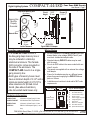
Panel without Front Cover
Presets must be un-locked to enable this operation (see paragraph below).
To store a scene:
1- Adjust the channel levels for a particular scene number. 2- Press and hold the corresponding scene
button. 3- When the panel's LED's flash, release the button.
To recall a scene:
1- Select the button of the scene you wish to recall. 2- Momentarily press and release the button.
The LED associated with the preset button that was actuated last remains on while all others turn off.
Locking/Unlocking Presets
Presets automatically re-lock upon panel reset or power-up.
To Unlock and Enable Storing the 8 Presets:
1- Hold down the panel's RESET button (or de-energize panel).
2- Simultaneously press and hold-down preset buttons 4 & 8.
3- Release the RESET button ( or re-energize panel). LED's will flash once.
4- Release Preset buttons 4 & 8. LED's will flash again to indicate that presets have been unlocked.
RESET
BUTTON
Scenes 4 & 8
Buttons
To Access RESET button gently
pry front cover from panel, using
a small tip screw driver applied to
the notch located at the bottom.
Operating Instructions COMPACT-44D
Four Channels, Four Scenes
Adjusting Channel levels
Each of the four channels this unit controls has a corresponding button for raising and lowering that channel. Channel levels may be adjusted by
pressing and holding their respective button until each level ramps up or down to the desired value. For fine adjustments, momentarily press
and release the appropriate button. This limits changes in levels to an increment or a decrement of 1 step out of 256. Pushing and holding a
button causes the level of the corresponding output to vary in one direction. Releasing the button and pressing again causes the
output level to vary in the reverse direction.
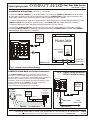
Panel without Front Cover
Preset Scenes
Presets must be un-locked to enable this operation (see paragraph below).
To store a scene:
1- Adjust the channel levels for a particular scene number.
2- Press and hold the corresponding scene button.
3- When the panel's LED's flash, release the button.
To recall a scene:
1- Select the button of the scene you wish to recall. 2- Momentarily press and release the button.
The LED associated with the preset button that was actuated last remains on while all others turn off.
Locking/Unlocking PresetsPresets automatically re-lock upon panel reset or power-up.
To Unlock and Enable Storing the 4 Presets:
1- Hold down the panel's RESET button (or de-energize panel).
2- Simultaneously press and hold-down buttons 4 & 8.
3- Release the RESET button ( or re-energize panel). LED's will flash once.
4- Release buttons 4 & 8. LED's will flash again to indicate that presets have been unlocked.
7588 NW 8th Street, Miami, Fl. 33126
Tel: 305-264-8391 or 1-877-264-8391
RESET
BUTTON
Buttons
4&8
To Access RESET button gently
pry front cover from panel, using
a small tip screw driver applied to
the notch located at the bottom.
Fax: 305-261-6637
Copyright 1999 Digital Lighting Systems, All rights Reserved Specifications are subject to change without notice. Printed in U.S.A.
C4448DUM
Rev. A 09/01