1
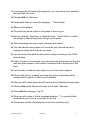
18. Looking at the left hand side navigation, you can see a topic towards
the top titled ‘Services’
19. Please click on ‘Services’
20. Underneath that you have the category – ‘Trend Guide’
21. Click on that please
22. This will bring up an article on the page in front of you.
23. Now to reiterate, ‘Services’ is called the topic, ‘Trend Guide’ is called
the category and clicking these brings up an article.
24. The terminology we use is topic, category and article
25. You can add as many topics on the site as you like and as many
categories under each topic as you wish.
26. You will notice that what we have been doing is clicking in the Public
Access area.
27. Public Access is an example of an access level and anyone surfing the
web can gain access to the content contained within the topics in this
area.
28. You are able to add as many topics to your site as you require.
29. When each topic is created you have the option of deciding which
access level to place it under on your website.
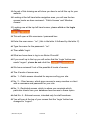
30. What you will notice down the left hand side is a Member Access area.
31. Please click under Member Access on the topic ‘Specials’,
32. Then click the category ‘Top 6!’,
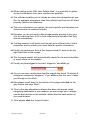
33. What you will notice is that a message displays - “To access further
information you must be a member of our site8888..”
34. This shows us that effectively this area is for members only.
©
eknowhow Pty Ltd
LU101008
3