1
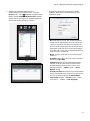
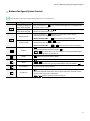
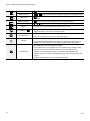
IDIS Solution
Suite
Software Manual
Video Wall Service
Powered by
Before reading this manual
This Operation Manual provides instructions for using IDIS Solution Suite, a network integration solution enabling
remote control of network cameras and video servers.
References to IDIS Solution Suite system throughout this Operation Manual mean the computer system on which the
IDIS Solution Suite program is running. References to device mean a network camera or a network video server.
Following program is provided in addition to IDIS Solution Suite:
Start > IDIS Solution Suite > Utility > ProblemReporter (contact your IDIS Solution Suite distributor for the
SecretKey.)
Copyright
© 2015 IDIS Co., Ltd.
IDIS Co., Ltd. reserves all rights concerning this operation manual.
Use or duplication of this operation manual in part or whole without the prior consent of IDIS Co., Ltd. is strictly
prohibited.
The information in this manual is believed to be accurate as of the date of publication even though explanations of
some functions may not be included. We are not responsible for any problems resulting from the use thereof. The
information contained herein is subject to change without notice. Revisions or new editions to this publication may be
issued to incorporate such changes.
Registered Trademarks
IDIS is a registered trademark of IDIS Co., Ltd.
Other company and product names are registered trademarks of their respective owners.
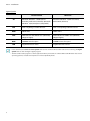
In-Text
Symbol
Type
Caution
Note
Description
Important information concerning a specific function.
Useful information concerning a specific function.
WEEE (Waste Electrical & Electronic Equipment)
Correct Disposal of This Product
(Applicable in the European Union and other European countries with separate collection systems)
2
This marking shown on the product or its literature, indicates that it should not be disposed with other household
wastes at the end of its working life. To prevent possible harm to the environment or human health from
uncontrolled waste disposal, please separate this from other types of wastes and recycle it responsibly to promote
the sustainable reuse of material resources.
Household users should contact either the retailer where they purchased this product, or their local government
office, for details of where and how they can take this item for environmentally safe recycling.
Business users should contact their supplier and check the terms and conditions of the purchase contract. This
product should not be mixed with other commercial wastes for disposal.
Table of Contents
1
2
Part 1 – Introduction. . . . . . . . . . . . . . . . . . . . . . . . . . . . . . . . . . . . . . . . . . 4
System Diagram. . . . . . . . . . . . . . . . . . . . . . . . . . . . . . . . . . . . . . . . . . . . . . . . . . . . . . . . . . . . . . . . . 5
Video Wall Service Registered on Administration Service . . . . . . . . . . . . . . . . . . . . . . . . . . . . . . . . . . . . 5
Video Wall Service Registered on Federation Service. . . . . . . . . . . . . . . . . . . . . . . . . . . . . . . . . . . . . . . . . 6
Part 2 - Installation . . . . . . . . . . . . . . . . . . . . . . . . . . . . . . . . . . . . . . . . . . . 7
Product Information. . . . . . . . . . . . . . . . . . . . . . . . . . . . . . . . . . . . . . . . . . . . . . . . . . . . . . . . . . . . . 7
Package Contents. . . . . . . . . . . . . . . . . . . . . . . . . . . . . . . . . . . . . . . . . . . . . . . . . . . . . . . . . . . . . . . . . . . . . . . . . . 7
System Requirements . . . . . . . . . . . . . . . . . . . . . . . . . . . . . . . . . . . . . . . . . . . . . . . . . . . . . . . . . . . . . . . . . . . . . . 7
Installation. . . . . . . . . . . . . . . . . . . . . . . . . . . . . . . . . . . . . . . . . . . . . . . . . . . . . . . . . . . . . . . . . . . . . . 9
Server System. . . . . . . . . . . . . . . . . . . . . . . . . . . . . . . . . . . . . . . . . . . . . . . . . . . . . . . . . . . . . . . . . . . . . . . . . . . . . . 9
Agent System. . . . . . . . . . . . . . . . . . . . . . . . . . . . . . . . . . . . . . . . . . . . . . . . . . . . . . . . . . . . . . . . . . . . . . . . . . . . 13
Uninstall. . . . . . . . . . . . . . . . . . . . . . . . . . . . . . . . . . . . . . . . . . . . . . . . . . . . . . . . . . . . . . . . . . . . . . . 15
3
Part 3 - Getting Started . . . . . . . . . . . . . . . . . . . . . . . . . . . . . . . . . . . . . 17
Running Services. . . . . . . . . . . . . . . . . . . . . . . . . . . . . . . . . . . . . . . . . . . . . . . . . . . . . . . . . . . . . . . 17
Registering Video Wall Service. . . . . . . . . . . . . . . . . . . . . . . . . . . . . . . . . . . . . . . . . . . . . . . . . . 17
Registering on Administration Service . . . . . . . . . . . . . . . . . . . . . . . . . . . . . . . . . . . . . . . . . . . . . . . . . . . . 18
Registering on Federation Service . . . . . . . . . . . . . . . . . . . . . . . . . . . . . . . . . . . . . . . . . . . . . . . . . . . . . . . . 20
4
Part 4 - Monitoring Using the Agent Program. . . . . . . . . . . . . . . . . 23
Registering Video Wall Agent System. . . . . . . . . . . . . . . . . . . . . . . . . . . . . . . . . . . . . . . . . . . . 23
Registering Agent System. . . . . . . . . . . . . . . . . . . . . . . . . . . . . . . . . . . . . . . . . . . . . . . . . . . . . . . . . . . . . . . . 23
Setting up Video Wall Agent Setup. . . . . . . . . . . . . . . . . . . . . . . . . . . . . . . . . . . . . . . . . . . . . . 26
Connecting to Agent System . . . . . . . . . . . . . . . . . . . . . . . . . . . . . . . . . . . . . . . . . . . . . . . . . . . 26
Monitoring Video and Playing Back Recorded Video. . . . . . . . . . . . . . . . . . . . . . . . . . . . . . . . . . . . . . . 27
Network Keyboard Buttons. . . . . . . . . . . . . . . . . . . . . . . . . . . . . . . . . . . . . . . . . . . . . . . . . . . . . 28
Buttons for Operation Commands. . . . . . . . . . . . . . . . . . . . . . . . . . . . . . . . . . . . . . . . . . . . . . . . . . . . . . . . 28
Buttons for Agent System Control. . . . . . . . . . . . . . . . . . . . . . . . . . . . . . . . . . . . . . . . . . . . . . . . . . . . . . . . . 29
3
Part 1 – Introduction
This document describes installation and operation of IDIS Solution Suite Video Wall software, which is designed to be
used with IDIS Solution Suite Standard or IDIS Solution Suite Federation software.
The video wall service allows you to control monitoring on multiple monitors with network keyboards for centralized
monitoring in a surveillance center.
If the video wall service is registered on an administration service, the IDIS Solution Suite system allows you to control
monitoring for devices registered on the administration service. If the video wall service is registered on a federation
service, the IDIS Solution Suite system allows you to control monitoring for devices registered on the all administration
services that are registered on the federation service.
Number of video wall services, video wall agent systems and monitors are as follows:
•• Video Wall Service Registration: Maximum of four per administration or federation service
•• Video Wall Agent System Registration: Maximum of 64 per video wall service depending on the type and number of
the WIBU-Keys. Ask your dealer or distributor about the number of video wall agent system that can be registered
using your IDIS Solution Suite software.
•• Monitor Registration: Maximum of 6 per video wall agent system
•• This product includes software developed by the OpenSSL Project for use in the OpenSSL Toolkit
(http://www.openssl.org/).
•• The software included in this product contains some Open Sources. You may obtain the complete corresponding source
code from us. See the Open Source Guide on the software CD (OpenSourceGuide\OpenSourceGuide.pdf) or as a
printed document included along with this document.
4
Part 1 – Introduction
System Diagram
Video Wall Service Registered on Administration Service
Network Keyboard
Video Wall Agent
Client
Video Analytics
Streaming
Administration Failover,
Monitoring Failover
Network
Update
Administration,
Monitoring
Recording Redundant
Video Wall
Network
Cameras
Network
IDIS
Network
IDIS
IDIS
Transmitters
DVRs
IDIS
Analog
Cameras
Recording
Video Wall Failover
IDIS
IDIS
IDIS
IDIS
IDIS
Recording Failover
5
Part 1 – Introduction
Video Wall Service Registered on Federation Service
Video Wall Agent
Network Keyboard
Monitoring Failover
Client
Administration Failover,
Monitoring Failover
Video Analytics
Network
Administration,
Monitoring
Streaming
Federation,
Monitoring
Backup
Update
Network
Network
Cameras
Network
Recording Failover
IDIS
IDIS
Streaming
Transmitters
Analog
Cameras
Video Wall
Recording
Network
IDIS
DVRs
IDIS
IDIS
IDIS
IDIS
Recording
Redundant
Recording
Redundant
Video Wall Failover
Administration,
Monitoring
IDIS
IDIS
Video Analytics
Network
Cameras
Network
IDIS
Administration Failover,
Monitoring Failover
IDIS
IDIS
Transmitters
Analog
Cameras
Recording
DVRs
IDIS
IDIS
Recording Failover
IDIS
IDIS
IDIS
IDIS
6
Part 2 - Installation
Product Information
Package Contents
•• Installation CD
•• User’s Manual
•• WIBU-Key (USB Dongle)
•• If a WIBU-Key is removed from a video wall server, the video wall service and video wall agent program
might not work properly.
•• When you connect or remove a WIBU-Key, stop running the video wall service first.
System Requirements
Server System
Recommended
OS
Microsoft® Windows® XP 32-bit/Vista (Home Standard, Business, Ultimate, Enterprise),
Microsoft® Windows® 7 (Home Premium, Professional, Ultimate), Microsoft® Windows® 8 (Pro,
Enterprise), Microsoft® Windows® Server 2003/2008/2012
CPU
Intel Core II Quad 8200 2.33 GHz/Intel Xeon 3.0 GHz or faster
RAM
2GB or more
VGA
AMD Radeon™ HD 2400 or NVIDIA GeForce FX5500 (AMD recommended) (1024x768, 24bpp
or higher)
HDD
2GB or more free space for each service (for example, 4GB or more free space when installing video
wall and update services)
LAN
Gigabit Ethernet or faster
7
Part 2 - Installation
Agent System
Recommended
OS
Minimum
Microsoft® Windows® 7 64-bit (Home
Premium, Professional, Ultimate) (Microsoft®
Windows® 8 (Pro, Enterprise) compatible)
Microsoft® Windows® 7 (Home Premium,
Professional, Ultimate)
CPU
Intel i7 Ivy Bridge 2.33 GHz or faster
Intel i7 Sendy Bridge 3.0 GHz or faster
RAM
2GB or more
2GB or more
VGA
AMD Radeon™ HD 5450 or later (1024x768,
24bpp or higher)
AMD Radeon™ HD 5450 or later (1024x768,
24bpp or higher)
HDD
350 MB or more free space
350 MB or more free space
LAN
Gigabit Ethernet or faster
Gigabit Ethernet or faster
•• In this document, the Server or Server System refers to a PC on which a IDIS Solution Suite service is running. The Agent
System refers to a PC running the Agent program.
•• The IDIS Solution Suite program is a 32-bit application. When you install it on a 64-bit of Microsoft® Windows® Vista or later
operating system, it is installed and operates in 32-bit compatibility mode.
8
Part 2 - Installation
Installation
Disable your PC’s Windows power saving function:
Start menu → Power Options → set both Turn off
the display and Put the computer to sleep to Never
(Power Options → Power Schemes tab → set both
Turn off monitor and Turn off hard disks to Never
when using the Microsoft® Windows® XP operating
system).
•• It is not possible to install the Agent program on
the same PC as IDIS Solution Suite services or Client
program.
•• If an older version of IDIS Solution Suite software is
installed on your computer, a screen appears asking
you to upgrade the software. In this case, you are
required to upgrade the software according to the
instructions in the screen.
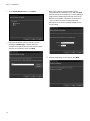
3 Select the language in which to run the program
and then click OK.
•• To properly display the selected language, your
PC’s operating system should be set to support
the selected language.
•• To change the IDIS Solution Suite program’s
language after the software has been installed,
select Language Selector in the IDIS Solution
Suite → Utility folder of the Start menu before
running the IDIS Solution Suite program.
4 When the following screen appears, select Install
and click Next.
Server System
1 Insert the software CD in the video wall server.
2 Run the Setup.exe file of the software CD.
The User Account Control window might appear
when using the Microsoft® Windows® Vista or later
operating system. Click Allow and install the software
following the instructions.
9
Part 2 - Installation
5 Select Video Wall Service and click Next.
7 Enter the IP address and port number of the
administration or federation service and click Next.
You can change the settings in the Service Manager
program after completing installation if necessary.
When the installation is complete, the video wall
service is connected to the administration or
federation service via the network if both services
are operating.
6 Designate the folder path to install the services.
Clicking the Disk Usage… button shows the
available and required disk space for each hard disk
drive for the installation. Then click Next.
8 When the following screens appear, click Next.
10
Part 2 - Installation
•• The following screen appears when the
port number of the service being installed
is already in use, and the screen displays
the port number that will be changed.
The changed port number will be applied
when the service starts operating after
installation.
•• The following screen appears when using
Microsoft® Windows® Vista or later operating
systems. It is recommended that you check
the Disable WS-Discovery Windows Service
(fdPHost, FDResPub) box. If you do not check
the box, the IDIS Solution Suite program cannot
auto-scan devices using ONVIF™ Conformance
protocol when scanning devices for device
registration.
•• .NET Framework and the Visual
C++ Runtime Libraries are installed
automatically, and it may take some time.
This installation step will be skipped if the
programs are already installed on your
computer.
9
Disconnect the WIBU-Key from the server if a WIBUKey is connected. Then install the WIBU-Key device
driver following the instructions.
11
Part 2 - Installation
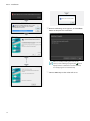
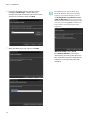
10When the following screen appears, click the Close
button to complete the installation.
After successfully installing the services, the
services, Service Manager program (the
icon is
displayed in the notification area of the task bar)
and Setup program run automatically.
11Connect WIBU-Keys to the video wall server.
1x
오늘
12
달력
Part 2 - Installation
Agent System
4 When the following screen appears, select Install
and click Next.
1 Insert the software CD in the video wall server.
2 Run the VideoWallAgentSetup.exe file of the
software CD.
The User Account Control window might appear
when using the Microsoft® Windows® Vista or later
operating system. Click Allow and install the software
following the instructions.
3 Select the language in which to run the program
and then click OK.
5 Select Video Wall Service and click Next.
•• To properly display the selected language, your
PC’s operating system should be set to support
the selected language.
•• To change the IDIS Solution Suite program’s
language after the software has been installed,
select Language Selector in the IDIS Solution
Suite → Utility folder of the Start menu before
running the IDIS Solution Suite program.
13
Part 2 - Installation
6 Designate the folder path to install the services.
Clicking the Disk Usage… button shows the
available and required disk space for each hard disk
drive for the installation. Then click Next.
•• The following screen appears when using
Microsoft® Windows® Vista or later operating
systems. It is recommended that you check
the Disable WS-Discovery Windows Service
(fdPHost, FDResPub) box. If you do not check
the box, the IDIS Solution Suite program cannot
auto-scan devices using ONVIF™ Conformance
protocol when scanning devices for device
registration.
7 When the following screens appear, click Next.
•• .NET Framework and the Visual
C++ Runtime Libraries are installed
automatically, and it may take some time.
This installation step will be skipped if the
programs are already installed on your
computer.
14
Part 2 - Installation
8
Uninstall
When the following screen appears, click the Close
button to complete the installation.
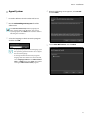
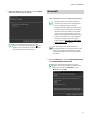
1 Stop running the services and Agent program first.
•• The IDIS Solution Suite software might not
uninstall correctly if you uninstall it while the
services or Agent program is running.
•• If an Agent system is registered on the service,
remove the Agent system before uninstalling
the IDIS Solution Suite software. If the Agent
system is not removed from the service and
all data is deleted while the IDIS Solution Suite
software is uninstalled, it is required that you
unregister the Agent system in the Agent
program. Refer to 4.2 Setting up Video Wall
Agent Setup (p. 22) for details.
After successfully installing the services, the
services, Service Manager program (the
icon is
displayed in the notification area of the task bar)
and Setup program run automatically.
The IDIS Solution Suite software should be
uninstalled following the procedures below. If you
delete the installation folder manually, the IDIS
Solution Suite software cannot be uninstalled or
reinstalled.
E
1x
오늘
달력
2 Go to the Start Menu, and click IDIS Solution Suite.
49 64
Click
Uninstall IDIS Solution Suite.
You can uninstall the software by using the
software CD. Insert the software CD in the video
wall server and run the Setup.exe file. Select
Remove and click Next.
15
Part 2 - Installation
3 Click OK when the following screen appears.
4 Click the Remove All or Do not remove button
when the following screen appears. Clicking the
Remove All button deletes all saved data including
recorded video and previous settings in the system.
Clicking the Do not remove button uninstalls the
software without deleting any saved data in the
system and keeps all saved data in the system.
The deleted data cannot be restored once the data
is deleted.
5 Click the OK button to complete the uninstall
process.
16
Part 3 - Getting Started
Services should be running on the IDIS Solution Suite
server for the IDIS Solution Suite program to operate.
Running Services
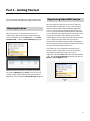
When the services are installed, the services run
automatically. You can also start or stop running the
services manually. Go to the Start Menu → Click IDIS
Solution Suite → Run the Service Manager program.
Registering Video Wall Service
You must register video wall services (max. 4) on the
administration or federation service. If the IP address
and port number of the administration or federation
server is entered correctly during the installation, the
service is registered on the administration or federation
service automatically. Registering the video wall service
on the administration service allows you to control
monitoring for devices registered on the administration
service. Registering the video wall service on the
federation service allows you to control monitoring for
devices registered on the all administration services that
are registered on the federation service.
The video wall service should be connected to the
administration or federation service via the network
connection, on which the video wall service is
registered. Go to the Start Menu and click IDIS Solution
Suite. Run the Service Manager program and click the
Option – Server Option menu.
Check the status of services. If any of the services are
not listed as Working under Status, start the services
manually. Refer to IDIS Solution Suite Standard User’s
Manual for details about the Service Manager program.
17
Part 3 - Getting Started
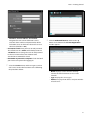
Registering on Administration
Service
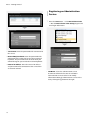
1 Go to the Start Menu → Click IDIS Solution Suite
→ Run the IDIS Solution Suite Setup program and
enter login information.
•• Service Port: Enter the port number for connection to
the service.
•• Network Keyboard Port: Enter the port number for
connection to the video wall service from a network
keyboard. The port number will be used when you
control the Agent system with the network keyboard.
•• External IP Address: Enter the external IP address
and port number for connection to the service from
an external network
•• Site Name: Select the administration service
to connect to from the list. You can add other
administration services to the list or modify
information about the administration service in the
button at the right.
list by clicking the
E
1x
오늘
18
달력
49
64
Part 3 - Getting Started
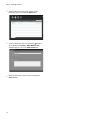
3 Click the
button at the bottom. The Service
Registration window appears, and a list of available
services is displayed with information about each
service.
E
1x
오늘
-- Site Name, Service Address, Service Port:
Designate the name of the administration service
and enter the IP address and port number of the
administration server to which the video wall
service is connected (default: 11001).
•• User ID, Password: Enter your user ID and password.
The default user ID is admin and default password is
12345678. You can change the user ID and password
in the User menu. Refer to IDIS Solution Suite
Standard User’s Manual for details.
•• Remember my ID on this computer: Check the box if
you want to save your ID for logging on.
달력
49
64
• Name: Displays services that are currently
connected to the administration service via the
network.
• Type: Displays the service type.
• Address: Display the IP address and port number
of each server.
4 Select a video wall services to register on the
administration service and click the OK button.
2 Select the Service menu, and then register a video
wall service on the administration service following
the procedures below.
19
Part 3 - Getting Started
5 Select a video wall service and click the
Registering on Federation Service
button
at the bottom. The Setup – Video Wall Service
window appears. Select the Information tab.
E
1 Go to the Start Menu → Click IDIS Solution Suite
1x
오늘
달력
49
64
→ Run the IDIS Solution Suite Setup program and
enter login information.
6 Enter the video wall service’s name and click the
Close button.
•• Site Name: Select the federation service to connect
to from the list. You can add other federation services
to the list or modify information about the federation
button at the
service in the list by clicking the
right.
E
1x
오늘
20
달력
49
64
Part 3 - Getting Started
-- Site Name, Service Address, Service Port:
Designate the name of the federation service
and enter the IP address and port number of the
federation server to which the video wall service is
connected (default: 11001).
3 Click the Video Wall Service, and then the
button at the bottom. The Service Registration
window appears.
•• User ID, Password: Enter your user ID and password.
The default user ID is admin and default password is
12345678. You can change the user ID and password
in the User menu. Refer to IDIS Solution Suite
Standard User’s Manual for details.
1x
오늘
•• Remember my ID on this computer: Check the box if
you want to save your ID for logging on.
2 Select the Service menu, and then register a video
wall service on the administration service following
the procedures below.
• Name: Displays services that are currently
connected to the federation service via the
network.
• Type: Displays the service type.
• Address: Display the IP address and port number
of each server.
21
달력
Part 3 - Getting Started
4 Select a video wall services to register on the
federation service and click the OK button.
5 Select a video wall service and click the
button
at the bottom. The Setup – Video Wall Service
window appears. Select the Information tab.
E
1x
오늘
달력
6 Enter the video wall service’s name and click the
Close button.
22
49
64
Part 4 - Monitoring Using the Agent Program
You can control monitoring on multiple monitors with
network keyboards.
If User Account Control is turned on in the Agent
system, the Video Wall Agent program may not work.
In this case, turn User Account Control off (Start menu
→ Control Panel → User Accounts and Family
Safety → User Accounts → Turn User Account
Control off) and run the Video Wall Agent program.
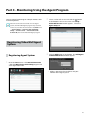
2 Select a video wall service and click the
button
at the bottom in the Service menu. The Setup –
Video Wall Service window appears. Select the
Agent Setup tab.
E
1x
오늘
달력
49
Registering Video Wall Agent
System
Registering Agent System
3 Click the Add button at the bottom. The Add Agent
to Video Wall Service window appears.
1 Go to the Start menu > Click IDIS Solution Suite
> Run the IDIS Solution Suite Setup program and
enter login information.
•• Address, Port: Enter the IP address and port
number of the Agent system.
23
64
Part 4 - Monitoring Using the Agent Program
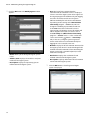
4 Click the OK button. The Modify Agent window
appears.
•• User: The list of users registered on the
administration or federation service is displayed.
Select a user of the Agent system to be registered.
The Agent program will automatically run logging
on as the selected user. Each user may have
different authority for each device and function
depending on the settings at the IDIS Solution
Suite Setup program → User menu. You can
change the authority or password of each user
at the User menu. If the video wall service is
registered on a federation service, this option will
not be supported and you can select a user at
the User Setup tab (IDIS Solution Suite Setup
program → Service menu → select a video wall
button → User Setup
service and click the
tab). In this case, all Agent systems registered
on the video wall service will automatically run
logging on as the selected same user.
•• Number: Displays ID of each monitor connected to
the Agent system. The ID is used to distinguish the
monitor from other monitors when controlling the
Agent system with a network keyboard, so each
must have a unique ID.
1x
•• Resolution: Displays the resolution of each
49 64
monitor connected to the Agent
system.
•• Description: Displays information of each monitor
connected to the Agent system.
E
•• Name: Allows you to change the Agent system
name.
•• Address, Port: Displays the IP address and port
number of the Agent system.
•• Description: Displays the Operating System
information of the Agent system.
오늘
달력
5 Click the OK button. A list of registered Agent
system is displayed.
24
Part 4 - Monitoring Using the Agent Program
6 Register the network keyboard on the
administration or federation service: Select the
(Network Keyboard Setup)
Device menu→ Click
button, and the Network Keyboard Scan window
appears. The way to register a network keyboard is
identical to the way to register a device.
7 Register the video wall service on the network
keyboard. Refer to the network keyboard’s user
manual for details.
•• ID (video wall service ID): The network keyboard
assigns the ID automatically when the video wall
service is registered, and you can change the ID.
The ID is used to distinguish the video wall service
from other video wall service when connecting to
the video wall service with a network keyboard, so
each must have a unique ID.
•• Name: Set up a video wall service name for your
reference.
•• IP Address: Enter the video wall server’s IP address.
Do not check Use FEN.
•• Control Port: Enter the Network Keyboard Port
number set in the video wall server (Check the
Network Keyboard Port number in the Service
Manager program → Option menu → Server
Option setting).
•• User ID, Password: Enter the user ID and password
for the connection to the video wall service. Check
the user ID and password in the IDIS Solution
Suite Setup program → Service menu → video
wall service → button → User Setup tab.
25
Part 4 - Monitoring Using the Agent Program
Setting up Video Wall Agent
Setup
Go to the Start Menu → Click IDIS Solution Suite →
Click VideoWallAgent Setup.
•• Port: Allows you to change the port number for the
connection to the Agent system.
Connecting to Agent System
1 Press on the network keyboard the video wall
service ID on which the Agent system is registered.
•• Unregister Agent: If the Agent system is not removed
from a video wall service and all data is deleted while
the IDIS Solution Suite software is uninstalled, the
Agent system cannot be registered again. In this case,
clicking the Unregister button allows you to register
the Agent system.
•• Restart Agent: The Agent program runs automatically
when the Agent program is registered on the video
wall service, and the Agent program keeps running as
long as the Agent system is operating. If you want to
stop running of the Agent program temporarily, enter
the duration and click the Restart button. The Agent
program stops running and restarts after the entered
length of time has expired.
Selected Device :
1
1
PressPANE
the
2MON
0
SHIFT
ESC
DEV
F1
MON
SHIFT ESC F3 F4
DEV button.
D001
3 Pressing the monitor ID.
D001
1
1
PANE DEV
4 Pressing the MON button.
0
SHIFT
D001
26
PANE
SHIFT
ESC
DEV
ESC F3 F4
PANE
MON
Part 4 - Monitoring Using the Agent Program
4 Moving to the desired item by using arrow buttons
Monitoring Video and Playing
Back Recorded Video
1
0theSHIFT
) selects
itemESC DEV PAN
and pressing the enter button (
in the menu or releases the selection. If you want to
MON PANE DEV SHIFT ESC
(Menu) 1 F3 0 F4 SHIFT
exit the current item setting,
press the
button and releases the selection.
MON PANE DEV SHIFT
1 Press on the network keyboard the F2 button. A list
of panels appears → Click Live or Play/DVR Search
by using the mouse connected to the network
keyboard.
2 Press on the network keyboard the F4 button. A
site list is displayed in the current Live or Play/DVR
Search panel → Select a site to connect to from the
site list, and drag and drop it on the Live or Play/DVR
Search screen by using the mouse connected to the
network keyboard. Live or recorded video from the
selected site is displayed on the screen.
3 Press on the network keyboard the
(Menu) 1
button. The live or play screen menu is displayed.
0
MON PANE DEV SHIFT
SHIFT
ESC
DEV
PANE
MON
F1
ESC F3 F4
5 Refer to Network Keyboard Buttons (28 page)
for the explanations about controlling with other
buttons of the network keyboard.
27
E
Part 4 - Monitoring Using the Agent Program
Network Keyboard Buttons
The following is an explanation of the network keyboard buttons used to control the Agent system. Refer to the
network keyboard’s user manual regarding buttons for PTZ control.
Buttons for Operation Commands
Button
1
0
MON PANE DEV SHIFT
1
0
PANE DEV SHIFT
1
0
SHIFT
DEV SHIFT
0
SHIFT
V SHIFT
SHIFT
IFT
T
0
PANE
MON
Number
(0)
DEV
PANE
ESC F3 F4
ESC
DEV
DEV
PANE
PANE
ESC
DEV
DEV
PANE
PANE
PANE
PANE
0
-
SHIFT
0
SHIFT
1
ESC
PANE
SHIFT
MON
•• Camera Screen ID
→
•• Monitor ID →
ESC
0
DEV
DEV
PANE
MON
F1
F1
DEV : Connects
SHIFT F1ESCtoF3
theF4video
wall service .
MON
ESC
DEV
PANE
MON
ESC
DEV
PANE
MON
DEV
F4
PANE
SHIFT
ESC
MON
DEVF3
1F4 0 SHIFT
&ESC
: Releases
theF3connection
to the
Agent
system.
•• SHIFT
Monitor
1
F1
F1
F1
MON
MON
MON
ESC
PANE
MON ID
•• Video wall service
→
PANE
••
MON
ESC F3 F4
PANE : DEV
SHIFT
ESC F3 screen.
F4
Selects
the camera
1
0
SHIFT
ESC
DEV
PANE
MON
F1
F1
ESC F3 F4
MON : PANE
SelectsDEV
the SHIFT
monitor.
F1
: Releases
the connection of the currently selected camera screen or
device.
•• F1: Displays monitor ID when using more than one monitor.
F1
MON
SHIFT
1
Camera
Screen
F1
MON PANE DEV SHIFT
F3 F4
PANE
PANE
PANE
MON
SHIFT
ESC
DEV
PANE DEV
SHIFT
F4
MON
1
0 its
ESC
F1
Cancels
a command during
operation.
•• ESC : F3
F1
F1
DEV
DEV
DEV
ESC
F3 F4
→
Button
: Performs the secondary function for buttons that support
DEV
PANE
MON
two functions.
F1
0
MON PANE
Disconnection
MON
MON
1
F1
MON
ESC
ESC
ESC
Operation
MON PANE DEV
•• SHIFT
F1
MON
Shift
Connection
MON
SHIFT
SHIFT
SHIFT
ESC
DEV
PANEa command
MON
1•F1
0 SHIFT
• Does
not function
as
button.
F1
DEV
ESC F3 F4
ESC F3 F4
DEV
ESC F3 F4
ESC
ESC F3 F4
ESC
ESC F3 F4
ESC
ESC F3 F4
ESC
SHIFT
SHIFT
000
PANE,DEV
SHIFT
SHIFT ESC
ESC
F3
F3 F4
F4 camera screen, panel tab or
MON
MON, PANE
PANE
DEV
DEV :SHIFT
ESC
F3
F4
Selects
a monitor,
•• ID F1
→ MON
Agent system to control.
ESC
DEV
Number
(1PANE
to 9)MON
SHIFT
MON PANE DEV SHIFT
1
111
Designation
•• F2: Displays or hides a list of panels. The maximum number of each panel is
the same as that of the IDIS Solution Suite Client program.
Function (1 to 8)
•• F3: Displays or hides a PIP screen. The PIP screen shows the enlarged area
of where the mouse cursor is located.
1
10
0SHIFT
SHIFT
ESC
ESCDEV
DEV
PANE
PANE
MON
MON
•• F4: Displays or hides a site list.
F1 F1
PANE
SHIFT
F4
MONMON
PANE
DEV
ESC
F3 ):F3
F4
&ESC
Displays
or hides the Preference setup screen of the IDIS
•• DEV
F7
( SHIFT
1
0 1 SHIFT 0 ESC SHIFT DEV ESC PANE DEV MON PANE MON F1
F1
Solution Suite Client program.
MON PANE
MON DEV
PANESHIFT
SHIFTF3
F4 ):F3
F4
&ESC
Displays
or hides the Agent program’s software version.
•• DEV
F8 ( ESC
28
Part 4 - Monitoring Using the Agent Program
Buttons for Agent System Control
Some functions may not be supported, depending on the connected device.
1
0
SHIFT
ESC
DEV
PANE
F1
MON
1
0
SHIFT
ESC
DEV
PANE
F1
MON
MON PANE DEV SHIFT ESC F3 F4
Button
Designation
Operation 1 0 SHIFT ESC DEV PANE MON
MON PANE DEV SHIFT ESC F3 F4
Instant Recording On/ •• Camera Screen ID →
: Starts instant recording/panic recording for the
ESC
DEV
PANE
MON
1
0 SHIFT MON
PANE DEV SHIFT ESCF1 F3 F4
Panic Recording On
selected camera screen.
1
0 SHIFT ESC DEV PANE MON
F1
F1
MON
PANE ID
DEV
F4 instant recording/panic recording
Instant Recording Off/ •• Camera
Screen
→ SHIFT &ESC F3: Stops
SHIFT
ESC
DEV
PANE
MON
MON PANE
ESC F3 F4
1Panic0Recording
F1 DEV SHIFT
Off
for the
selected
camera
screen.
1
0 SHIFT ESC DEV PANE MON
F1
•• Camera Screen ID →
: Activates the
1ESCof the
SHIFT
DEV device
PANE
MON
1 alarm
0 out
F1
MON PANE DEV SHIFT ESC F3 F4
MON PANE DEV Alarm
SHIFTOutESC
connected to the selected
camera screen.
On F3 F4
1
0
SHIFT
ESC
DEV
PANE
MON
F1
DEV SHIFT ESC F3 F4
: Activates
the
out.
•• Alarm-out device No. →MON PANE
ESC
DEV
PANE
1 selected
0 SHIFT alarm
1
0
SHIFT
0
SHIFT
DEV
MON PANE DEV SHIFT
ESC F3 DEV
F4 SHIFT
•• Alarm-outMON
device
SHIFT →ESC
DEV
1 PANE
0 No.
ESC F3 F4
ESC
DEV
Display
MON
N PANE
DEV
SHIFT
ESC
F3
F4
SHIFT
ESC
DEV
PANE
1
0
••
F3
F4
&ESC
:MON
Deactivates
the selected alarm out.
PANE
F1
: Allows
you
to PANE
change
a screen format. Select a screen format by
SHIFT
ESC
DEV
MON
ESC F3 F4 F1
). 1 0 SHIFT ESC DEV PANE
using arrow
buttons
and
enter
button (
SHIFT
ESC
DEV
PANE
MON
0 PANE DEV
F1 SHIFT
MON
MON
1
PANE
1
0
F1
MON
F1
F4
&ESC F3
: Changes
to the 1x1 screen
format. Pressing the button again
MON PANE DEV SHIFT ESC F3 F4
SHIFT
DEV
PANE
MON
1 DEV
0 returns
F1
MON MON
PANE
SHIFT
ESC
F3
F4
F1ESCto
the
previous
screen format.
PANE DEV
•• SHIFT
1
MON
PANE DEV SHIFT
Group
••
ESCDEV F3 PANE
F4
SHIFT
ESC
1E DEV
0 SHIFT
MON
Freeze MON
V SHIFT
IFT
PANE
DEV
SHIFT
F3
F4
&ESC
: Deactivates
alarm out 1 of the device
•• Camera
SHIFT ID
ESC→ DEV
MON
1 MON
0Screen
F1 PANE MON
SHIFT
ESC
DEV
1 PANE0 MON
F1
PANE
MON
F1
connected to the selected
camera PANE
screen.DEV SHIFT ESC F3 F4
Alarm Out Off
MON PANE DEV SHIFT
1
ESC
F1
MON
SHIFT
ESC
PANE
MON
ESC F3 F4
SHIFT
ESC
DEV
PANE
ESC
DEV
PANE
MON
MON
1F1DEV
0 SHIFT
PANE
SHIFT
F1
F1
ESC F3 F4
: Freezes
the current live images on the screen.
••
F4
&ESC F3
: Zooms
in the current live images on the screen. You can
DEV
PANE
MON
F1
). 1
move
the zoomed-in
area by using arrow buttons and enter button (
MON PANE DEV
•• SHIFT
ESC F3 F4
DEV
0
ESC
F3 F4
: Moves
to the next camera group.
Zoom
1
0
SHIFT
ESC
F1
PANE
DEV
SHIFT ESC •F3
F4
Panel
Toolbar
• Displays
or hides a panel toolbar.
MON
1
Search/Live
MON
PANE DEV
••
MON PANE DEV SHIFT
: Displays the Play or DVRF1Search panel and allows you to search and
play back
recorded
video
of the device connected to the selected camera
ESC
DEV
PANE
MON
1
0 SHIFT
F1
SHIFT
ESC
F3 F4
screen
in the Live panel is connected.
0
SHIFT
ESC
MON PANE DEV
•• SHIFT
DEV
PANE
0
MON
F4
&ESC F3
: Returns
to the previous Live panel.
29
SHIFT
ES
ESC
MON
Part 4PANE
- Monitoring
Using
the Agent Program
1
0 F1 SHIFT ESC DEV PANE
DEV
PANE F3
MON F4
SC
DEV
3 F4
1
MON PANE DEV SHIFT
1
F1
0
SHIFT
0
MON PANE DEV SHIFT
F1
ON
SHIFT
PANE
MON
ESC F3 F4
DEV
MON
DEV SHIFT
FastPANE
Backward
Play
MON
PANE PANE
MON DEV SHIFT
1
ESC
0
ESC F3MON
F4
PANE
Backward
Step
F1
ESC
DEV
PANE
SHIFT
1
Play,F3Pause
ESC
F4
MON
DEV Play
SHIFT
FastPANE
Forward
SHIFT
Button
(
MON PANEEnter
DEV
SHIFT
F1
••
DEV
•• SHIFT
ESC
F1
MON
DEV
PANE
MON
F1
F4 video backward image-by-image in the playback mode.
&ESC F3
: Plays
F1
: Plays
ESC
DEV
PANE back
MON video. Pressing the button while playing back video pauses
F1
the video.
1
0 F4
ESC
F3
••
F1
PANE
: Plays video backward at high speed in the playback mode.
MON
0
1 Menu
0
F1
DEV
F1
SHIFT
1
0 F4
ESC
F3
SHIFT ••
MON
PANE
Forward
Step
ESC
MON
SHIFT
ESC
DEV
PANE
MON
F1
: Plays video forward at high speed in the playback mode.
DEV
•• SHIFT
F4 video forward image-by-image in the playback mode.
&ESC F3
: Plays
DEV
PANEscreen
MON menu of the selected camera screen
•ESC
• Displays
the
F1
••
) 1
ESC
••
Selects an item in the screen menu of the selected camera.
SHIFT
ESC
DEV
PANE
MON
0 F4
F1
F3
Toggles the zoom size when in the zoom mode.
MON PANE DEV•• Navigates
SHIFT ESC through
F3 F4 items in the screen menu of the selected camera screen.
Arrow Buttons
•• Moves the zoomed-in area when in the zoom mode.
•• Functions only when in the playback mode.
Jog Dial
•• Plays video forward or backward image-by-image by turning the jog dial
clockwise or counterclockwise when playback video has been paused.
•• Functions only when in the playback mode.
Shuttle Ring
•• Plays video when in the playback mode. The shuttle ring is spring loaded
and returns to the center position when released. Turning the ring
clockwise or counterclockwise plays video forward or backward. The
playback speed varies with the amount the ring is turned: fast forward and
rewind.
•• Controls the playback speed in the DVR Search panel.
30
V2.4
IDIS Co., Ltd.
For more information, please visit at
www.idisglobal.com