1
AV-56/48WP30 English
4/18/02
9:05 AM
Page 21
Remote Control
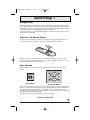
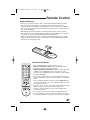
Install the Batteries
• Before you can operate the remote control, you must first install the batteries (included).
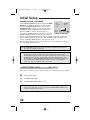
• Push down on the remote’s back cover and slide towards the bottom to remove it.
• Insert two AA batteries (supplied), carefully noting the “+” and “–” markings on the batteries
and on the remote control. To avoid a potential short circuit, insert the “–” end first. Be sure to
use only size AA batteries.
• When batteries are installed, slide the cover back into place (until it clicks into position).
• If the remote control acts erratically, replace the batteries. Typical battery life is six months to
one year. We recommend using alkaline batteries for longer battery life.
• When you change the batteries, try to complete the task within three minutes. If you take
longer than three minutes, the remote control codes for your VCR, DVD, and/or Cable Box
may have to be reset (pages 22-24).
Remote Control Basics
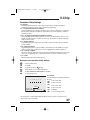
TV CATV VCR DVD
ASPECT
POWER
MULTI SCREEN
SPLIT
POP
INDEX
FREEZE
SWAP
NATURAL CINEMA
SELECT
ENTER
1
2
3
INPUT
4
5
6
DISPLAY
7
8
100+
0
SLEEP TIMER
BBE
9
RETURN+
V. STATUS HYPER SUR.
LIGHT
RM-C322G
V CHIP
MUTING
+
CH
VOL
+
VOL
CH
EXIT
MENU
VCR CHANNEL
PREV NEXT
REW
REC
OPEN/CLOSE
VCR/DVD
POWER
PLAY
TV/VCR
FF
STOP PAUSE
STILL/PAUSE
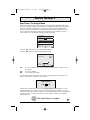
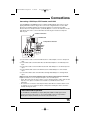
• Press the POWER button to turn the television on or off.
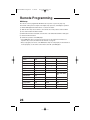
• Make sure the TV/CATV switch is set to TV. Move the switch to
CATV only if you need to operate a cable box.
• Slide the VCR/DVD selector switch to VCR to control a VCR, slide
to DVD to control a DVD player. Please see pages 22 to 24 for
instructions on programming your remote control to operate a Cable
box, VCR or DVD player.
• Press the CH+ and CH– buttons to scan through the channels. Tap
the CH+ or CH- button to move through the channels one channel at
a time.
• To move rapidly through the channels using JVC’s Hyper Scan feature, press and hold CH+ or CH–. The channels will zip by at a rate of
five channels per second.
• Press VOL+ or VOL - to raise or lower the volume. An indicator bar will
appear onscreen to show you the television volume level.
• The CH+/– and VOL+/– buttons are also used to navigate JVC’s
onscreen menu system.
• You can directly access specific channels using the 10-key pad.
• For more information on remote control button features, see pages
53 to 59. For information on using the onscreen menus, see page 26.
21