1
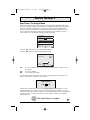
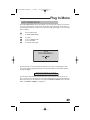
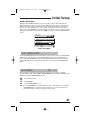
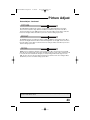
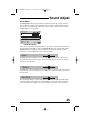
AV-56/48WP30 English 4/18/02 9:05 AM Page 45 Sound Adjust Sound Adjust The SOUND ADJUST menu lets you tailor the television’s sound to suit your personal taste. You can adjust the television’s bass and treble output, as well as the speaker balance. You can also choose to receive broadcasts either stereo or mono sound, or listen to a Second Audio Program (SAP), if one is broadcast. SOUND ADJUST PREVIOUS BASS TREBLE BALANCE MTS STEREO SAP MONO NEXT PAGE SELECT BY OPERATE BY EXIT BY EXIT SOUND ADJUST Menu Access the onscreen menus by pressing MENU on your remote control. You may then either use the up and down arrows to scroll to the SOUND ADJUST menu, or press MENU until the SOUND ADJUST screen appears. Use the arrows to move to the setting you wish to change. You can make adjustments to any or all of the settings. BASS The BASS level lets you adjust the level of low-frequency sounds. Press ¥to decrease the bass level. Press to increase the level of bass. Use the to move to the next setting or press EXIT to leave the menu. TREBLE The TREBLE level lets you adjust the level of high-frequency sounds. Press ¥ to decrease the treble. Press to increase the treble. Use the to move to the next setting or press EXIT to leave the menu. BALANCE You can adjust the balance of sound output between the television’s RIGHT and LEFT speakers with the balance control. Press ¥to shift the balance to the left. Press to shift the balance to the right. Use the to move to the next setting or press EXIT to leave the menu. 45