1
2.2.5
Minimum Flows
Minimum Flows define the instantaneous flows which the plant’s releases must always exceed
(note the difference between minimum flows and base flows; see Section 2.3.5 for a description
of base flows). Unlike bypass flows, the water required for minimum flows is available for
generation. This may or may not be enough flow for energy generation, depending on the
turbine performance characteristics. The secondary drop-down menu under the Minimum Flows
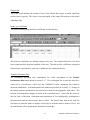
option lists the plants in the model system. The Minimum Flows dialog box, and its use, is
identical to the Bypass Flows box except minimum flows are entered in the third column. See
Section 2.2.3 for instructions on the use of the dialog box.
2.2.6
Ramping Rates
The Ramping Rate option allows the user to define the ramping rates below the project. The
Lake Chelan model is not currently configured to allow for ramping rates. If this option is to be
added in the future, the type of ramp rates (cfs/hour or ft/hr) must be known.
2.2.7
Turbine Performance Data
This option provides the mechanism for changing the turbine-generator performance for the
projects. Through this procedure the user can investigate the benefits of turbine upgrades or the
benefits of additional units. This option is considerably more complicated than the options
discussed previously.
We recommend reading through the entire documentation before
attempting any turbine-generator performance evaluations. The technique for making these
changes will make more sense after reading Section 3.2 and Section 4.1. When a plant is
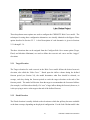
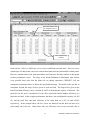
selected from the Turbine Performance Data secondary drop-down menu, a message box will
appear as shown below.
12
CHEOPS™ Model Documentation