1
Using the TR510 Control Center
The TR510 Control Center software is a simple and easy-to-use program that allows
you to access the TR510 Time Recorders online and setup the function parameters (Settings)
as well as download and save the Time and Attendance data collected by each Terminal.
System Requirements
The TR510 Control Center software runs under Windows-95/98/2000/NT. At least
7MB free disk space is required on hard disk drive (HDD). Recommended RAM size is 32MB.
Installation
To install the TR510 Control Center, run the “TR510.exe” file from the enclosed
software CD. Simply click on the “Install TR510 Control Center for Windows” link on the CD’s
title HTML page (runs automatically once you insert the CD into the CD-ROM drive). After you
click on this link, a File Download dialog will open. Choose “Run this program from its
current location” and click OK. A Security Warning will appear at this point - just click Yes
to continue the installation. The WinZip self-extractor dialog will appear next - click Install
and follow the installation instructions on the screen.
Running the TR510 Control Center
By default, Control Center icon is created in the Start/Programs/Giga-TMS folder.
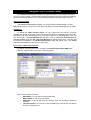
After the program startup, the main screen will appear:
Main screen contains four tabs:
• SETTINGS- to set up basic function parameters
• RING TABLE- to edit the ring schedule
• RECORDS- to upload and save the TR510’s Time and Attendance database
contents
• Time Scheduler-to set up time for auto-uploading the records from all TR510s
that are connected to PC.